I have been working with .NET since .NET Framework 3.5, and I have learned that staying ahead means adopting the right tools and practices at the right time. In this post, I want to share 10 actionable steps that will help you grow as a .NET developer in 2026.
These are practices I follow myself and recommend to every developer I work with.
Let's dive in.
1. Migrate Your Existing Projects to .NET 10
.NET 10 and C# 14 were released on November 11, 2025.
As a Long-Term Support (LTS) release, .NET 10 will receive three years of support until November 14, 2028. This makes it a solid choice for production applications that need long-term stability.
Here are the most amazing new features in this release:
C# 14:
- Extension Members
- Null-Conditional Assignment
- The Field Keyword
- Lambda Parameters with Modifiers
- Partial Constructors and Events
File-Based Apps:
- Starting with .NET 10, you can create a single *.cs file and run it directly, without solution file (sln) and project file (csproj).
ASP.NET Core:
- Validation Support in Minimal APIs
- JSON Patch Support in Minimal APIs
- Server-Sent Events (SSE)
- OpenAPI 3.1 Support
EF Core:
- Optional Complex Types
- JSON and struct Support for Complex Types
- LeftJoin and RightJoin Operators
- Named Query Filters
- ExecuteUpdate for JSON Columns
- Regular Lambdas in ExecuteUpdate
Here is a list of resources to help you migrate your existing projects to .NET 10:
- My in-depth article on the new features.
- Breaking changes in .NET 10
- How Migrate from ASP.NET Core in .NET 9 to ASP.NET Core in .NET 10
- .NET Upgrade Assistant
It's a good time to start migrating your projects to .NET 10 in 2026.
2. Start Using Aspire For Your Projects
.NET Aspire is an application framework for building observable, production-ready, cloud-native applications with .NET. It provides a consistent way to manage your application's dependencies, configuration, and deployment.
Think of Aspire as a layer that sits on top of your application and orchestrates how everything works together. It handles service discovery, configuration, health checks, and telemetry out of the box.
Starting from version 13, .NET Aspire was rebranded to Aspire and is now a multi-language application platform.
While Aspire continues to provide best-in-class support for .NET applications, version 13.0 brings support for Python and JavaScript. It provides comprehensive support for running, debugging, and deploying applications written in these languages.
Here are the key benefits of using Aspire:
- Simplified local development: Run all your services, databases, and dependencies with a single command.
- Built-in observability: OpenTelemetry integration for logs, metrics, and traces comes preconfigured.
- Service discovery: Services automatically discover each other without hardcoded URLs.
- Configuration management: Centralized configuration that works locally and in the cloud.
- Easy deployment to Cloud: Deploy your entire application stack to Azure or AWS with minimal setup.
- Consistent developer experience: New team members can get the entire application running in minutes.
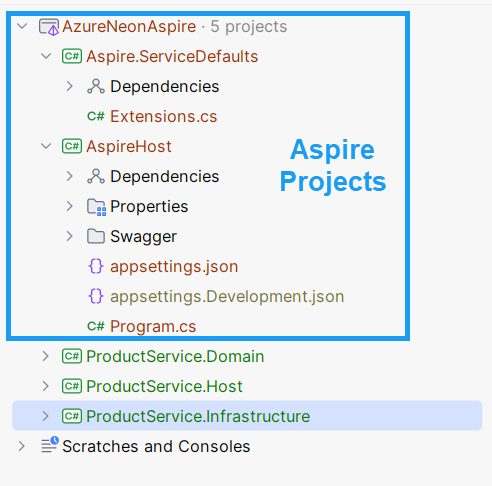
Aspire introduces two new project types to your solution:
- AppHost: The orchestrator that defines your application's architecture and dependencies.
- ServiceDefaults: Shared configuration and observability setup applied to all services.
Here is how you structure your solution with Aspire:
If you want to get started with Aspire and learn how easy it is to deploy your application to Azure, I recommend checking out this article.
3. Invest Early in Code Quality
Code quality is a crucial aspect of software development that directly affects a project's maintainability, scalability, and reliability. High-quality code makes software easier to understand, modify, and extend, reducing development time and cost. It also minimises the possibility of bugs and security vulnerabilities, thereby increasing the overall robustness of the application.
Code quality is not something you fix later. It is something you build from day one.
Many developers wait until the codebase becomes messy before addressing quality issues. By then, fixing problems takes 10 times longer than preventing them in the first place.
Investing in code quality early saves significant resources in the long run and improves developer productivity and satisfaction.
There are several tools and practices available to improve code quality in .NET projects. Each has its own advantages and disadvantages, and a combination of these methods often yields the best results.
Here is a list of available options:
- Code Editor (IDE) — offers real-time feedback and suggestions to improve code quality
- Static Code Analysis — helps to apply coding standards, identify code smells, potential bugs and vulnerabilities when building the project in the IDE
- Code Analysis Software — external software that provides a higher level of code analysis than static analyzers (often these are paid instruments)
- Code Review (AI) — helps to catch issues, reducing time for manual code reviews
- Code Review (human) — helps to catch issues that automated tools might miss
Enforcing Code Analysis with .editorconfig
.editorconfig is a file used to maintain consistent coding styles and conventions across different editors and IDEs.
It defines a set of rules for various coding aspects, such as indentation, line endings, and spacing, ensuring that all contributors to a project follow the same guidelines.
By specifying these rules in a .editorconfig file, you can enforce a uniform coding style, making the codebase more readable and maintainable.
In this file, you can specify the severity level for each analyser rule, either standard provided by .NET itself or from the NuGet packages. You should put this file near your "*.sln" file.
Static Code Analysis
Static code analysers examine your code without running it. They catch common mistakes, enforce coding standards, and identify potential bugs before they reach production.
You can use a centralised Directory.Build.props file to configure project-wide settings, ensuring consistency across all projects within a solution.
You should put this file near your "*.sln" file.
In my projects, I use the following settings in Directory.Build.props:
xml<Project> <PropertyGroup> <Nullable>enable</Nullable> <ImplicitUsings>enable</ImplicitUsings> <AnalysisLevel>latest</AnalysisLevel> <AnalysisMode>All</AnalysisMode> <TreatWarningsAsErrors>true</TreatWarningsAsErrors> <CodeAnalysisTreatWarningsAsErrors>true</CodeAnalysisTreatWarningsAsErrors> <EnforceCodeStyleInBuild>true</EnforceCodeStyleInBuild> </PropertyGroup> <ItemGroup> <PackageReference Include="Meziantou.Analyzer" Version="2.0.155"> <PrivateAssets>all</PrivateAssets> <IncludeAssets>runtime; build; native; contentfiles; analyzers; buildtransitive</IncludeAssets> </PackageReference> <PackageReference Include="SonarAnalyzer.CSharp" Version="9.26.0.92422"> <PrivateAssets>all</PrivateAssets> <IncludeAssets>runtime; build; native; contentfiles; analyzers; buildtransitive</IncludeAssets> </PackageReference> <PackageReference Include="Roslynator.Analyzers" Version="4.12.4"> <PrivateAssets>all</PrivateAssets> <IncludeAssets>runtime; build; native; contentfiles; analyzers; buildtransitive</IncludeAssets> </PackageReference> </ItemGroup> </Project>
You should always strive to have zero warnings in your project, but many developers are lazy about fixing them.
TreatWarningsAsErrors ensures that you have no warnings in your project; otherwise, your project won't compile.
Code Reviews
Manual code reviews take time, which is why you should use AI-powered code review tools to speed up the process. I use Code Rabbit - an AI code review tool that automatically reviews pull requests. It identifies issues, suggests improvements, and provides feedback within minutes.
AI code reviews do not replace human reviews, but they reduce the time spent on routine feedback. Your team can focus on architectural decisions and business logic.
Code Analysis Software
If you need to improve the quality of your code further, I suggest using 3rd party software for code analysis, for example:
For more information about code quality, I recommend reading this article.
I also recommend using Central Package Management (CPM) to manage your NuGet packages. Read more in my LinkedIn post.
4. Add Observability to every project
In today's complex software environments, understanding what's happening in your applications is no longer optional - it's essential. Bugs like to hide in the dark, and they will appear when you least expect them.
OpenTelemetry opens the light into what is happening in your application. It provides a standardised way to collect and analyse telemetry data from your applications, giving you visibility into their behaviour.
OpenTelemetry is essential for monitoring any application, from large microservices to monoliths. Yes, even in monoliths, you can benefit from OpenTelemetry.
Every application has external dependencies, such as databases, caches, APIs, and other services. Monitoring these dependencies is essential for understanding how your application performs and interacts with the rest of the system.
OpenTelemetry is an open-source observability framework that provides APIs, libraries, and tools for instrumenting, generating, collecting, and exporting telemetry data for analysis.
OpenTelemetry collects logs, metrics, and traces from your applications and infrastructure:
- Logs - explain what
- Traces - reveal where and how long
- Metrics - show how often
OpenTelemetry has the following benefits:
For Monoliths:
- Internal Performance Insights: Understand which components of your monolith are causing slowdowns.
- Database Interactions: Monitor database query performance and connection issues.
- External Service Dependencies: Track calls to external APIs and services.
- Future-Proofing: If you ever decide to break your monolith into microservices, you'll already have observability infrastructure in place.
For Microservices:
- End-to-End Request Tracing: Follow requests as they travel through multiple services.
- Service Dependency Maps: Visualize how your services interact and depend on each other.
- Distributed Problem Solving: Quickly identify which service is causing an issue in a complex system.
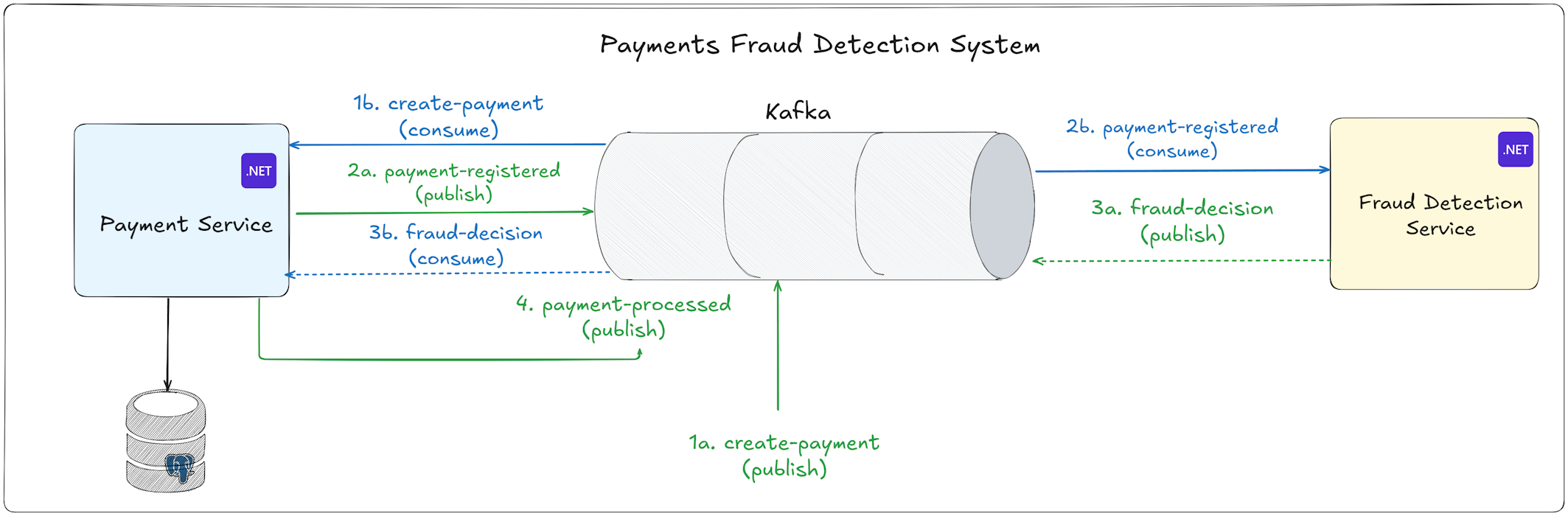
Here is how you can add OpenTelemetry to your application and configure it to work with Jaeger and Seq in Docker.
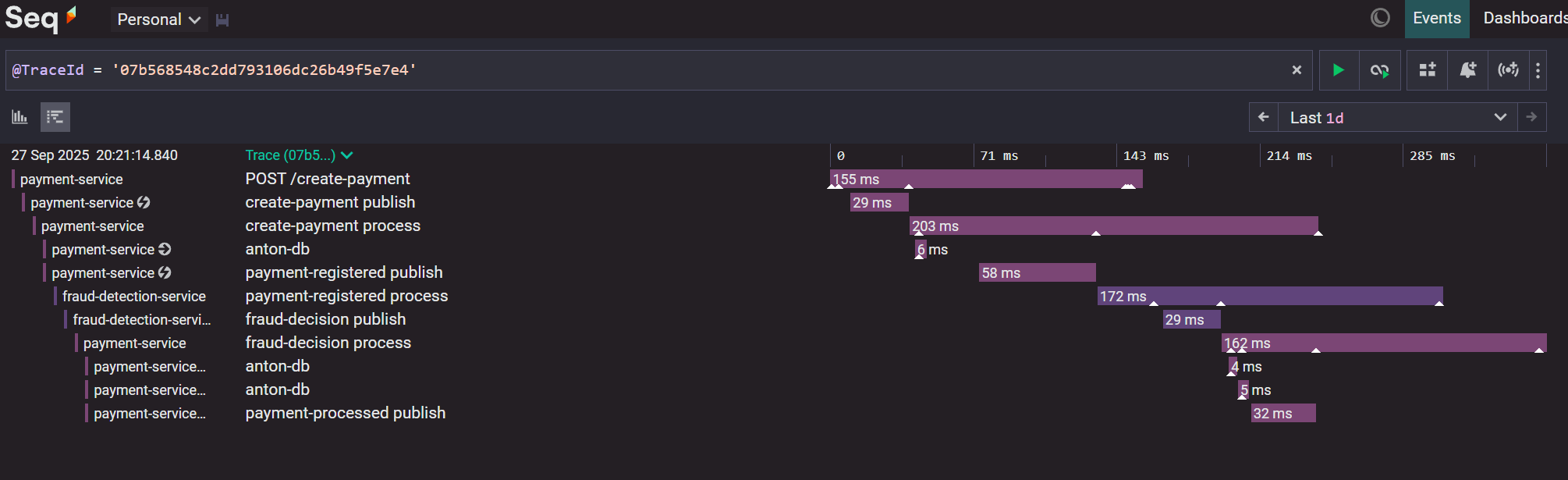
OpenTelemetry helps you understand the complex flow between multiple components and services, both for sync and async flows:
Here is what this flow looks like in Seq:
5. Enhance DevOps Pipelines with GitHub Actions or Azure DevOps
Modern software development requires automated pipelines. You cannot afford to deploy manually or skip automated tests.
A good DevOps pipeline ensures that every code change is built, tested, and deployed consistently. It catches bugs before they reach production and accelerates your delivery speed.
If you are still deploying manually or running tests on your local machine before pushing to production, you are taking unnecessary risks. One forgotten test or one missed build step can cause production outages.
DevOps pipelines provide several critical benefits:
- Consistency: Every build follows the same steps in the same environment
- Speed: Automated deployments happen in minutes without manual steps
- Quality: Tests run automatically, catching bugs before deployment
- Confidence: You know exactly what is being deployed and what tests passed
- Rollback capability: You can quickly revert to a previous version if something goes wrong
- Audit trail: You have a complete history of what was deployed and when
Without proper CI/CD pipelines, you waste time on manual tasks and increase the risk of human error.
Both GitHub Actions and Azure DevOps are excellent choices for .NET developers. Your choice depends on where your code lives and which cloud platform you use.
Use GitHub Actions if:
- Your code is hosted on GitHub
- You want tight integration with GitHub pull requests and issues
- You prefer a marketplace of community-created actions
- You want a modern, YAML-based configuration
Use Azure DevOps if:
- Your code is hosted on Azure Repos
- You are heavily invested in the Azure ecosystem
- You need advanced work item tracking and project management
- You prefer a GUI-based pipeline editor alongside YAML
For most teams using GitHub, GitHub Actions is the natural choice. It integrates seamlessly with your repository and provides everything you need for .NET applications.
To set up a GitHub Actions pipeline, create a .github/workflows/ci.yml file in your repository.
Here is how you can build and test your application:
yamlname: BUILD_AND_TEST on: push: branches: [ "main" ] pull_request: branches: [ "main" ] jobs: build: runs-on: ubuntu-latest strategy: matrix: dotnet-version: [ '10.0.x' ] steps: - uses: actions/checkout@v3 - name: Setup .NET uses: actions/setup-dotnet@v3 with: dotnet-version: ${{ matrix.dotnet-version }} - name: Restore dependencies run: dotnet restore - name: Build run: dotnet build --no-restore - name: Test run: dotnet test --no-build --no-restore --verbosity normal --logger trx --results-directory "TestResults-${{ matrix.dotnet-version }}" - name: Upload dotnet test results uses: actions/upload-artifact@v3 with: name: dotnet-results-${{ matrix.dotnet-version }} path: TestResults-${{ matrix.dotnet-version }} if: ${{ always() }} - name: Build Docker image if: ${{ success() }} run: docker build -t myapp:${{ github.sha }} .
If tests are successful, we build the Docker image. You can further expand this script to deploy the image to a staging environment or to production.
Follow these best practices for DevOps pipelines:
- Keep pipelines fast (under 10 minutes for CI)
- Run tests on every pull request
- Deploy automatically to staging environments
- Require manual approval for production deployments
- Store secrets in secure vaults, never in code
- Use separate pipelines for different environments and keep them in version control (GIT)
6. Learn a Major Cloud Platform such as Azure, AWS, or Google Cloud
Cloud platforms are the backbone of modern application infrastructure. If you are not familiar with at least one major cloud provider, you are limiting your career opportunities.
As a .NET developer, understanding cloud services is no longer optional. It is a fundamental skill that employers expect.
Cloud platforms offer:
- Scalability: Your application can handle millions of users
- Reliability: Cloud providers offer better uptime than most companies can achieve on their own
- Global reach: Deploy your application in multiple regions around the world
- Managed services: Databases, caches, message queues, and more without managing servers
- Cost efficiency: Pay only for what you use, scale down when traffic is low
- Security: Enterprise-grade security features and compliance certifications
Learning cloud platforms opens up better job opportunities and higher salaries. Cloud architects and cloud engineers are among the highest-paid roles in software development.
Which cloud platform should you learn? The three major cloud providers are Azure, AWS, and Google Cloud Platform (GCP).
Azure is often the natural choice for .NET developers, as it is supported by Microsoft. AWS is the market leader with the largest ecosystem. Google Cloud Platform is also popular, as it offers some services at lower prices.
For .NET developers, I recommend starting with Azure. It has superb .NET integration, and Microsoft provides extensive documentation and tools specifically for .NET developers. Once you understand one cloud platform, learning others becomes easier because the core concepts are similar.
Regardless of which cloud you choose, focus on these core services:
Services that run your application code:
- Azure: App Service, Container Apps, Azure Functions, Azure Kubernetes Service (AKS)
- AWS: EC2, ECS, Lambda, Elastic Beanstalk
- GCP: Compute Engine, Cloud Run, Cloud Functions, Google Kubernetes Engine (GKE)
Database services:
- Azure: Azure SQL Database, Cosmos DB, Azure Database for PostgreSQL
- AWS: RDS (supports SQL Server, PostgreSQL, MySQL), DynamoDB, Aurora
- GCP: Cloud SQL, Cloud Spanner, Firestore
Storage services for files, images, and unstructured data:
- Azure: Azure Blob Storage, Azure Files
- AWS: S3, EFS
- GCP: Cloud Storage
Messaging services for asynchronous communication:
- Azure: Azure Service Bus, Azure Event Hubs, Azure Event Grid
- AWS: SQS, SNS, EventBridge
- GCP: Cloud Pub/Sub
Networking services:
- Azure: Virtual Network, Application Gateway, Azure Front Door
- AWS: VPC, Elastic Load Balancing, CloudFront
- GCP: VPC, Cloud Load Balancing, Cloud CDN
Monitoring and logging services provide observability:
- Azure: Application Insights, Log Analytics, Azure Monitor
- AWS: CloudWatch, X-Ray
- GCP: Cloud Monitoring, Cloud Logging, Cloud Trace
These services integrate with OpenTelemetry and provide insights into your application's performance and health.
7. Increase Test Coverage by Adding Integration, Load, and Architecture Tests
Most developers write unit tests and stop there. Unit tests are important, but they only verify that individual components work in isolation.
They do not test how your application behaves when all the pieces work together, whether your architecture remains consistent, or how your system performs under load. Comprehensive test coverage requires multiple types of tests working together.
The traditional testing pyramid suggests:
- Many unit tests at the base
- Fewer integration tests in the middle
- Few end-to-end tests at the top
This model still holds, but you need to add two more test types that many teams ignore:
- Load tests that verify performance under stress
- Architecture tests that enforce architectural rules
Integration Tests
In my projects, I write integration tests first, as they offer the most value. I add unit tests later, for complex algorithms and uncovered code paths.
Integration tests run your application with real dependencies, such as databases, message queues, external APIs, and other services. They catch issues that unit tests miss.
I use the following libraries for integration tests:
- xUnit (for assertions I use xUnit and Shouldly)
- TestContainers and WebApplicationFactory
- Respawn
Here is the list of integration tests best practices.
Load Tests
Many teams skip load tests. They think it takes too much time, or they are not important.
This is a mistake. Without load tests, problems often show up in production when it is too late and too costly to fix them.
They show how much traffic your system can handle before it slows down or fails. They reveal slow parts of your system and help compare different design choices.
They show real latency numbers, help you check timeouts, retries, and error handling under stress.
They also give you data for capacity planning, so you know when to scale. And when you run them regularly, you can spot performance regressions early.
For load tests, I use two libraries:
k6 is a simple framework and requires JavaScript to write load tests. NBomber is a more powerful framework written in C#.
The biggest advantage of NBomber is that you can write load tests directly in C# or F#. This means you can reuse your existing application code, helpers, and libraries inside your tests. You don't need to learn JavaScript or custom scripts for creating tests.
NBomber is free for personal use. Using NBomber in an organization requires a paid license, learn more here.
NBomber's pricing is very affordable because the license covers the entire organization. A single license can be shared across all teams, so there's no need to manage individual developer seats — one license works for the whole company.
Here is an example of a simple load test written in C# with NBomber:
csharpvar httpClient = Http.CreateDefaultClient(); var scenario = Scenario.Create("user_login_and_get_profile_scenario", async context => { var step1 = await Step.Run("login", context, () => LoginStep(httpClient)); var token = step1.Payload.Value; var step2 = await Step.Run("get_profile", context, () => GetProfileStep(httpClient, token)); return step2; }) .WithoutWarmUp() .WithLoadSimulations( Simulation.Inject(rate: 10, interval: TimeSpan.FromSeconds(1), during: TimeSpan.FromSeconds(30)) ); NBomberRunner .RegisterScenarios(scenario) .Run(args);
This test runs a Login and GetProfile steps, and here is what the report looks like:
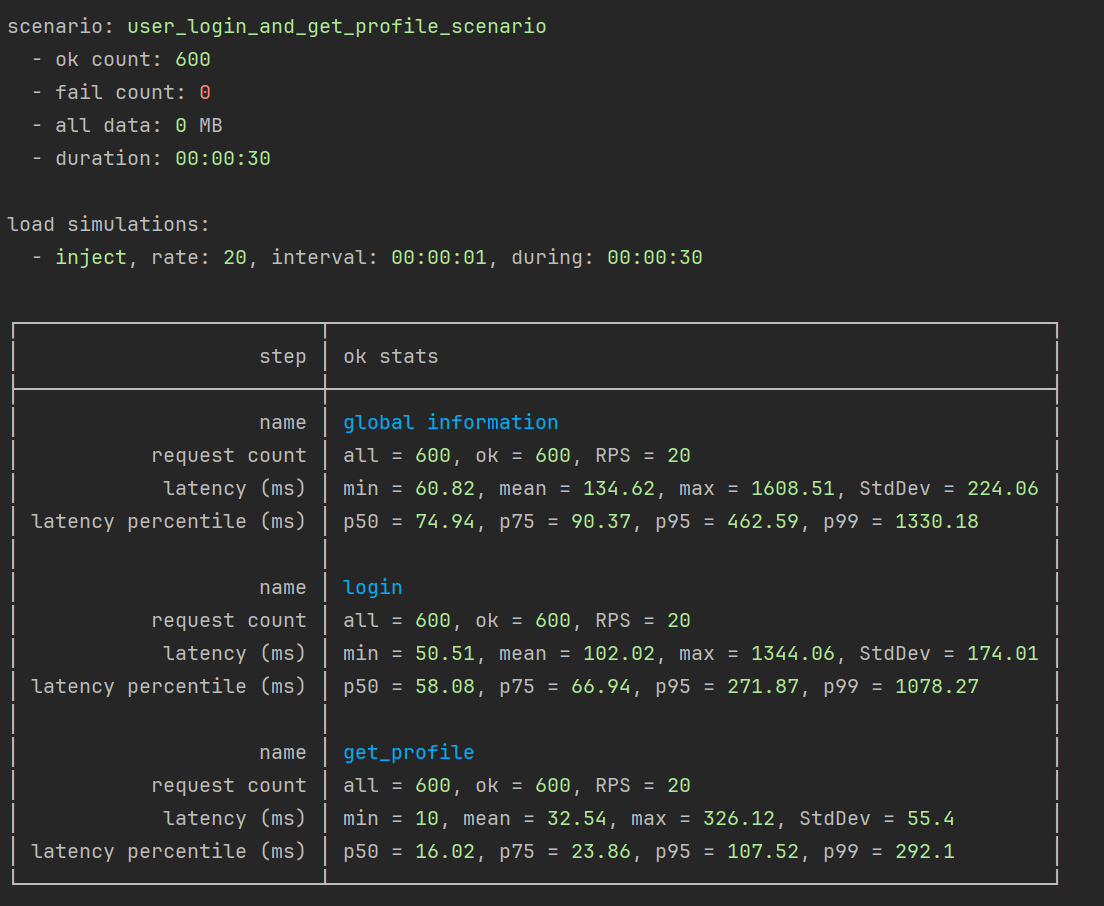
Read more on writing load tests with NBomber here, and here is how to load test Kafka pipelines.
Architecture Tests
I have worked on many .NET Projects. Often, as the project grows, maintaining architecture becomes harder than writing new features.
Developers unintentionally add dependencies between layers, violate module boundaries, or create classes without interfaces, which can weaken your testability and design. Over months, your architecture drifts away from its original rules, and refactoring becomes risky and expensive.
Architecture Tests can prevent such issues.
Architecture Tests ensure that your system's design rules are enforced and that your code follows the architecture you've set up.
They ensure that your layers, modules, classes, and namespaces interact correctly. For example:
- The Domain layer should not depend on the Infrastructure layer.
- The Application layer should reference Domain, but not the Presentation project.
- Modules inside a Modular Monolith should communicate through public contracts, not directly reference each other.
- All entities should inherit from a common base
Entityclass. - All your application handlers should have the
Handlersuffix in their names.
As the project grows, developers often make shortcuts:
- "Let's just call the repository directly from the controller."
- "We need a helper class from Infrastructure inside the Domain."
- "We can reuse this service across modules - just add a reference."
- Forget to add essential prefixes and suffixes to class names.
- Forget to inherit their classes from a common base class or an interface.
These small violations accumulate silently. Without architecture tests, no one notices - the build succeeds, the app runs.
Yet, your architecture starts to drift — and by the time it becomes visible, refactoring becomes costly.
With architecture tests, the build would fail immediately, warning the team that the dependency violates the architecture.
This turns your architecture into enforceable documentation.
For architecture tests, I use NetArchTest.
This is how you can test that Domain should not depend on any other layers:
csharpusing NetArchTest.Rules; using Xunit; namespace Shipments.Tests.Architecture; public class CleanArchitectureTests { private const string Domain = "Shipments.Domain"; private const string Application = "Shipments.Application"; private const string Infrastructure = "Shipments.Infrastructure"; private const string Api = "Shipments.Api"; [Fact] public void Domain_Should_Not_Depend_On_Application_Infrastructure_Or_Api() { var result = Types .InAssembly(DomainAssembly) .That() .ResideInNamespace(Domain) .ShouldNot() .HaveDependencyOn(Application) .AndShouldNot() .HaveDependencyOn(Infrastructure) .AndShouldNot() .HaveDependencyOn(Api) .GetResult(); Assert.True(result.IsSuccessful, FormatFailure(result)); } }
Architecture tests are easy to write, and usually I copy a set of tests from one project to another.
Architecture tests are just regular tests; that's why I recommend running them in the CI/CD pipeline when building your application.
Learn more about how to write architecture tests for real-world scenarios here.
Affiliate: If you want to learn how to build maintainable applications, I recommend checking this Clean Architecture course by Milan Jovanovic. It's the best course on the market on building applications with Clean Architecture.
8. Start a project with a Modular Monolith instead of microservices
"You shouldn't start a new project with microservices, even if you're sure your application will be big enough to make it worthwhile." — Martin Fowler. This advice exists for a good reason.
Microservices introduce complexity that most new projects do not need. The overhead of managing multiple services, distributed transactions, network calls, and deployment pipelines significantly slows down development.
A Modular Monolith gives you the structure and boundaries of microservices without the operational complexity.
Microservices are often sold as the solution to all scalability and maintainability problems.
But they come with high costs:
- Slower development: Coordinating changes across multiple services takes time
- Complex deployment: Each service needs its own CI/CD pipeline and infrastructure
- Distributed debugging: Finding bugs across multiple services is difficult
- Network overhead: Every service call adds latency and potential failure points
- Data consistency: Distributed transactions and eventual consistency are hard to implement correctly
- Operational burden: Monitoring, logging, and alerting become exponentially more complex
When you start with microservices, you pay all these costs upfront before you know if your application will succeed.
A Modular Monolith is a single deployable application with clear boundaries between modules.
It combines the best parts of monoliths and microservices:
- Single codebase: All code lives in one solution, making it easy to navigate and refactor
- Single deployment: Deploy the entire application as one unit
- Clear module boundaries: Modules cannot access each other's databases directly
- Independent development: Different teams can work on different modules
- Easy testing: Integration tests can verify all modules working together
- Migration path: Each module can be extracted into a microservice later if needed
Modules communicate through well-defined interfaces, just like microservices, but without network calls or distributed transactions.
The key to a successful Modular Monolith is enforcing module boundaries. Modules cannot access each other's databases directly. Each module has its own database schema and EF Core DbContext (if you are using EF Core).
When a module calls another module, it is a simple method call in the same process: no network overhead, no serialization, no distributed transactions.
You get the structure and boundaries that will help you migrate to microservices later if needed, but without paying the upfront cost.
Not all modules need to become microservices. Extract a module to a microservice only when you have a clear reason:
- Independent scaling: The module needs different scaling characteristics than the rest of the application
- Team independence: A dedicated team owns the module and needs deployment autonomy
- Technology requirements: The module needs a different technology stack
- Performance isolation: The module is resource-intensive and affects other modules
To better decouple and reduce immediate latency, you can use events for communication between modules.
Start your next project as a Modular Monolith. Define clear module boundaries from day one. Use interfaces for module communication. Organise code by features within each module.
As your application grows, you will have the structure and boundaries needed to extract microservices if necessary. But you might find that you never need to.
A well-designed Modular Monolith can take you very far. Do not fall into the trap of starting with microservices because it seems like the "modern" way to build applications.
Start simple, deliver value quickly, and evolve your architecture based on real needs, not hypothetical future requirements.
If you are interested in learning more about Modular Monoliths, explore these articles:
- Building a Modular Monoliths with Vertical Slice Architecture
- Modular Monoliths with Vertical Slice Architecture without MediatR
- How to Migrate Modular Monolith to Microservices
Affiliate: If you want to learn how to build a real-world Modular Monolith, I recommend checking this online course by Milan Jovanovic. It's the best course on the market on building Modular Monoliths.
9. Learn a new framework in 2026
Staying current with new frameworks and technologies keeps you competitive and expands your problem-solving capabilities. 2026 is the perfect time to explore frameworks that will expand your existing .NET skills.
I will give you a few ideas on what to learn next, but feel free to explore other frameworks and technologies.
.NET Web development:
- GraphQL
- gRPC
- Blazor
- Machine Learning
- AI
.NET Desktop development:
- MAUI
- Uno Platform
Databases:
- NoSQL (MongoDB, CosmosDB, DynamoDB)
- Redis
Frontend:
- React or Angular (based on what is relevant in your company and job market)
- TypeScript
- Tailwind CSS
Also, if you are new to Cloud Platforms, it's a perfect time to expand your skills. I will recommend starting with Azure.
Affiliate: If you want to expand your .NET and soft skills, I recommend checking online courses on Dometrain. You can level up your career with 100+ courses.
10. Start reading one or more books to support your growth as a developer and architect
Reading books is one of the highest-leverage activities for career growth. Yet many developers stop reading technical books after they land their first job. This is a mistake that limits career growth.
A single book can change how you think about software development.
.NET Books
If you want to level up as a .NET Engineer, I recommend reading one of Mark J. Price's books:
- C# 14 and .NET 10 – Modern Cross-Platform Development Fundamentals
- Tools and Skills for .NET 10
- Apps and Services with .NET 10
- Real-World Web Development with .NET 10
I have read and reviewed all these books and can highly recommend them.
Software Architecture Books
If you want to level up as an architect in Azure, I highly recommend reading this book:
This is the best book I have read on Architecture in 2025.
Here you can read my review on the book.
Software Development Books
Here is the list of the best books on software development I have read (and you should too):
1. The Pragmatic Programmer (Andy Hunt & Dave Thomas)
- Practical lessons for every stage of your career.
- It teaches adaptability, curiosity, and continuous learning.
2. The Clean Coder (Robert C. Martin)
- Learn professionalism, discipline, and how to take ownership.
- Being a great developer isn't just about writing code — it's about attitude.
3. Head First Design Patterns (Eric Freeman & Elisabeth Robson)
- A fun and visual way to learn design patterns.
- You'll finally understand how patterns actually work in real projects.
4. Head First Software Architecture (Raju Gandhi, Mark Richards, Neal Ford)
- A friendly, hands-on guide to thinking like an architect.
- Great for developers who want to move into architecture.
5. Building Evolutinary Architectures (Neal Ford, Rebecca Parsons, Patrick Kua)
- Learn how to design systems that can adapt and grow over time.
- Change is constant — this book teaches you how to handle it.
6. Enterprise Architecture Patterns (Martin Fowler)
- Understand how to structure and connect large systems.
- Perfect for enterprise or long-term, large-scale projects.
7. Designing Data-Intensive Applications (Martin Kleppmann)
- A must-read for modern system design.
- It explains databases, scaling, and data processing in clear language.
8. Domain-Driven Design (Eric Evans)
- Learn to model complex business logic with simplicity.
- It will change how you talk to both devs and business people.
9. Building Microservices (Sam Newman)
- A complete guide to creating distributed systems.
- Full of real-world trade-offs and practical lessons.
10. Patterns of Enterprise Application Architecture (Martin Fowler)
- Classic reference for solving common design problems.
- Once you read it, you'll start seeing these patterns everywhere.
See my post on LinkedIn for more information on these books.
Hope you find this newsletter useful. See you next time.
