Many .NET teams start with a Modular Monolith.
Modular Monolith has clear boundaries between its modules. Modules can't access a database of other modules directly. Modules can talk with each other only via a public API. This works exactly as in microservices, but in a single Application.
But as the system grows, you may need to scale modules independently, introduce load balancing, and move to a microservices architecture.
Migrating from a Modular Monolith to microservices is a natural evolution for many projects, but it requires careful planning and execution.
If you simply split the code into multiple projects, you'll end up with a distributed monolith — harder to maintain than before.
Today, I will show you a step-by-step migration strategy for transforming a Modular Monolith in .NET into a well-structured microservices architecture.
During migration, we will do the following steps:
- Define Service Boundaries
- Extract modules into independent services
- Replace direct module-to-module calls with service REST APIs
- Introduce asynchronous messaging for decoupling
- Add Observability with OpenTelemetry
- Introduce an API Gateway
Let's dive in.
Stellar Repair for MS SQL fixes corrupted MDF & NDF files, restores deleted records, and brings your database back online with 100% integrity. Restores tables, indexes, keys, rules, triggers, and stored procedures.
Trusted by thousands of DBAs and developers worldwide.
👉 Recover your SQL database now
Overview of a Modular Monolith We Will Migrate
Let's explore Modular Monolith with three modules: Shipments, Carriers, and Stocks.
Each module is built using a combination of Vertical Slice Architecture and Clean Architecture, which structures an application by features. Each slice encapsulates all aspects of a specific feature, including the API, business logic, and data access.
Here is a project's structure:
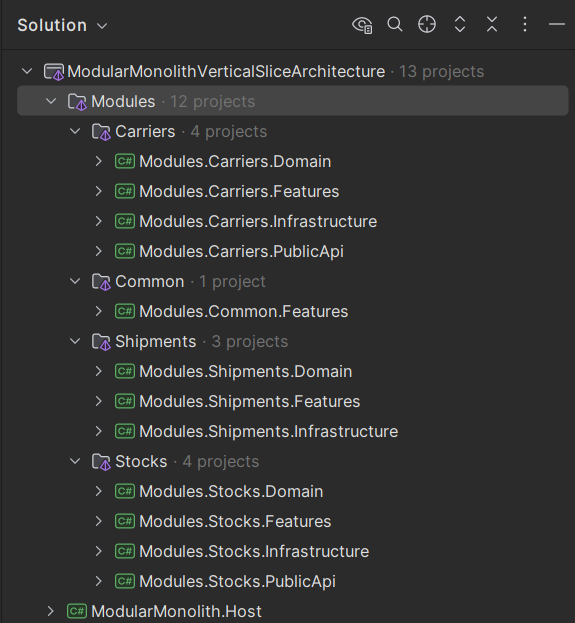
You can download the source code of this Modular Monolith from my previous article.
Now let's see how we can migrate it to microservices.
Diskless Kafka 2.0 will cut your cloud costs by up to 90% (Sponsored)
And no, this isn't vendor marketing — it's Apache Kafka's own future.
Most teams are still burning cash on expensive local disk storage when they could be using cloud-native architecture.
With Diskless Topics KIP-1150 proposal, Kafka skips local disks and writes straight to object storage. Result? Cloud costs drop by up to 90%.
That's $46.3k/month instead of $159k/month for the same workload.
Before this, you had to choose between two separate approaches. Now it's seamlessly integrated.
Here's what this means for your infrastructure 👇
➡️ Zero-copy migration from existing Kafka clusters (no downtime, no data movement)
➡️ AWS S3 Express improvements delivering 10ms PUTs
➡️ No more midnight alerts about disk capacity
➡️ Automatic cost optimization without sacrificing performance
Read the article on how Aiven is already preparing for a Diskless-first future in Kafka.
Step 1: Define Service Boundaries
The first step in moving from a modular monolith to microservices is deciding where the service boundaries should be. Without clear boundaries, you risk ending up with "distributed monolith" — services that depend on each other too much.
Defining service boundaries is a challenging task. It's difficult to get it right the first time, and it takes time to understand the business domain and the dependencies between modules.
That's why many teams choose to start with a Modular Monolith, as it's much easier to adjust module boundaries within a single solution.
If you use a Domain-Driven Design (DDD) approach in a Modular Monolith, you can define boundaries by defining bounded contexts. Each bounded context is a clear business or technical area where terms, rules, and logic make sense together.
Once you have a Modular Monolith, you can start to identify the boundaries between services.
As a starting point, you can extract the modules into their own services. However, some modules can sometimes be combined into a single service.
In our Modular Monolith, we have three Modules:
- Shipments Module: Handles creating orders for shipments.
- Carriers Module: Maintains information about shipping partners and registers shipments for delivery.
- Stocks Module: Manages product inventory levels.
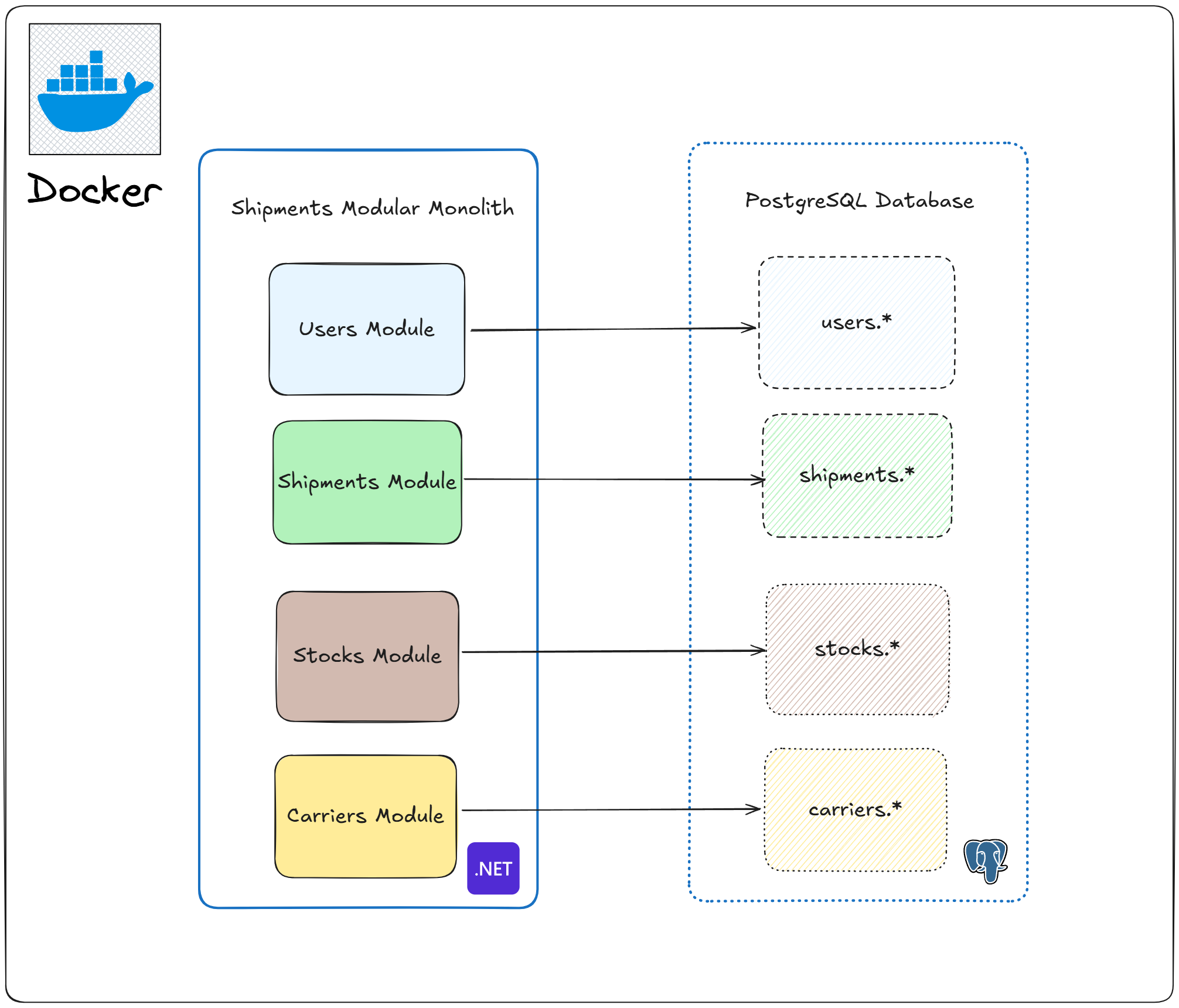
Each module exposes an interface that allows other modules to call it. Under the hood, it's a method call in the same process.
Let's briefly explore how modules communicate with each other.
The most complex use case is "Create Shipment". It involves communication with the Carriers and Stocks modules:
- Checks if a Shipment for a given OrderId is already created
- Calls the Stocks Module to check the products' availability
- Creates a Shipment in the database
- Calls the Carrier Module to save the shipment details
- Calls the Stocks Module to update stock levels
In this application, we can extract Shipments, Carriers, and Stocks modules into their own services.
Step 2: Extract Modules into Independent Services
Once we have defined our service boundaries, the next step is to separate them physically. The goal here is not yet to deploy each service independently, but to prepare your system for that future step.
At first, you don't need to create separate GIT repositories for every service.
Instead, extract each module into its own service project inside the same solution. This lets you:
- Keep the migration safe and manageable.
- Avoid breaking changes across teams too early.
- Still share common infrastructure (logging, configuration) until you are ready for a full split.
Why not split everything at once?
If you immediately create separate repositories and databases, you'll increase complexity too fast. Things like CI/CD pipelines and deployment will need to be addressed immediately.
We don't need this complexity right now. We can start with a single solution and gradually split it into multiple services.
In a Modular Monolith, each module consists of the following projects:
- Domain: Contains the domain model, business logic, and shared interfaces.
- Infrastructure: Contains infrastructure-specific code, like database configuration, authentication.
- Features: Contains the application logic.
- PublicApi: Contains the public API contracts for module communication.
And we have one runnable Host project that starts the application.
When splitting to microservices, we need to do the following steps for each service:
- Extract all the Common logic into separate projects
- Leave the Domain, Infrastructure and Features projects as-is
- Create a new ASP.NET Core Web API project to run the service
Here is what our project should look like after completing these steps:
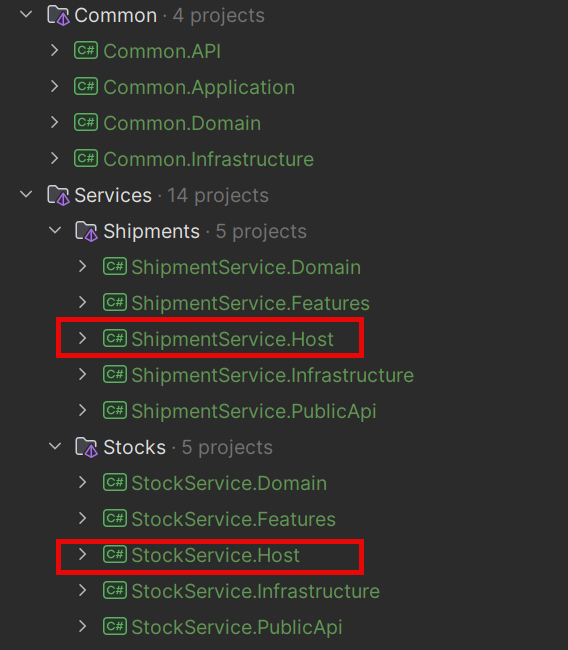
Here is what the ShipmentService.Host project looks like:
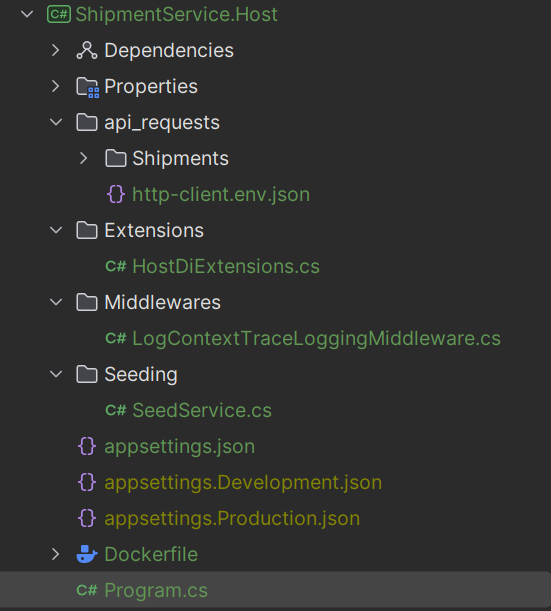
The Program.cs is as simple as this:
csharpusing Common.Infrastructure.Database; using ShipmentService.Host.Middlewares; using ShipmentService.Host.Seeding; var builder = WebApplication.CreateBuilder(args); builder.Services.AddWebHostDependencies(); builder.AddCoreHostLogging(); builder.Services.AddCoreWebApiInfrastructure(); builder.Services .AddCoreInfrastructure(builder.Configuration, ShipmentServiceRegistration.ActivityServiceName) .AddShipmentService(builder.Configuration); // Seed entities in DEVELOPMENT mode if (builder.Environment.IsDevelopment()) { builder.Services.AddScoped<SeedService>(); } var app = builder.Build(); // Run migrations in DEVELOPMENT mode if (app.Environment.IsDevelopment()) { using var scope = app.Services.CreateScope(); await scope.MigrateServiceDatabasesAsync(); var seedService = scope.ServiceProvider.GetRequiredService<SeedService>(); await seedService.SeedDataAsync(); } if (app.Environment.IsDevelopment()) { app.UseSwagger(); app.UseSwaggerUI(); } app.UseAuthentication(); app.UseAuthorization(); app.MapApiEndpoints(); await app.RunAsync();
Step 3: Replace Direct Module-to-Module Calls with Service APIs
In our Modular Monolith, modules usually communicate through direct method calls in the same process.
Once you split modules into services, you need to replace these calls with service-to-service communication.
You have two options: synchronous APIs (using HTTP or gRPC) or asynchronous messaging (via events).
I will suggest the following migration strategy:
- Replace method calls with synchronous APIs (HTTP or gRPC).
- Replace in-memory events with a message bus.
Start with synchronous APIs (HTTP or gRPC). These are easier to introduce since they feel closer to the direct method calls we are replacing. Gradually introduce asynchronous messaging as needed.
In our Modular Monolith, the Stocks Module exposes an API in the Modules.Stocks.PublicApi project:
csharppublic interface IStockModuleApi { Task<CheckStockResponse> CheckStockAsync( CheckStockRequest request, CancellationToken cancellationToken = default); Task<UpdateStockResponse> UpdateStockAsync( UpdateStockRequest request, CancellationToken cancellationToken = default); }
In the Stocks service, instead of a class that implements the IStockModuleApi interface, we have to expose a Web API (Minimal API endpoint):
csharppublic class CheckStockApiEndpoint : IApiEndpoint { public void MapEndpoint(WebApplication app) { app.MapPost(RouteConsts.CheckStock, Handle); } private static async Task<IResult> Handle( [FromBody] CheckStockRequest request, IValidator<CheckStockRequest> validator, ICheckStockHandler handler, CancellationToken cancellationToken) { var validationResult = await validator.ValidateAsync(request, cancellationToken); if (!validationResult.IsValid) { return Results.ValidationProblem(validationResult.ToDictionary()); } var response = await handler.HandleAsync(request, cancellationToken); if (response.IsError) { return response.Errors.ToProblem(); } return Results.Ok(response.Value); } }
We can now replace direct calls to the Stock Module with a synchronous HTTP API.
We will use Refit library to generate the client code. This library provides an interface wrapper (with code generation) that wraps Typed HttpClient using HttpClientFactory.
csharppublic interface IStockServiceApi { [Post("/api/stocks/check")] Task<ApiResponse<Result<Success>>> CheckStockAsync( CheckStockRequest request, CancellationToken cancellationToken); }
Here is how we register the Refit client in DI:
csharpvar stockApiBaseUrl = configuration["StockService:BaseUrl"]!; services.AddRefitClient<IStockServiceApi>() .ConfigureHttpClient(c => c.BaseAddress = new Uri(stockApiBaseUrl));
The best part is that our CreateShipmentHandler remains unchanged and only needs to call the Refit IStockServiceApi interface instead of the old IStockModuleApi interface.
csharpinternal sealed class CreateShipmentHandler( ShipmentsDbContext context, IStockServiceApi stockApi, ILogger<CreateShipmentHandler> logger) : ICreateShipmentHandler { public async Task<ErrorOr<ShipmentResponse>> HandleAsync( CreateShipmentRequest request, CancellationToken cancellationToken) { var stockRequest = CreateCheckStockRequest(request); var stockResponse = await stockApi.CheckStockAsync(stockRequest, cancellationToken); if (!stockResponse.IsSuccess) { logger.LogInformation("Stock check failed: {ErrorMessage}", stockResponse.ErrorMessage); return Error.Validation("ProductsNotAvailableInStock", stockResponse.ErrorMessage ?? "Products not available in stock"); } // ... }
Now let's replace the UpdateStockAsync method with an asynchronous HTTP API.
Step 4: Introduce Asynchronous Messaging
Your modular Monolith likely raises in-memory events that trigger handlers inside the same process. To decouple services, move those integration events into a message queue or event bus.
Also, you can replace some direct method calls with asynchronous messaging.
Instead of the Shipment service calling Stocks directly every time, Shipment service can publish a ShipmentCreatedEvent event.
Stocks Service (and any other interested service) subscribes to and reacts to this event.
Why asynchronous messaging?
- Loose coupling: Publishers don't know who listens. You can add or remove consumers without changing publishers.
- Resilience: Temporary outages don't break the whole flow. Messages wait in a queue or topic until consumers catch up with them.
- Scalability: Each service scales based on its own load. A busy consumer can scale out horizontally to read the queue.
I will define the ShipmentCreatedEvent in the ShipmentService.PublicApi project:
csharppublic sealed record ShipmentCreatedEvent(Guid Id, List<ShipmentProduct> Products); public sealed record ShipmentProduct(string Product, int Quantity);
We will use MassTransit library and RabbitMQ to implement the producing and consuming of events:
csharpinternal sealed class CreateShipmentHandler( ShipmentsDbContext context, IStockServiceApi stockApi, IEventPublisher eventPublisher, ILogger<CreateShipmentHandler> logger) : ICreateShipmentHandler { public async Task<ErrorOr<ShipmentResponse>> HandleAsync( CreateShipmentRequest request, CancellationToken cancellationToken) { // ... await context.Shipments.AddAsync(shipment, cancellationToken); await context.SaveChangesAsync(cancellationToken); var shipmentCreatedEvent = new ShipmentCreatedEvent(shipment.Id, products); await publishEndpoint.Publish(shipmentCreatedEvent, cancellationToken); return shipment.MapToResponse(); } }
In the Stocks service, we need to define a Consumer for the ShipmentCreatedEvent:
csharppublic class ShipmentCreatedConsumer( ILogger<ShipmentCreatedConsumer> logger, IDecreaseStockHandler decreaseStockHandler) : IConsumer<ShipmentCreatedEvent> { public async Task Consume(ConsumeContext<ShipmentCreatedEvent> context) { var message = context.Message; logger.LogInformation("Received shipment created event: {@Event}", message); var products = message.Products.Select(x => new ProductStock(x.Product, x.Quantity)).ToList(); var request = new DecreaseStockRequest(products); await decreaseStockHandler.HandleAsync(request, context.CancellationToken); } }
Learn more about how to work with MassTransit in this article.
Step 5: Add OpenTelemetry for Traces, Metrics, and Logs
Once services communicate over HTTP and RabbitMQ, troubleshooting becomes more challenging.
OpenTelemetry opens the light into what is happening in your application. It provides a standardized way to collect and analyze telemetry data from your applications, giving you visibility into their behavior.
OpenTelemetry is essential for monitoring any application, from large microservices to monoliths. Yes, even in monoliths, you can benefit from OpenTelemetry.
Our application has the following external dependencies:
- Postgres database
- RabbitMQ
And we also need to monitor our own services:
- Shipment Service
- Carrier Service
- Stocks Service
Monitoring these dependencies and services is crucial for understanding how your application performs and interacts with the rest of the system.
If your Modular Monolith is already using OpenTelemetry, you can skip this step.
First, we need to add the following NuGet packages:
csharpdotnet add package Npgsql.OpenTelemetry dotnet add package OpenTelemetry.Exporter.OpenTelemetryProtocol dotnet add package OpenTelemetry.Extensions.Hosting dotnet add package OpenTelemetry.Instrumentation.AspNetCore dotnet add package OpenTelemetry.Instrumentation.Http dotnet add package OpenTelemetry.Instrumentation.Runtime
To configure tracing, you need to add OpenTelemetry to DI:
csharpprivate static IServiceCollection AddHostOpenTelemetry( this IServiceCollection services, string serviceName) { services .AddOpenTelemetry() .ConfigureResource(resource => resource.AddService(serviceName)) .WithTracing(tracing => { tracing .AddAspNetCoreInstrumentation() .AddHttpClientInstrumentation() .AddNpgsql() .AddSource(MassTransit.Logging.DiagnosticHeaders.DefaultListenerName); tracing.AddOtlpExporter(); }); return services; }
You can send telemetry data to your backend systems by configuring exporters.
You can check my article for a complete guide on how to configure OpenTelemetry with Jaeger and Seq.
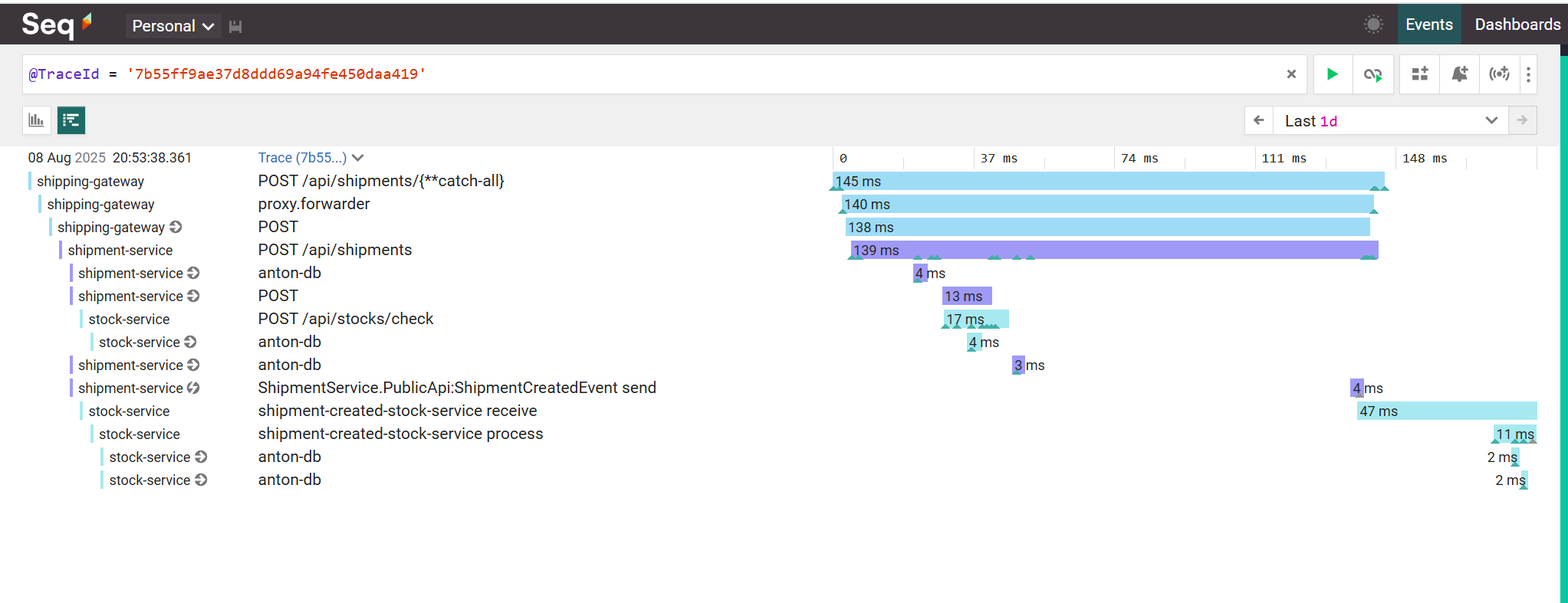
Here is how the services interact with each other when creating a shipment (Seq):
Step 7: Introduce an API Gateway
We have split our Monolith into services, which communicate with each other over HTTP and RabbitMQ.
But we have to hardcode the routes for each service. We also need to update the routes in each dependent service when we migrate services to new hosts.
We need to introduce an API Gateway that sits in front of our services, giving a single endpoint for communication.
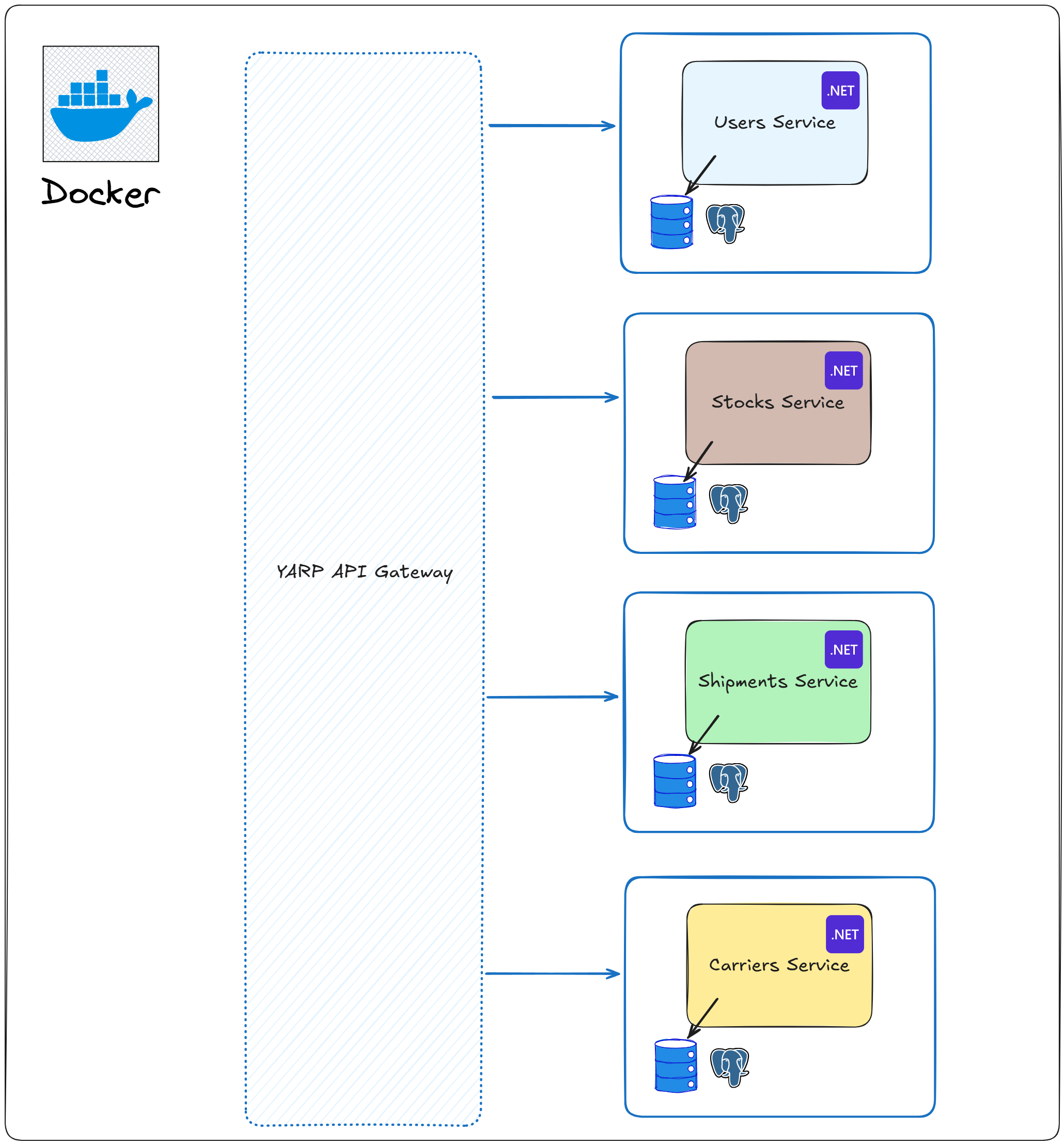
We will create a new ASP.NET Core Web API project that will act as an API Gateway. We will use Yarp as an API Gateway.
Yarp is a reverse proxy that can route requests to multiple services. It can also handle authentication, authorization, and load balancing.
Yarp is very performant and has the best integration with the ASP.NET Core ecosystem.
You need to add the following NuGet package to the API Gateway project:
csharpdotnet add package Yarp.ReverseProxy
In the appsettings.json, we need to configure the routes for each service:
json{ "ReverseProxy": { "Routes": { "stock-service-route": { "ClusterId": "stock-service-cluster", "Timeout": "00:00:30", "Match": { "Path": "/api/stocks/{**catch-all}" } }, "shipment-service-route": { "ClusterId": "shipment-service-cluster", "Timeout": "00:00:30", "Match": { "Path": "/api/shipments/{**catch-all}" } } }, "Clusters": { "stock-service-cluster": { "HttpClient": { "MaxConnectionsPerServer": 500 }, "Destinations": { "destination1": { "Address": "http://stock-service:8080" } } }, "shipment-service-cluster": { "HttpClient": { "MaxConnectionsPerServer": 500 }, "Destinations": { "destination1": { "Address": "http://shipment-service:8080" } } } } } }
Here I have specified the routes for the StockService and ShipmentService in the Docker containers:
ymlservices: shipping-api-gateway: image: shipping-api-gateway container_name: shipping-api-gateway build: context: . dockerfile: ./Shipping.Gateway.Host/Dockerfile ports: - "5000:8080" environment: - ASPNETCORE_ENVIRONMENT=Production restart: always networks: - docker-web shipment-service: image: shipment-service container_name: shipment-service build: context: . dockerfile: ./Shipments/ShipmentService.Host/Dockerfile ports: - "5005:8080" environment: - ASPNETCORE_ENVIRONMENT=Production restart: always networks: - docker-web stock-service: image: stock-service container_name: stock-service build: context: . dockerfile: ./Stocks/StockService.Host/Dockerfile ports: - "5152:8080" environment: - ASPNETCORE_ENVIRONMENT=Production restart: always networks: - docker-web networks: docker-web: driver: bridge
For local development, you can use the actual ports for each service in appsettings.Development.json when running all the services from the IDE.
Now that your API Gateway setup is ready, let's register the necessary services in DI in the Program.cs:
csharpvar builder = WebApplication.CreateBuilder(args); // Register Yarp services builder.Services.AddRequestTimeouts(); builder.Services.AddReverseProxy() .LoadFromConfig(builder.Configuration.GetSection("ReverseProxy")); builder.Services .AddOpenTelemetry() .ConfigureResource(resource => resource.AddService("shipping-gateway")) .WithTracing(tracing => { tracing .AddAspNetCoreInstrumentation() .AddHttpClientInstrumentation() .AddSource("Yarp.ReverseProxy"); tracing.AddOtlpExporter(); }); var app = builder.Build(); app.UseRequestTimeouts(); app.MapReverseProxy(); await app.RunAsync();
Note: I use OpenTelemetry to trace the requests to the API Gateway (as you can see in the previous screenshot).
Summary
We have migrated our Modular Monolith to Microservices in a single solution. All services are running in Docker containers and communicate over HTTP and RabbitMQ.
We have added OpenTelemetry and Yarp API Gateway as a single entry point for all services.
However, there are additional things to consider:
- Move Services to their own GIT repositories; extract Public shared contracts into versioned NuGet packages
- Introduce CI/CD for each service
- Implement Health Checks for each service
- Integrate Authorization services and propagate tokens across downstream calls
- Implement outbox/inbox patterns for messaging
- Implement idempotency in services as needed
- Add resilience policies (retries, timeouts, circuit breakers, fallbacks) and verify with load tests
- Add distributed caching as needed
- Write Integration tests for each Service
- Write Load tests to test your system under load
Hope you find this newsletter useful. See you next time.
