
I have worked on many .NET Projects. Often, as the project grows, maintaining architecture becomes harder than writing new features.
Developers unintentionally add dependencies between layers, violate module boundaries, or create classes without interfaces, which can weaken your testability and design. Over months, your architecture drifts away from its original rules, and refactoring becomes risky and expensive.
Every .NET developer knows the importance of unit tests and integration tests - they verify that code works correctly. However, even the most complete test suite cannot tell you whether your codebase structure still follows your intended architectural design.
Then I found that Architecture Tests can prevent such issues.
Architecture Tests ensure that your system's design rules are enforced and that your code follows the architecture you've set up.
In this post, we will explore:
- What architecture tests are and why they matter
- Writing your first architecture tests in .NET with NetArchTest
- Enforcing Clean Architecture and layer isolation
- Testing modular boundaries in Modular Monoliths
Let's dive in.
What Are Architecture Tests and Why They Matter
Architecture tests are automated checks that verify the high-level design rules of your system. Not just whether methods or API endpoints return correct results, but whether your project structure and dependencies match your intended architecture.
They ensure that your layers, modules, classes, and namespaces interact correctly. For example:
- The Domain layer should not depend on the Infrastructure layer.
- The Application layer should reference Domain, but not the Presentation project.
- Modules inside a Modular Monolith should communicate through public contracts, not directly reference each other.
- All entities should inherit from a common base
Entityclass. - All your application handlers should have the
Handlersuffix in their names.
You can think of architecture tests as unit tests for your architecture, which verify the structure.
Let's say you have the following .NET solution:
OrdersApi.sln │ ├── Domain ├── Application ├── Infrastructure └── Presentation
When a project starts, architecture is nice and clean. Each developer understands that the layer boundaries and dependencies are simple.
But as the project grows, developers make shortcuts:
- "Let's just call the repository directly from the controller."
- "We need a helper class from Infrastructure inside the Domain."
- "We can reuse this service across modules - just add a reference."
- Forget to add essential prefixes and suffixes to class names.
- Forget to inherit their classes from a common base class or an interface.
These small violations accumulate silently. Without architecture tests, no one notices - the build succeeds, the app runs.
Yet, your architecture starts to drift — and by the time it becomes visible, refactoring becomes costly.
With architecture tests, the build would fail immediately, warning the team that the dependency violates the architecture.
This turns your architecture into enforceable documentation.
Writing Your First Architecture Tests in .NET with NetArchTest
For writing Architecture tests, you can use one of the two libraries:
I have mainly used NetArchTest, so let's see how to get started with it.
For architecture tests, I create a separate test project with xUnit.
To get started with NetArchTest, add the NuGet package to your test project:
bashdotnet add package NetArchTest.Rules
Let's write our first architecture test.
With NetArchTest, you can enforce conventions.
Let's verify that all Controllers have the [ApiController] attribute:
csharp[Fact] public void Controllers_Should_Have_ApiController_Attribute() { // Act var result = Types .InAssembly(ApiAssembly) .That() .HaveNameEndingWith("Controller") .Should() .HaveCustomAttribute(typeof(Microsoft.AspNetCore.Mvc.ApiControllerAttribute)) .GetResult(); // Assert Assert.True(result.IsSuccessful, FormatFailure(result)); } private static string FormatFailure(TestResult result) { if (result.FailingTypes is null || !result.FailingTypes.Any()) { return "Architecture rule failed."; } return "Architecture rule failed. Offending types: " + string.Join(", ", result.FailingTypeNames); }
Let's explore another practical example.
In most Clean Architecture or DDD-style .NET solutions, you define a base Entity class in your Domain layer.
Every aggregate root and entity should inherit from this class to ensure:
- Consistent identity handling
- Equality comparison
- Using Domain events implementation
- Common conventions across your Domain.
Let's write an architecture test that verifies this rule:
csharp[Fact] public void All_Domain_Entities_Should_Inherit_From_Base_Entity() { // Arrange var result = Types .InAssembly(DomainAssembly) .That() .ResideInNamespace(DomainNamespace) .And() .AreClasses() .Should() .Inherit(typeof(Common.Domain.Entity)) .GetResult(); // Assert Assert.True(result.IsSuccessful, FormatFailure(result)); }
Enforcing Clean Architecture and Layer Isolation
In Clean Architecture, you have a Domain layer, an Application layer, an Infrastructure layer and a Presentation layer.
Here are the layer boundaries:
- Domain → should not depend on any other layers
- Application → can only depend on the Domain layer
- Presentation → can depend on Domain and Application
- Infrastructure → can depend on Application and Domain
We can enforce this with NetArchTest.
Domain should not depend on any other layers:
csharpusing NetArchTest.Rules; using Xunit; namespace Shipments.Tests.Architecture; public class CleanArchitectureTests { private const string Domain = "Shipments.Domain"; private const string Application = "Shipments.Application"; private const string Infrastructure = "Shipments.Infrastructure"; private const string Api = "Shipments.Api"; [Fact] public void Domain_Should_Not_Depend_On_Application_Infrastructure_Or_Api() { var result = Types .InAssembly(DomainAssembly) .That() .ResideInNamespace(Domain) .ShouldNot() .HaveDependencyOn(Application) .AndShouldNot() .HaveDependencyOn(Infrastructure) .AndShouldNot() .HaveDependencyOn(Api) .GetResult(); Assert.True(result.IsSuccessful, FormatFailure(result)); } }
This test finds all types in Shipments.Domain.
It asserts that none of them depend on Shipments.Application, Shipments.Infrastructure or Shipments.Api.
If someone adds a reference, the test fails and shows the offending types. This is exactly how we stop accidental design drift.
Let's add more rules to match a typical Clean Architecture setup:
csharppublic class CleanArchitectureTests { [Fact] public void Application_Should_Depend_On_Domain_Only() { var result = Types .InAssembly(ApplicationAssembly) .That() .ResideInNamespace(Application) .ShouldNot() .HaveDependencyOn(Infrastructure) .AndShouldNot() .HaveDependencyOn(Api) .GetResult(); Assert.True(result.IsSuccessful, FormatFailure(result)); } [Fact] public void Api_Should_Not_Depend_On_Infrastructure() { var result = Types .InAssembly(ApiAssembly) .That() .ResideInNamespace(Api) .ShouldNot() .HaveDependencyOn(Infrastructure) .GetResult(); Assert.True(result.IsSuccessful, FormatFailure(result)); } }
Testing Modular Boundaries in Modular Monoliths
Architecture tests are also very useful in Modular Monoliths as they have the following requirements:
- Modular Monolith has clear boundaries between its modules.
- Modules can't access a database of other modules directly.
- Modules can talk with each other only via a public API.
A modular monolith organizes code into separate modules that handle different business capabilities.
These boundaries are not just folders or namespaces. They represent business domains that should remain independent of each other.
When boundaries are clear, teams can work on different modules without affecting other modules.
The problem is that boundaries in a modular monolith are logical, not physical. Unlike microservices, where modules run in separate processes, all modules in a modular monolith share the same codebase. This makes it easy to violate boundaries.
A developer working on the Shipments module needs carrier information.
Instead of using the proper integration API, they reference the Carriers.Domain namespace directly.
The compiler allows it. The code works. But the architecture is broken.
Let's explore an application with three core modules: Shipments, Carriers and Stocks:
- Shipments Module: Handles creating orders for shipments.
- Carriers Module: Maintains information about shipping partners and registers shipments for delivery.
- Stocks Module: Manages product inventory levels.
Each module exposes an interface that allows other modules to call it. Under the hood, it's a method call in the same process.
Each module has its own database schema and DbContext for EF Core, providing clear separation of data.
When creating a shipment, the Shipments Module needs to:
- Checks if a Shipment for a given OrderId is already created in its database
- Calls the Stocks Module to check the products' availability
- Creates a Shipment in the database
- Calls the Carrier Module to save the shipment details
- Calls the Stocks Module to update stock levels
Here is a project's structure:
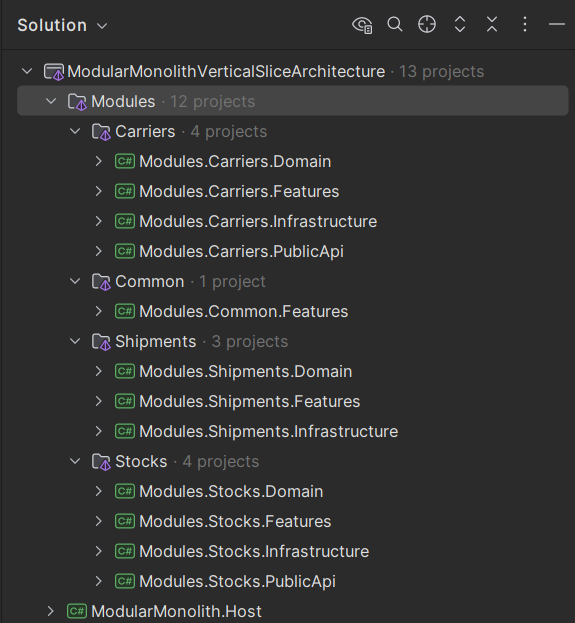
Architecture tests need to reference the assemblies they will check. Let's create a helper class that holds all module assembly references:
csharpinternal static class ModuleAssemblies { // Shipments module assemblies internal static readonly Assembly ShipmentsDomainAssembly = Shipments.Domain.AssemblyReference.Assembly; internal static readonly Assembly ShipmentsFeaturesAssembly = Shipments.Features.AssemblyReference.Assembly; internal static readonly Assembly ShipmentsInfrastructureAssembly = Shipments.Infrastructure.AssemblyReference.Assembly; // Stocks module assemblies internal static readonly Assembly StocksDomainAssembly = Stocks.Domain.AssemblyReference.Assembly; internal static readonly Assembly StocksFeaturesAssembly = Stocks.Features.AssemblyReference.Assembly; internal static readonly Assembly StocksInfrastructureAssembly = Stocks.Infrastructure.AssemblyReference.Assembly; internal static readonly Assembly StocksPublicApiAssembly = Stocks.PublicApi.AssemblyReference.Assembly; // Carriers module assemblies internal static readonly Assembly CarriersDomainAssembly = Carriers.Domain.AssemblyReference.Assembly; internal static readonly Assembly CarriersFeaturesAssembly = Carriers.Features.AssemblyReference.Assembly; internal static readonly Assembly CarriersInfrastructureAssembly = Carriers.Infrastructure.AssemblyReference.Assembly; internal static readonly Assembly CarriersPublicApiAssembly = Carriers.PublicApi.AssemblyReference.Assembly; }
This approach requires each project in every module to have an AssemblyReference class:
csharppublic static class AssemblyReference { public static readonly Assembly Assembly = typeof(AssemblyReference).Assembly; }
This is a simple marker class. It exists only to provide a type that belongs to the assembly. The test project references this type, which forces the assembly to be loaded at runtime.
Here is how we can test that the Stocks module does not depend on any other module:
csharpprivate const string ShipmentsNamespace = "Modules.Shipments"; private const string CarriersNamespace = "Modules.Carriers"; private const string StocksNamespace = "Modules.Stocks"; [Fact] public void StocksModule_ShouldNotHaveDependencyOn_AnyOtherModule() { var result = Types.InAssemblies(GetStocksModuleAssemblies()) .Should() .NotHaveDependencyOnAny( CarriersNamespace, ShipmentsNamespace) .GetResult(); Assert.True(result.IsSuccessful, string.Join(", ", result.FailingTypeNames ?? [])); }
This test loads all assemblies in the Stocks module and checks every type.
If any type has a using statement, field, parameter, or property that references the Carriers or Shipments namespaces, the test fails.
You can download the full source code for this project from my .NET Backend Template.
Let's write a test that checks that the Shipments module references only Public API projects from Carriers or Stocks:
csharpprivate const string ShipmentsNamespace = "Modules.Shipments"; private const string CarriersNamespace = "Modules.Carriers"; private const string StocksNamespace = "Modules.Stocks"; // Project namespaces private const string CarriersDomainNamespace = CarriersNamespace + ".Domain"; private const string CarriersInfraNamespace = CarriersNamespace + ".Infrastructure"; private const string CarriersFeaturesNamespace = CarriersNamespace + ".Features"; private const string CarriersPublicApiNamespace = CarriersNamespace + ".PublicApi"; private const string StocksDomainNamespace = StocksNamespace + ".Domain"; private const string StocksInfraNamespace = StocksNamespace + ".Infrastructure"; private const string StocksFeaturesNamespace = StocksNamespace + ".Features"; private const string StocksPublicApiNamespace = StocksNamespace + ".PublicApi"; [Fact] public void ShipmentsModule_ShouldOnlyReference_PublicApiProjects() { var shipmentsAssemblies = GetShipmentsModuleAssemblies(); // Check that the Shipments module doesn't reference internal Carriers projects var carriersInternalResult = Types.InAssemblies(shipmentsAssemblies) .Should() .NotHaveDependencyOnAny( CarriersDomainNamespace, CarriersInfraNamespace, CarriersFeaturesNamespace) .GetResult(); Assert.True(carriersInternalResult.IsSuccessful, $"Shipments module should not reference internal Carriers projects: {string.Join(", ", carriersInternalResult.FailingTypeNames ?? [])}"); // Check that the Shipments module doesn't reference internal Stocks projects var stocksInternalResult = Types.InAssemblies(shipmentsAssemblies) .Should() .NotHaveDependencyOnAny( StocksDomainNamespace, StocksInfraNamespace, StocksFeaturesNamespace) .GetResult(); Assert.True(stocksInternalResult.IsSuccessful, $"Shipments module should not reference internal Stocks projects: {string.Join(", ", stocksInternalResult.FailingTypeNames ?? [])}"); // Verify that it DOES reference the PublicApi projects (optional positive test) var hasCarriersPublicApiDep = Types.InAssemblies(shipmentsAssemblies) .That() .HaveDependencyOn(CarriersPublicApiNamespace) .GetTypes() .Any(); var hasStocksPublicApiDep = Types.InAssemblies(shipmentsAssemblies) .That() .HaveDependencyOn(StocksPublicApiNamespace) .GetTypes() .Any(); Assert.True(hasCarriersPublicApiDep || hasStocksPublicApiDep, "Shipments module should reference at least one PublicApi project"); } private static Assembly[] GetShipmentsModuleAssemblies() { return [ ModuleAssemblies.ShipmentsDomainAssembly, ModuleAssemblies.ShipmentsInfrastructureAssembly, ModuleAssemblies.ShipmentsFeaturesAssembly ]; }
This test has three parts.
The first check ensures Shipments does not reference Carriers.Domain, Carriers.Infrastructure, or Carriers.Features.
These are internal to the Carriers module.
The second check does the same for the Stocks module.
The third verifies that Shipments references only the Public API projects of the Carriers and Stocks modules.
Summary
Architecture tests are a powerful tool in a developer's toolbox. They ensure that your architecture is consistent and enforces the rules you set.
They work better than any documentation. A developer can forget some rules, and the tests will catch them.
Architecture tests are easy to write, and usually I copy a set of tests from one project to another.
Architecture tests are just regular tests; that's why I recommend running them in the CI/CD pipeline when building your application.
Hope you find this newsletter useful. See you next time.

Comments