Choosing the right communication style between microservices is one of the most important architectural decisions you will make.
Get it wrong, and you end up with a fragile system where one failing service brings everything down. Get it right, and your services stay independent, scalable, and resilient.
In distributed systems, there are two fundamental ways services talk to each other: synchronous and asynchronous communication. Each comes with trade-offs in latency, coupling, reliability, and complexity.
Throughout my career, I have designed and built distributed systems using both approaches. In this post, I will break down how each communication style works, when to use each one, and how real systems often combine both to achieve the best results.
In this post, we will explore:
- How Microservices Communicate
- Synchronous Communication: HTTP and gRPC
- Asynchronous Communication: Message Brokers and Event Streaming
- Synchronous vs Asynchronous: Deep Comparison
- Hybrid Communication: Mixing Sync and Async in One Flow
- How to Choose: Decision Checklist
- Summary
Let's dive in.
How Microservices Communicate
In a Modular Monolith application, components call each other through in-process method calls. It's fast, simple, and reliable.
But when you break a Modular Monolith into microservices, those calls become network calls. And network calls introduce latency, failures, and a whole new set of challenges.
There are two fundamental approaches for microservices communication:
Synchronous communication: the caller sends a request and waits for a response before continuing. The caller is blocked until the response arrives or a timeout occurs.
Think of it like a phone call - you dial, the other person picks up, you talk, and you wait for an answer before continuing the conversation.
Asynchronous communication: the caller sends a message and moves on without waiting for an immediate response. The message is processed later by the receiving service at its own pace.
Think of it like sending an email - you send it and continue with your work, without waiting for the recipient to read and reply.
These two styles lead to fundamentally different system behaviors in terms of coupling, resilience, and scalability.
Now let's explore each communication style in detail.
Synchronous Communication: HTTP and gRPC
Synchronous communication is the most intuitive way for services to talk. Service A calls Service B, waits for the result, and then continues its work.
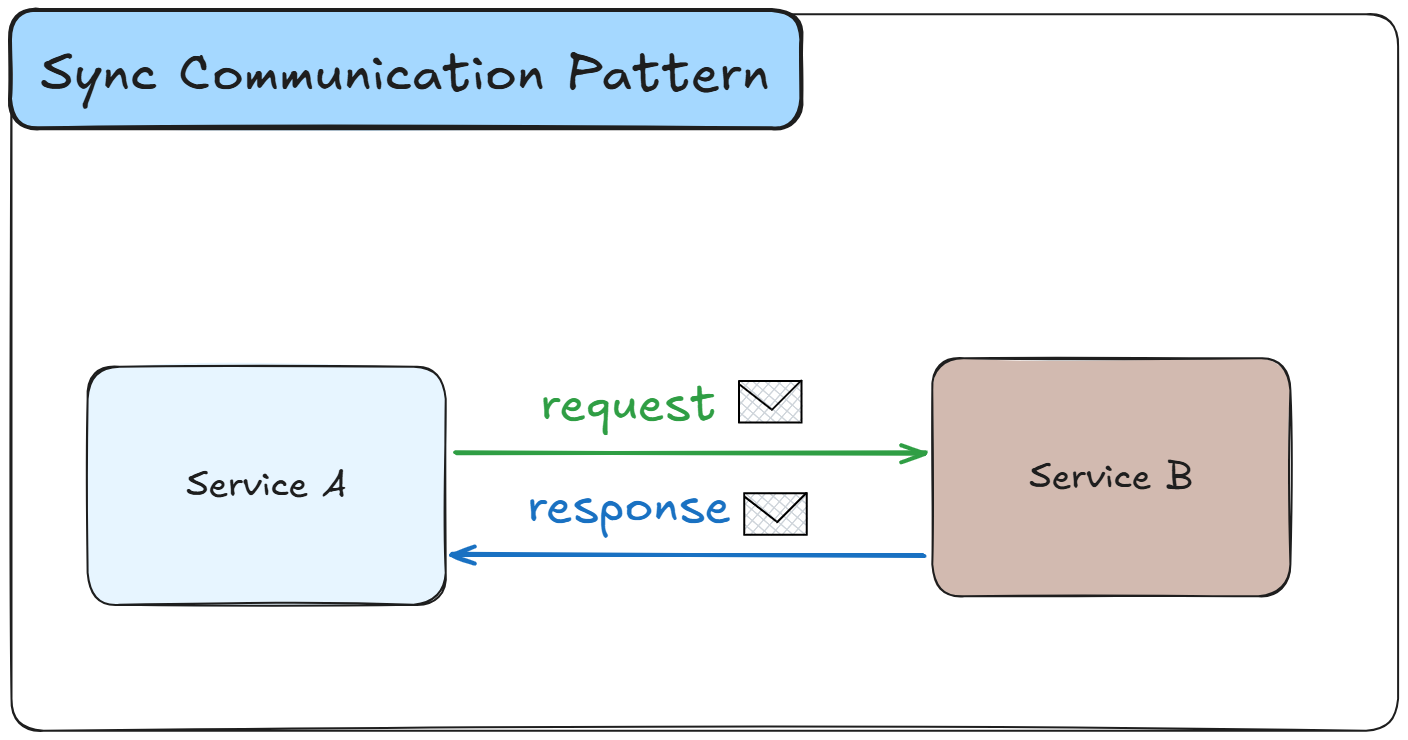
The two most popular protocols for synchronous communication in .NET are HTTP (REST) and gRPC.
You can also use HotChocolate GraphQL Strawberry Shake for HTTP/REST communication. But this is a pretty niche approach. If you want to learn more about HotChocolate GraphQL, see this article.
HTTP/REST
HTTP-based REST APIs are the most common way microservices communicate synchronously. They are simple to build, easy to debug, and supported by virtually every language and framework.
Here is a typical example. The Booking Service needs to check room availability from the Property Service before confirming a reservation:
csharppublic class PropertyServiceClient { private readonly HttpClient _httpClient; public PropertyServiceClient(HttpClient httpClient) { _httpClient = httpClient; } public async Task<RoomAvailability?> CheckAvailabilityAsync( int propertyId, DateOnly checkIn, DateOnly checkOut) { var response = await _httpClient.GetAsync( $"/api/properties/{propertyId}/availability?checkIn={checkIn}&checkOut={checkOut}"); response.EnsureSuccessStatusCode(); return await response.Content.ReadFromJsonAsync<RoomAvailability>(); } }
HTTP/REST works well when:
- You need a simple request-response interaction
- The client needs data immediately to continue
- You are building public APIs
- You want broad compatibility across languages and platforms
The main downside is temporal coupling - the caller must wait for the receiver to respond. If the Property Service is slow or down, the Booking Service is stuck.
gRPC
gRPC is a high-performance RPC (Remote Procedure Call) framework built on HTTP/2. It uses Protocol Buffers (Protobuf) for serialization, which is significantly faster and smaller than JSON.
gRPC shines in service-to-service communication where performance matters.
Let's explore an example: how to check the room availability with gRPC.
First, define the service contract in a .proto file:
protobufsyntax = "proto3"; option csharp_namespace = "BookingPlatform.Protos"; service PropertyService { rpc CheckAvailability (AvailabilityRequest) returns (AvailabilityResponse); } message AvailabilityRequest { int32 property_id = 1; string check_in = 2; string check_out = 3; } message AvailabilityResponse { bool is_available = 1; double price_per_night = 2; string currency = 3; }
Then call it from the Booking Service:
csharppublic class PropertyGrpcClient { private readonly PropertyService.PropertyServiceClient _client; public PropertyGrpcClient(PropertyService.PropertyServiceClient client) { _client = client; } public async Task<AvailabilityResponse> CheckAvailabilityAsync( int propertyId, string checkIn, string checkOut) { var request = new AvailabilityRequest { PropertyId = propertyId, CheckIn = checkIn, CheckOut = checkOut }; return await _client.CheckAvailabilityAsync(request); } }
gRPC works well when:
- You need low-latency, high-throughput communication between internal services
- You have strict performance requirements
- You want strongly typed contracts between services
- You need streaming capabilities (server streaming, client streaming, or bidirectional)
gRPC is not ideal for browser-to-service communication (though gRPC-Web exists as a workaround) or when you need human-readable payloads for debugging.
Handling Failures in Synchronous Communication
The biggest risk with synchronous communication is cascading failures. When Service A calls Service B, and Service B calls Service C - if Service C is down, all three services are affected.
To mitigate this, you should implement resilience patterns:
Retries with backoff - retry failed requests with increasing delays between attempts:
csharpbuilder.Services.AddHttpClient<PropertyServiceClient>(client => { client.BaseAddress = new Uri("https://property-service:5001"); }) .AddStandardResilienceHandler(options => { options.Retry.MaxRetryAttempts = 3; options.Retry.BackoffType = DelayBackoffType.Exponential; options.Retry.Delay = TimeSpan.FromMilliseconds(500); options.CircuitBreaker.SamplingDuration = TimeSpan.FromSeconds(10); options.CircuitBreaker.FailureRatio = 0.9; options.CircuitBreaker.MinimumThroughput = 5; options.AttemptTimeout.Timeout = TimeSpan.FromSeconds(2); });
The AddStandardResilienceHandler from Microsoft.Extensions.Http.Resilience gives you retries, circuit breaker, and timeouts in a single configuration.
Circuit Breaker - stops calling a failing service to give it time to recover.
When a service fails repeatedly, the circuit "opens," and all subsequent requests fail immediately instead of waiting for a timeout. After a cooldown period, the circuit "half-opens" to test if the service has recovered.
These patterns don't eliminate the problem of synchronous coupling. They reduce the impact. If you need true independence between services, you need asynchronous communication.
Asynchronous Communication: Message Brokers and Event Streaming
Asynchronous communication decouples services. The sender publishes a message and moves on. The receiver processes it when ready.
This decoupling makes your system more resilient: if a downstream service is temporarily unavailable, messages wait in the queue until the service comes back online.
There are several communication patterns that fall under the asynchronous style.
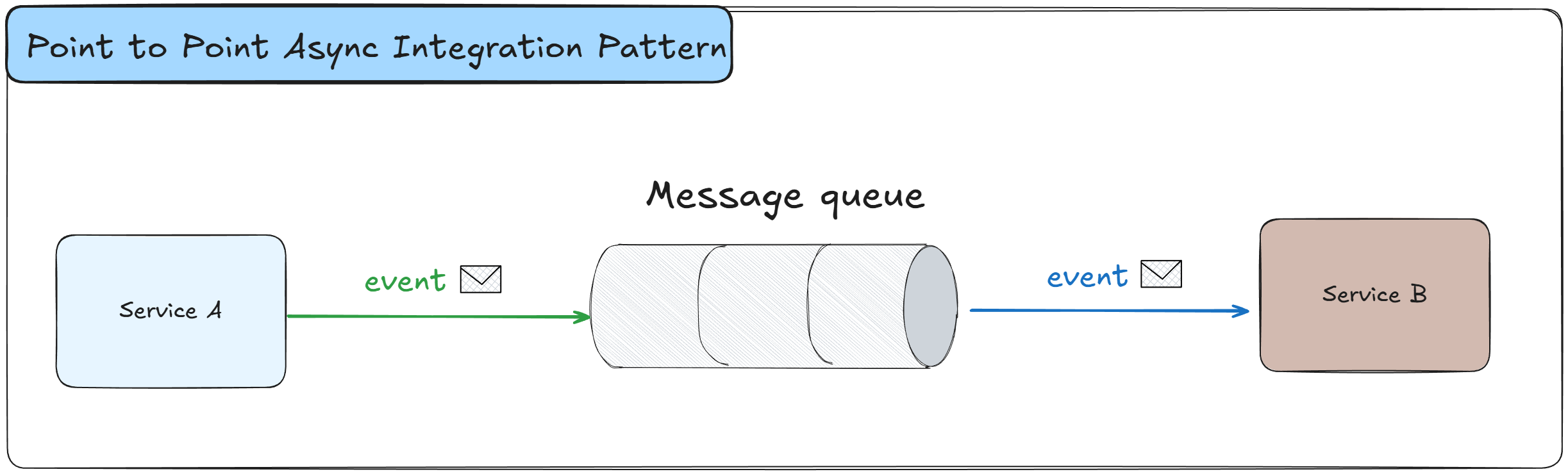
Point-to-Point integration: when one service communicates directly with another service by sending a message to a specific queue. In Point-to-Point, there is only one receiver.
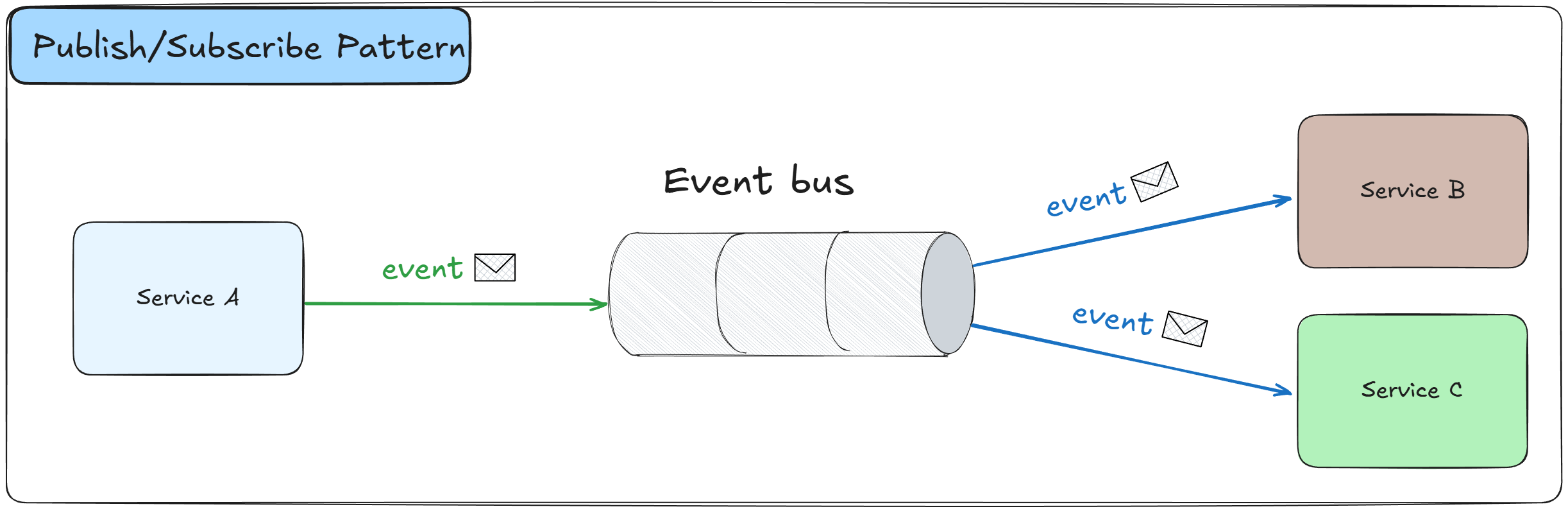
Publish-Subscribe: when a service publishes an event, and multiple subscribers can react to it independently.
Both patterns are fundamental building blocks in distributed systems. You can learn more about these and other patterns in my article on 12 Essential Distributed System Design Patterns Every Architect Should Know.
There are two main categories of async communication: message queues and event streaming.
Message Queues
Message queues follow a Point-to-Point model. A producer sends a message to a queue, and a single consumer picks it up and processes it.
Once a message is consumed, it's removed from the queue.
This is ideal for task-based work - "process this payment", "send this email", "generate this invoice".
Popular message queue technologies include:
- RabbitMQ - a widely-used open source message broker with rich routing capabilities
- Azure Service Bus - a fully managed enterprise message broker on Azure with support for queues and topics
Here is an example of publishing a booking confirmation message to Azure Service Bus:
csharppublic class BookingMessagePublisher : IAsyncDisposable { private readonly ServiceBusSender _sender; public BookingMessagePublisher(ServiceBusClient client) { _sender = client.CreateSender("booking-confirmations"); } public async Task PublishBookingConfirmedAsync( BookingConfirmed message, CancellationToken cancellationToken = default) { var json = JsonSerializer.Serialize(message); var serviceBusMessage = new ServiceBusMessage(json) { ContentType = "application/json", MessageId = Guid.NewGuid().ToString() }; await _sender.SendMessageAsync(serviceBusMessage, cancellationToken); } public async ValueTask DisposeAsync() { await _sender.DisposeAsync(); } }
And consuming it in the Notification Service:
csharppublic class BookingConfirmationConsumer : BackgroundService { private readonly ServiceBusClient _client; private readonly ILogger<BookingConfirmationConsumer> _logger; public BookingConfirmationConsumer( ServiceBusClient client, ILogger<BookingConfirmationConsumer> logger) { _client = client; _logger = logger; } protected override async Task ExecuteAsync(CancellationToken stoppingToken) { var processor = _client.CreateProcessor("booking-confirmations", new ServiceBusProcessorOptions { AutoCompleteMessages = false, MaxConcurrentCalls = 1 }); processor.ProcessMessageAsync += async args => { var message = JsonSerializer.Deserialize<BookingConfirmed>( args.Message.Body.ToString()); _logger.LogInformation( "Sending confirmation email for booking {BookingId}", message!.BookingId); // Send email, push notification, etc. await args.CompleteMessageAsync(args.Message, stoppingToken); }; processor.ProcessErrorAsync += args => { _logger.LogError(args.Exception, "Error processing message from queue {QueueName}", args.EntityPath); return Task.CompletedTask; }; await processor.StartProcessingAsync(stoppingToken); // Keep the service running await Task.Delay(Timeout.Infinite, stoppingToken); await processor.StopProcessingAsync(stoppingToken); await processor.DisposeAsync(); } }
When a consumer fails to process a message, you don't want it to be lost. Dead-letter queues capture messages that couldn't be processed after a certain number of retries. This lets you inspect failed messages, fix the issue, and reprocess them later.
Azure Service Bus supports dead-letter queues out of the box.
Request-Response with Message Queues
It's a common misconception that message queues only support fire-and-forget. You can also implement a Request-Response pattern over message queues.
In this pattern, the sender publishes a request message with a correlation ID and a reply-to queue. The receiver processes the request and sends a response back to the reply-to queue. The sender correlates the response using the correlation ID.
This gives you the decoupling benefits of async communication while still getting a response.
And both services in Request-Response async communication don't know about each other.
You may consider Request-Response over queues when:
- You need a response but don't want tight synchronous coupling
- You want the broker to act as a buffer between services
It adds complexity compared to simple fire-and-forget, so use it only when you genuinely need the response back. And for such request-response cases, gRPC or REST can be a better choice.
Event Streaming
Event streaming follows a Publish-Subscribe model. A producer publishes events to a topic, and multiple consumers can independently subscribe and process those events.
Unlike message queues, events are not removed after consumption. They are stored for a configurable retention period, which allows consumers to replay events if needed.
This is ideal for broadcasting facts - "a booking was created", "a payment was processed", "a guest checked in". Multiple services can react to the same event independently.
Popular event streaming technologies include:
- Apache Kafka - the industry standard for high-throughput event streaming
- Azure Event Hubs - a fully managed event streaming platform on Azure
Here is an example of publishing a booking event to Kafka:
csharppublic class BookingEventPublisher : IDisposable { private readonly IProducer<string, string> _producer; public BookingEventPublisher(IConfiguration configuration) { var config = new ProducerConfig { BootstrapServers = configuration["Kafka:BootstrapServers"], Acks = Acks.All, EnableIdempotence = true }; _producer = new ProducerBuilder<string, string>(config).Build(); } public async Task PublishBookingCreatedAsync(BookingCreated bookingEvent) { var message = new Message<string, string> { Key = bookingEvent.BookingId.ToString(), Value = JsonSerializer.Serialize(bookingEvent) }; await _producer.ProduceAsync("booking-events", message); } public void Dispose() { _producer.Dispose(); } }
And consuming events in multiple independent services:
csharppublic class BookingEventConsumer : BackgroundService { private readonly IConsumer<string, string> _consumer; private readonly ILogger<BookingEventConsumer> _logger; public BookingEventConsumer( IConfiguration configuration, ILogger<BookingEventConsumer> logger) { _logger = logger; var config = new ConsumerConfig { BootstrapServers = configuration["Kafka:BootstrapServers"], GroupId = "analytics-service", AutoOffsetReset = AutoOffsetReset.Earliest, EnableAutoCommit = false }; _consumer = new ConsumerBuilder<string, string>(config).Build(); } protected override async Task ExecuteAsync(CancellationToken stoppingToken) { _consumer.Subscribe("booking-events"); await Task.Run(() => { while (!stoppingToken.IsCancellationRequested) { var result = _consumer.Consume(stoppingToken); var bookingEvent = JsonSerializer .Deserialize<BookingCreated>(result.Message.Value); _logger.LogInformation( "Processing booking event {BookingId} for analytics", bookingEvent!.BookingId); // Process the event for analytics _consumer.Commit(result); } }, stoppingToken); } }
The key difference from message queues: multiple consumer groups can independently read the same events.
The Analytics Service, Notification Service, and Reporting Service can all subscribe to booking-events and process them independently.
A Note on MassTransit
If you want to simplify working with message brokers in .NET, consider MassTransit or Wolverine.
MassTransit is an open-source abstraction layer that works with RabbitMQ, Azure Service Bus, Amazon SQS, and Kafka. It provides a consistent API, automatic retries, dead-letter handling, saga orchestration, and much more.
However, MassTransit recently moved to a commercial license model for production use. But still, MassTransit V8 will remain free with support until the end of 2026.
If you're looking for an alternative, consider Wolverine.
Synchronous vs Asynchronous: Deep Comparison
Let's compare synchronous and asynchronous communication across the criteria that matter most when designing microservice architectures.
Coupling
- Synchronous: high coupling - the caller depends on the receiver being available
- Asynchronous: low coupling - services are independent and communicate through a broker
Latency
- Synchronous: low latency - the caller gets an immediate response
- Asynchronous: higher latency - the message is processed later, not in real time
Service Availability
- Synchronous: if the receiver is down, the caller fails (unless you implement retries and circuit breakers)
- Asynchronous: if the receiver is down, messages wait in the queue and get processed when the service recovers
Scalability
- Synchronous: scaling requires load balancing across service instances
- Asynchronous: scaling is natural - add more consumers to process messages in parallel
Data Consistency
- Synchronous: easier to maintain strong consistency with immediate responses
- Asynchronous: eventual consistency - data may not be immediately up-to-date across services
Complexity
- Synchronous: simpler to implement, debug, and trace
- Asynchronous: more complex - requires a message broker, monitoring, dead-letter queues, and idempotency handling
Failure Handling
- Synchronous: failures are immediate and visible - you get an error response or timeout right away
- Asynchronous: failures can be silent - a message might sit in a dead-letter queue without anyone noticing unless monitoring is set up
Debugging and Tracing
- Synchronous: straightforward to trace - you can follow the request-response chain through logs
- Asynchronous: harder to trace - requires distributed tracing and correlation IDs to follow a message across services
Best Use Cases
- Synchronous: real-time queries, user-facing APIs, operations that need an immediate response
- Asynchronous: background processing, notifications, event-driven workflows, cross-service data synchronization
Neither approach is universally better. The right choice depends on your specific use case, and most real systems use both.
Hybrid Communication: Mixing Sync and Async in One Flow
In practice, most microservice architectures don't use purely synchronous or purely asynchronous communication. They mix both styles in the same request flow.
The idea is simple: use synchronous communication where you need an immediate response, and asynchronous communication for everything that can happen in the background.
Here is a common pattern. A user books a hotel room:
- The API Gateway receives the booking request (sync HTTP)
- The Booking Service calls the Property Service to verify availability (sync gRPC)
- The Booking Service calls the Payment Service to charge the guest (sync HTTP)
- The Booking Service confirms the booking and publishes a
BookingConfirmedevent (async) - The Notification Service picks up the event and sends a confirmation email (async)
- The Analytics Service picks up the same event and updates dashboards (async)
- The Property Service picks up the same event and updates availability (async)
Steps 1-3 are synchronous because the user is waiting for a response. Steps 5-7 are asynchronous because they don't affect the user's immediate experience.
In some workflows, you can move Payment to an async flow as well, depending on your requirements.
For example, after booking, the user is redirected to a payment page and may receive an email notification that their booking is being processed and is awaiting payment. While the payment happens in the background, the user sees it as a seamless process in the same browser tab.
On the backend, it can be an asynchronous flow. Once the payment is confirmed, you send an email notification that your booking is now active.
This hybrid approach gives you the best of both worlds:
- The user gets an immediate confirmation because the critical steps (availability check, payment) happen synchronously
- Background work (notifications, analytics, availability updates) happens asynchronously without blocking the user
- If the Notification Service is temporarily down, the confirmation email is not lost - it waits in the message queue
The key principle is: be synchronous at the boundary, be asynchronous behind it.
What happens at the boundary (user-facing API) should be fast and responsive. What happens behind the boundary (service-to-service coordination) should be resilient and decoupled.
How to Choose: Decision Checklist
When you are deciding between synchronous and asynchronous communication for a specific interaction, walk through this checklist:
Use synchronous communication when:
- The caller needs data from the receiver to continue processing
- The user is waiting for an immediate response
- You need strong consistency - the caller must know the result before moving on
- The interaction is a simple query or lookup
- The operation is short-lived (milliseconds to low seconds)
Use asynchronous communication when:
- The caller doesn't need an immediate response
- The work can be done in the background
- Multiple services need to react to the same event
- You need resilience - the system should work even if some services are temporarily unavailable
- The operation is long-running (seconds to minutes)
- You need to handle traffic spikes - the message broker acts as a buffer
Use a hybrid approach when:
- The user-facing operation requires an immediate response, but the side effects can happen later
- You want fast response times at the API boundary but decoupled processing behind it
- Some parts of the flow require data from other services (sync), while others are independent reactions (async)
Use Request-Response over message queues when:
- You need a response but don't want tight synchronous coupling
- You want the broker to buffer requests during load spikes
Red flags that you need to switch from sync to async:
- You see cascading failures across services
- Timeouts are a frequent issue
- You are adding more and more retries and circuit breakers to keep things stable
- Downstream services can't keep up with the request volume
- You need to scale services independently but they are blocking each other
Red flags that you need to switch from async to sync:
- Users complain about stale data or delayed responses
- You need immediate confirmation or validation results
- Eventual consistency creates too many edge cases in your business logic
Summary
Synchronous and asynchronous communication are both essential tools in a microservice architecture. Neither one is universally better - they solve different problems.
Synchronous communication (HTTP, gRPC) is simple, immediate, and easy to reason about. It is the right choice when users need real-time responses and strong consistency.
Asynchronous communication (RabbitMQ, Kafka, Azure Service Bus, Azure Event Hubs) is resilient, scalable, and decoupled. It is the right choice for background processing, event-driven workflows, and broadcasting events to multiple services.
Most production systems use a hybrid approach - synchronous at the user-facing boundary and asynchronous behind it.
The key decisions come down to:
- Does the caller need a response right now?
- Can this work happen in the background?
- How many services need to react?
Start simple. Use synchronous communication where it's natural.
Introduce asynchronous communication where you need resilience and scalability.
And always design for failure - regardless of which style you choose.
Hope you find this newsletter useful. See you next time.

Comments