
Building modern distributed applications requires a robust API Gateway to manage traffic, security, and routing.
YARP (Yet Another Reverse Proxy) is Microsoft's high-performance reverse proxy built on ASP.NET Core. You can use it as a flexible and extensible foundation for building API Gateways in .NET.
It features high performance and integrates seamlessly with ASP.NET Core. And it's pretty simple to set up.
If you are using Ocelot, consider that YARP provides improved performance and more efficient integration with ASP.NET Core, making it a stronger choice for .NET environments.
If you use complex API Gateways such as Traefik or Envoy, YARP can serve as a simpler solution if advanced features are unnecessary.
In this post, we will explore:
- Getting Started with YARP
- Using YARP as an API Gateway for Microservices
- Load Balancing Across Service Instances
- Centralized Authentication and Authorization
- Request Routing and Path Rewriting
- YARP as Backend-For-Frontend (BFF) Gateway
- Traffic Shaping and Rate Limiting
- Observability and Centralized Logging
- Additional Scenarios You Might Consider
Let's dive in.
Getting Started with YARP
YARP is a reverse proxy toolkit developed by Microsoft for building fast and customizable proxy servers using ASP.NET Core infrastructure.
Unlike traditional API Gateway solutions with fixed features, YARP offers building blocks you can compose for your needs.
Why choose YARP:
- Built on ASP.NET Core, using the same high-performance infrastructure
- Fully extensible through middleware and custom transformations
- Configuration can be loaded from appsettings.json, C# code, or external sources
- Supports dynamic configuration updates without restarting the application
- Integrates seamlessly with existing ASP.NET Core features like authentication, logging, and health checks
- Open source and actively maintained by Microsoft
- Available as a Docker container
Getting started with YARP is easy.
First, create a new ASP.NET Core Web API project and install the YARP NuGet package:
bashdotnet add package Yarp.ReverseProxy
Here is how to configure YARP in your Program.cs file:
csharpvar builder = WebApplication.CreateBuilder(args); // Add YARP services builder.Services.AddReverseProxy() .LoadFromConfig(builder.Configuration.GetSection("ReverseProxy")); var app = builder.Build(); // Map YARP routes app.MapReverseProxy(); app.Run();
This minimal setup lets YARP read the reverse proxy configuration from appsettings.json and sets up all the necessary routing.
Let's create a simple reverse proxy that forwards requests to a backend service.
Add this configuration to your appsettings.json:
json{ "Logging": { "LogLevel": { "Default": "Information", "Microsoft.AspNetCore": "Warning" } }, "ReverseProxy": { "Routes": { "products-route": { "ClusterId": "shipments-cluster", "Match": { "Path": "/products/{**catch-all}" } } }, "Clusters": { "shipments-cluster": { "Destinations": { "destination1": { "Address": "https://localhost:5001/" } } } } } }
In this configuration:
- Routes define how incoming requests are matched and which cluster handles them
- Match.Path uses pattern matching -
{**catch-all}captures everything after/products/ - Clusters define groups of backend destinations
- Destinations specify the actual backend service addresses
When a client sends a request to https://127.0.0.1:5000/products/123 (assuming you run your YARP application on port 5000), YARP forwards it to https://localhost:5001/products/123.
You can also configure YARP entirely in code if you prefer:
csharpvar builder = WebApplication.CreateBuilder(args); builder.Services.AddReverseProxy() .LoadFromMemory( routes: new[] { new RouteConfig { RouteId = "products-route", ClusterId = "shipments-cluster", Match = new RouteMatch { Path = "/products/{**catch-all}" } } }, clusters: new[] { new ClusterConfig { ClusterId = "shipments-cluster", Destinations = new Dictionary<string, DestinationConfig> { { "destination1", new DestinationConfig { Address = "https://localhost:5001/" } } } } }); var app = builder.Build(); app.MapReverseProxy(); app.Run();
This approach provides identical functionality with full code control, useful for dynamic configurations.
YARP supports loading the proxy configuration from multiple sources.
LoadFromConfig may be called multiple times, referencing different IConfiguration sections from different config files, or it may be combined with a different config source, such as InMemory.
In YARP, code-based configuration loaded via IProxyConfigProvider generally takes priority or can override appsettings.json.
Now that you have YARP set up, let's explore real-world scenarios where it's helpful.
API Gateway for Microservices
In a microservices architecture, you have multiple services, each handling a specific business boundary. An API Gateway acts as a single entry point for all client requests, routing them to the appropriate backend service.
Without an API Gateway, clients need to know the address of every microservice. This creates tight coupling and makes it difficult to change service locations or add new services.
YARP solves this by providing a unified endpoint that routes requests based on path patterns.
Let's build an API Gateway for three microservices:
- Shipment Service - manages shipments and their states (runs on port 5001)
- Stock Service - handles stock updates (runs on port 5002)
- User Service - manages users (runs on port 5003)
Here is the complete appsettings.json configuration:
json{ "Logging": { "LogLevel": { "Default": "Information", "Microsoft.AspNetCore": "Warning", "Yarp": "Information" } }, "ReverseProxy": { "Routes": { "products-route": { "ClusterId": "shipments-cluster", "Match": { "Path": "/api/shipments/{**catch-all}" } }, "orders-route": { "ClusterId": "stocks-cluster", "Match": { "Path": "/api/stocks/{**catch-all}" } }, "customers-route": { "ClusterId": "users-cluster", "Match": { "Path": "/api/users/{**catch-all}" } } }, "Clusters": { "shipments-cluster": { "Destinations": { "products-service": { "Address": "https://localhost:5001/" } } }, "stocks-cluster": { "Destinations": { "orders-service": { "Address": "https://localhost:5002/" } } }, "users-cluster": { "Destinations": { "customers-service": { "Address": "https://localhost:5003/" } } } } } }
With this configuration:
- Requests to
https://gateway:5000/api/shipments/123route to the Shipments Service - Requests to
https://gateway:5000/api/stocks/456route to the Stocks Service - Requests to
https://gateway:5000/api/users/789route to the Users Service
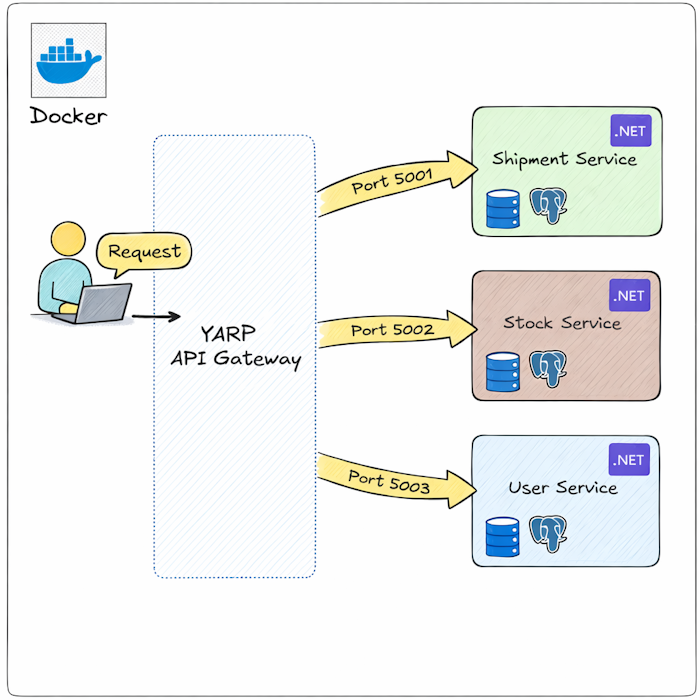
The {**catch-all} pattern captures the entire path after the prefix, including any additional segments and query strings.
Load Balancing Across Service Instances
When your application scales, you may need to run multiple instances of the same service to handle increased traffic. Load balancing spreads incoming requests across these service instances to ensure no single instance becomes overwhelmed.
YARP provides built-in load balancing strategies that automatically distribute traffic across multiple destinations within a cluster.
Load Balancing Strategies
YARP supports several load balancing policies:
- PowerOfTwoChoices (default) - picks two random destinations and chooses the one with fewer active requests
- RoundRobin - spreads requests evenly across all destinations in sequence
- Random - randomly selects a destination for each request
- FirstAlphabetical - always picks the first destination alphabetically (useful for testing)
- LeastRequests - routes to the destination with the fewest active requests
Here is how you can configure load balancing for the Shipment Service running on three instances:
json{ "ReverseProxy": { "Routes": { "products-route": { "ClusterId": "shipments-cluster", "Match": { "Path": "/api/shipments/{**catch-all}" } } }, "Clusters": { "shipments-cluster": { "LoadBalancingPolicy": "RoundRobin", "Destinations": { "shipment-service-instance-1": { "Address": "https://localhost:5001/" }, "shipment-service-instance-2": { "Address": "https://localhost:5011/" }, "shipment-service-instance-3": { "Address": "https://localhost:5012/" } } } } } }
With this configuration, YARP distributes requests evenly across all three instances using the Round-Robin strategy.
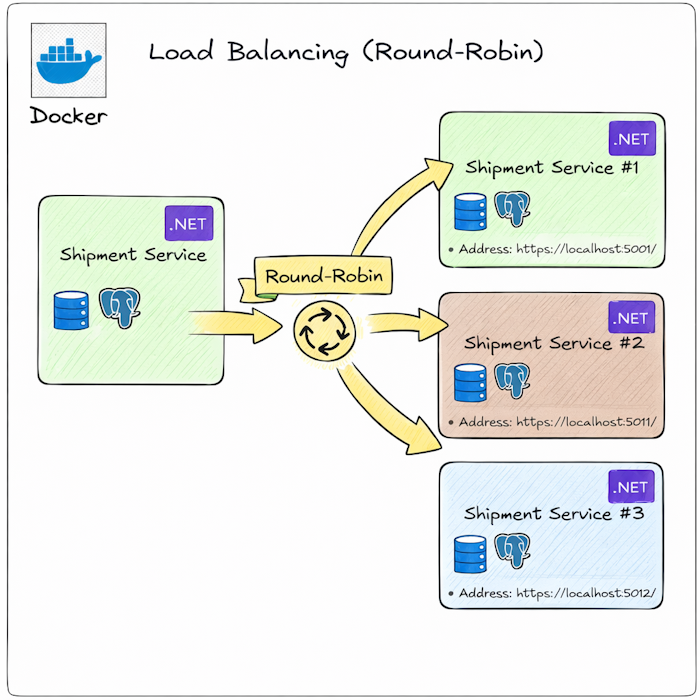
Health checks let YARP route traffic only to healthy instances. If an instance fails its health check, YARP automatically stops sending requests to it until it recovers.
First, install the health checks package:
bashdotnet add package Microsoft.Extensions.Diagnostics.HealthChecks
Configure health checks in appsettings.json:
json{ "ReverseProxy": { "Routes": { "products-route": { "ClusterId": "shipments-cluster", "Match": { "Path": "/api/shipments/{**catch-all}" } } }, "Clusters": { "shipments-cluster": { "LoadBalancingPolicy": "RoundRobin", "HealthCheck": { "Active": { "Enabled": true, "Interval": "00:00:10", "Timeout": "00:00:05", "Policy": "ConsecutiveFailures", "Path": "/health" }, "Passive": { "Enabled": true, "Policy": "TransportFailureRate", "ReactivationPeriod": "00:01:00" } }, "Destinations": { "shipment-service-instance-1": { "Address": "https://localhost:5001/", "Health": "https://localhost:5001/health" }, "shipment-service-instance-2": { "Address": "https://localhost:5011/", "Health": "https://localhost:5011/health" }, "shipment-service-instance-3": { "Address": "https://localhost:5012/", "Health": "https://localhost:5012/health" } } } } } }
Active Health Checks periodically send requests to the /health endpoint of each destination:
- Interval - how often to check (every 10 seconds)
- Timeout - how long to wait for a response (5 seconds)
- Policy - when to mark a destination as unhealthy (after consecutive failures)
- Path - the health check endpoint on the backend service
Passive Health Checks monitor actual traffic and mark destinations as unhealthy based on real request failures:
- Policy - what triggers marking as unhealthy (transport failures like connection errors)
- ReactivationPeriod - how long to wait before trying an unhealthy destination again (1 minute)
For this to work, your backend services need to expose a health check endpoint. See this article for how to add Health Checks in ASP.NET Core.
Sometimes you need to route requests from the same client to the same backend instance. This is called session affinity or sticky sessions.
For more information, see the following article from official Microsoft documentation.
Centralized Authentication and Authorization
In a microservices architecture, handling authentication and authorization at the API Gateway level simplifies security management. Instead of implementing authentication in every backend service, you validate tokens once at the gateway and forward authenticated requests to backend services.
This approach provides several benefits:
- Backend services do not need to validate tokens themselves
- You can enforce consistent security policies across all services
- Token validation happens once, reducing overhead
- Backend services receive authenticated user information through headers
JWT Token Validation at Gateway Level
Let's configure YARP to validate JWT tokens before forwarding requests to backend services.
First, install the required NuGet packages:
bashdotnet add package Microsoft.AspNetCore.Authentication.JwtBearer
Configure JWT authentication in Program.cs:
csharpusing Microsoft.AspNetCore.Authentication.JwtBearer; using Microsoft.IdentityModel.Tokens; using System.Text; var builder = WebApplication.CreateBuilder(args); // Configure JWT authentication builder.Services.AddAuthentication(JwtBearerDefaults.AuthenticationScheme) .AddJwtBearer(options => { options.TokenValidationParameters = new TokenValidationParameters { ValidateIssuer = true, ValidateAudience = true, ValidateLifetime = true, ValidateIssuerSigningKey = true, ValidIssuer = builder.Configuration["Jwt:Issuer"], ValidAudience = builder.Configuration["Jwt:Audience"], IssuerSigningKey = new SymmetricSecurityKey( Encoding.UTF8.GetBytes(builder.Configuration["Jwt:Key"]!)) }; }); builder.Services.AddAuthorization(); builder.Services.AddReverseProxy() .LoadFromConfig(builder.Configuration.GetSection("ReverseProxy")); var app = builder.Build(); app.UseAuthentication(); app.UseAuthorization(); app.MapReverseProxy(); app.Run();
Add JWT configuration to appsettings.json:
json{ "Jwt": { "Key": "YourSuperSecretKeyThatIsAtLeast32CharactersLong", "Issuer": "https://your-auth-server.com", "Audience": "https://your-api-gateway.com" }, "ReverseProxy": { "Routes": { "products-route": { "ClusterId": "shipments-cluster", "AuthorizationPolicy": "default", "Match": { "Path": "/api/shipments/{**catch-all}" } }, "orders-route": { "ClusterId": "stocks-cluster", "AuthorizationPolicy": "AdminOnly", "Match": { "Path": "/api/stocks/{**catch-all}" } } }, "Clusters": { "shipments-cluster": { "Destinations": { "products-service": { "Address": "https://localhost:5001/" } } }, "stocks-cluster": { "Destinations": { "orders-service": { "Address": "https://localhost:5002/" } } } } } }
The AuthorizationPolicy: "default" setting requires authentication for these routes.
Requests without a valid JWT token receive a 401 Unauthorized response.
Another option is AuthorizationPolicy: anonymous.
This allows unauthenticated requests to these routes.
You can also configure custom Authorization policies at the gateway level (that we use for stocks-cluster):
csharpbuilder.Services.AddAuthorization(options => { options.AddPolicy("AdminOnly", policy => policy.RequireRole("Admin")); });
Request Routing and Path Rewriting
Path rewriting allows you to transform incoming request URLs before forwarding them to backend services.
This is useful when:
- Your public API structure differs from your internal service structure
- You need to support multiple API versions
- You want to expose different endpoints to different clients (A/B testing)
YARP provides transformation capabilities that let you modify paths, query strings, and headers.
Let's explore an example where you can route different API versions to different backend services or different endpoints:
json{ "ReverseProxy": { "Routes": { "products-v1-route": { "ClusterId": "products-v1-cluster", "Match": { "Path": "/api/v1/products/{**remainder}" } }, "products-v2-route": { "ClusterId": "products-v2-cluster", "Match": { "Path": "/api/v2/products/{**remainder}" }, "Transforms": [ { "PathPattern": "/api/shipments/{**remainder}" } ] } }, "Clusters": { "products-v1-cluster": { "Destinations": { "products-v1-service": { "Address": "https://localhost:5001/" } } }, "products-v2-cluster": { "Destinations": { "products-v2-service": { "Address": "https://localhost:5002/" } } } } } }
This configuration:
- Routes
/api/v1/products/*to the v1 service without path transformation - Routes
/api/v2/products/*to the v2 service and removes the version prefix
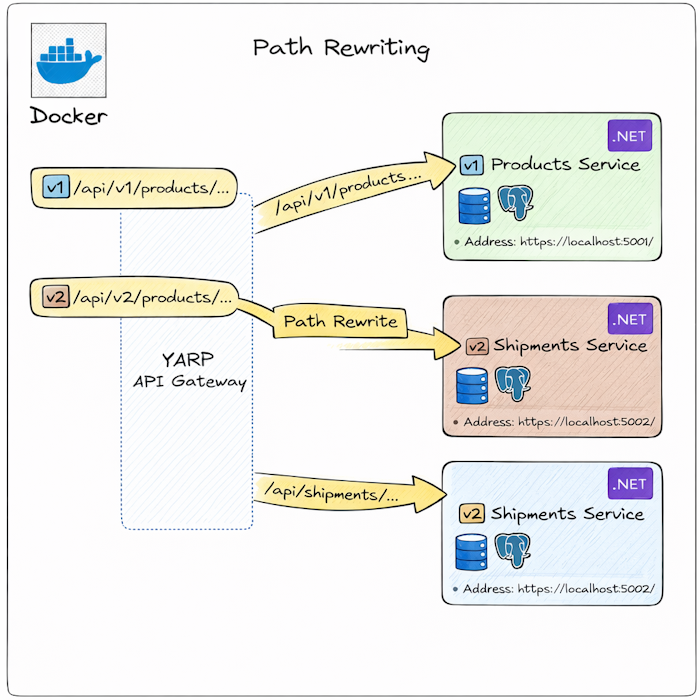
You can explore more examples in the official documentation.
Backend-For-Frontend (BFF) Gateway
The Backend-For-Frontend pattern creates specialized API gateways for different client types. Mobile apps, web applications, and third-party integrations often need different data formats, aggregation levels, and performance characteristics.
Instead of forcing all clients to use the same API, you create tailored endpoints that serve each client's specific needs.
Why Use BFF Pattern:
- Mobile apps need smaller payloads and fewer round trips
- Web applications can handle larger responses and more complex data
- Different clients need different authentication mechanisms
- You can optimize responses for each platform without affecting others
Here is how you can configure YARP to route requests to different backend services based on the client type:
json{ "ReverseProxy": { "Routes": { "mobile-products-route": { "ClusterId": "mobile-bff-cluster", "Match": { "Path": "/api/shipments/{**remainder}", "Headers": [ { "Name": "X-Client-Type", "Values": ["mobile"], "Mode": "ExactHeader" } ] } }, "web-products-route": { "ClusterId": "web-bff-cluster", "Match": { "Path": "/api/shipments/{**remainder}", "Headers": [ { "Name": "X-Client-Type", "Values": ["web"], "Mode": "ExactHeader" } ] } }, "default-products-route": { "ClusterId": "web-bff-cluster", "Match": { "Path": "/api/shipments/{**remainder}" } } }, "Clusters": { "mobile-bff-cluster": { "Destinations": { "mobile-bff-service": { "Address": "https://localhost:5001/" } } }, "web-bff-cluster": { "Destinations": { "web-bff-service": { "Address": "https://localhost:5002/" } } } } } }
Mobile clients send X-Client-Type: mobile header and get routed to the mobile BFF service, which returns optimized, smaller payloads.
Web clients get routed to the web BFF service with richer data.
Traffic Shaping and Rate Limiting
Rate limiting protects your backend services from being overwhelmed by too many requests. Without rate limiting, a single client can consume all available resources, causing service degradation or outages for other users.
YARP does not include built-in rate limiting, but you can integrate ASP.NET Core's rate limiting middleware to control traffic at the gateway level.
ASP.NET Core 7.0 and later includes built-in rate limiting middleware.
Let's explore a simple Fixed window rate limiting that allows a specific number of requests within a time window:
csharpusing System.Threading.RateLimiting; var builder = WebApplication.CreateBuilder(args); builder.Services.AddRateLimiter(options => { options.AddFixedWindowLimiter("fixed", limiterOptions => { limiterOptions.PermitLimit = 100; limiterOptions.Window = TimeSpan.FromMinutes(1); limiterOptions.QueueProcessingOrder = QueueProcessingOrder.OldestFirst; limiterOptions.QueueLimit = 10; }); }); builder.Services.AddReverseProxy() .LoadFromConfig(builder.Configuration.GetSection("ReverseProxy")); var app = builder.Build(); app.UseRateLimiter(); app.MapReverseProxy(); app.Run();
Apply rate limiting to specific routes in appsettings.json:
json{ "ReverseProxy": { "Routes": { "products-route": { "ClusterId": "shipments-cluster", "RateLimiterPolicy": "fixed", "Match": { "Path": "/api/shipments/{**catch-all}" } } }, "Clusters": { "shipments-cluster": { "Destinations": { "products-service": { "Address": "https://localhost:5001/" } } } } } }
This configuration allows 100 requests per minute per client. When the limit is exceeded, requests are queued (up to 10), and additional requests receive a 429 Too Many Requests response.
Explore more rate limiting options in the official documentation.
Observability and Centralized Logging
Observability is essential for understanding what happens inside your API Gateway. Without proper logging and tracing, debugging issues in a distributed system becomes pretty hard.
YARP integrates seamlessly with ASP.NET Core's logging infrastructure and OpenTelemetry for distributed tracing.
For structured logging, install Serilog:
bashdotnet add package Serilog.AspNetCore dotnet add package Serilog.Sinks.Seq
And register Serilog in Program.cs:
csharpbuilder.Host.UseSerilog((context, loggerConfig) => loggerConfig.ReadFrom.Configuration(context.Configuration));
See a full example of how to configure Serilog logging here.
OpenTelemetry provides distributed tracing, metrics, and logs. Install the required packages:
bashdotnet add package OpenTelemetry.Exporter.OpenTelemetryProtocol dotnet add package OpenTelemetry.Extensions.Hosting dotnet add package OpenTelemetry.Instrumentation.AspNetCore dotnet add package OpenTelemetry.Instrumentation.Http dotnet add package OpenTelemetry.Instrumentation.Runtime
Configure OpenTelemetry in Program.cs:
csharpbuilder.Services .AddOpenTelemetry() .ConfigureResource(resource => resource.AddService("shipping-gateway")) .WithTracing(tracing => { tracing .AddAspNetCoreInstrumentation() .AddHttpClientInstrumentation() .AddSource("Yarp.ReverseProxy"); tracing.AddOtlpExporter(); });
Configure middlewares to use Serilog HTTP request and response logging, YARP timeout handling and reverse proxy:
csharpvar app = builder.Build(); app.UseMiddleware<LogContextTraceLoggingMiddleware>(); app.UseSerilogRequestLogging(); app.UseRequestTimeouts(); app.MapReverseProxy(); await app.RunAsync();
Add trace ID to track requests across services:
csharpinternal sealed class LogContextTraceLoggingMiddleware(RequestDelegate next) { public async Task Invoke(HttpContext context) { var traceId = Activity.Current?.TraceId.ToString(); using (LogContext.PushProperty("TraceId", traceId)) { await next.Invoke(context); } } } app.UseMiddleware<LogContextTraceLoggingMiddleware>(); app.UseSerilogRequestLogging(); app.UseRequestTimeouts(); app.MapReverseProxy();
Additional Scenarios You Might Consider
Beyond the core scenarios we explored, YARP supports several advanced patterns that help with system evolution and deployment strategies.
Gradual Migration from Monolith to Microservices
When migrating from a monolith to microservices, you cannot rewrite everything at once. YARP helps you migrate gradually by routing some endpoints to the new microservices while keeping others in the monolith.
You can configure routes to split traffic between monoliths and microservices.
Canary Releases and Gradual Rollouts
Canary releases let you deploy new versions to a small percentage of users before rolling out to everyone. This reduces the risk of introducing bugs.
You can configure weighted routing to split traffic between versions with "LoadBalancingPolicy": "Random"
For example, with 5 total destinations (4 running v1, 1 running v2), approximately 20% of traffic goes to the new version. Monitor error rates and performance. If everything looks good, gradually increase the percentage by adding more v2 instances and removing v1 instances.
A/B Testing
You can use the same load balancing approach to implement A/B testing.
Or you can implement a more advanced header-based traffic distribution for more control:
csharpbuilder.Services.AddReverseProxy() .LoadFromConfig(builder.Configuration.GetSection("ReverseProxy")) .AddTransforms(context => { context.AddRequestTransform(async transformContext => { var httpContext = transformContext.HttpContext; var userId = httpContext.User.FindFirst("sub")?.Value; // Route 10% of users to a new service based on user ID hash if (!string.IsNullOrEmpty(userId)) { var hash = Math.Abs(userId.GetHashCode()); var isCanaryUser = (hash % 100) < 10; if (isCanaryUser) { transformContext.ProxyRequest.Headers.Add("X-New-Service-User", "true"); } } await Task.CompletedTask; }); });
These patterns make YARP a powerful tool not just for routing traffic, but for managing the entire lifecycle of your distributed system.
Summary
YARP provides a flexible and powerful foundation for building API Gateways in .NET. Unlike traditional API Gateway solutions with fixed features, YARP provides building blocks you can compose and extend to create exactly the gateway you need.
YARP integrates seamlessly with the ASP.NET Core ecosystem, giving you access to authentication, authorization, logging, health checks, and all other middleware. You can extend it with custom transforms, policies, and middleware to handle any scenario.
Whether you are building a new microservices architecture, migrating from a monolith, or creating specialized gateways for different clients, YARP provides the flexibility and performance you need.
Hope you find this newsletter useful. See you next time.

Comments