Building microservices is hard.
Microservices don't just come with scalability, they come with mandatory complexity you pay for upfront and forever.
You need to handle service-to-service communication, message brokers, state management, secrets, and more. Each of these concerns requires its own library, configuration, and expertise.
What if there were a runtime that provided all these capabilities out of the box, regardless of the infrastructure you use?
That is exactly what Dapr does.
Dapr (Distributed Application Runtime) is a portable, event-driven runtime that makes it easier to build resilient microservices. It provides a set of building block APIs for common distributed systems challenges: pub/sub messaging, service invocation, state management, secrets, and more.
The best part? Dapr is infrastructure-agnostic. You can swap RabbitMQ for Kafka, or Redis for PostgreSQL, without changing a single line of application code.
Dapr is a free and open-source project; you can see its GitHub repo here.
And when you combine Dapr with .NET Aspire, you get a powerful local development experience where containers, sidecars, and services are orchestrated for you with a single command.
In this post, we will explore:
- What is Dapr and How It Simplifies Microservice Development?
- Understanding Dapr Building Blocks
- How Dapr Components Work
- How to set up Dapr with .NET Aspire
- How to use Dapr to Publish Events to a Message Queue with Pub/Sub
- How to use Dapr to Consume Events from a Message Queue
- How to use Dapr to Call REST Services with Service Invocation
- How to use Dapr to Manage State with State Management
Let's dive in.
What is Dapr and How It Simplifies Microservice Development?
When you build microservices, you quickly face a set of recurring challenges:
- How do services discover and call each other reliably?
- How do you publish and consume events across services?
- How do you store state without coupling to a specific database?
- How do you manage secrets securely?
- How do you handle retries, timeouts, and circuit breakers?
Without Dapr, you solve each problem independently. You install a RabbitMQ client library for messaging, a Redis library for caching, a Vault client for secrets, and write custom retry logic. Each library has its own API, configuration, and behavior.
You can use messaging libraries such as MassTransit, Wolverine, Rebus or Brighter, but they solve only the async messaging flows. You still need to implement caching, secrets, synchronous communication, service discovery, and others.
Dapr solves all of these by providing a unified set of APIs that abstract these concerns. Your application talks to Dapr, and Dapr talks to the infrastructure.
If you need to switch from RabbitMQ to Kafka for messaging, you change a configuration file (in production). Your application code stays exactly the same.
How the Sidecar Architecture Works
Dapr runs as a sidecar alongside your application. This means Dapr is a separate process (or container) that runs next to your service.
Your application communicates with the Dapr sidecar over HTTP or gRPC on localhost. The sidecar handles the actual interaction with external infrastructure: message brokers, databases, secret stores, and other services.
Here is how it works:
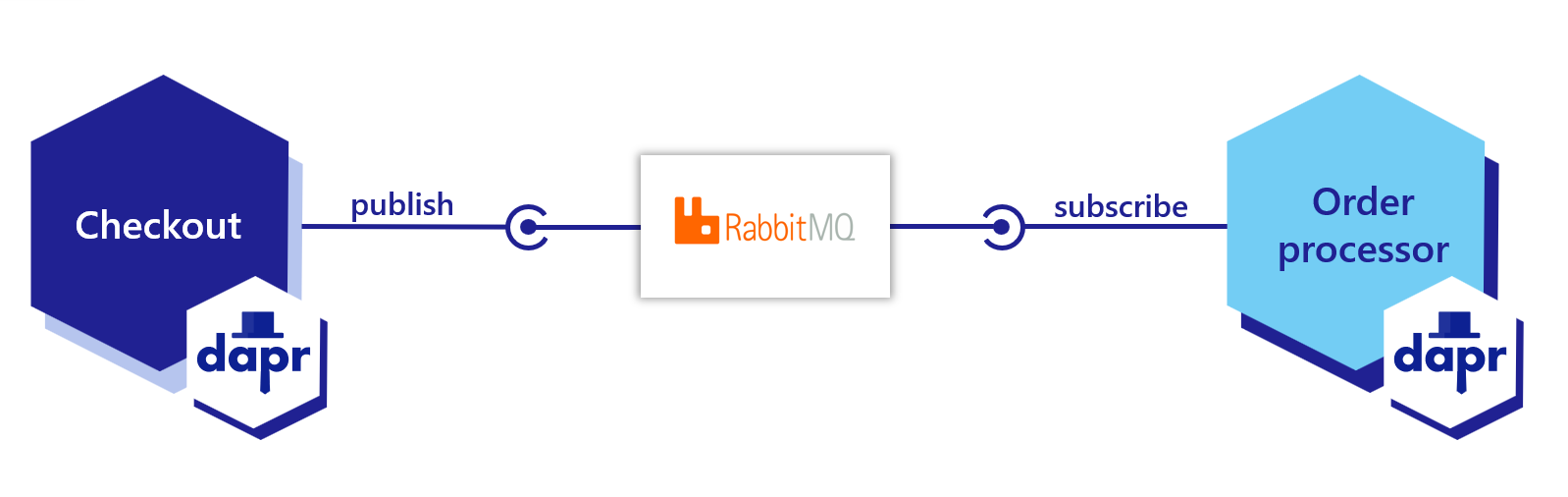
In a Kubernetes environment, Dapr runs as a companion container within the same pod as your application. In local development, it runs as a separate process on your machine.
This sidecar architecture provides several benefits:
-
Language agnostic: Dapr works with any language that can make HTTP or gRPC calls. Whether you write in C#, Go, Python, or Java, you use the same Dapr APIs.
-
No SDK lock-in: While Dapr provides SDKs for popular languages (including .NET), you can always fall back to raw HTTP calls.
-
Independent lifecycle: Your application and the Dapr sidecar can be updated independently. Upgrading Dapr does not require recompiling your application.
-
Consistent behavior: Retry policies, timeouts, and circuit breakers are configured at the sidecar level. Every service in your system automatically receives the same resilience guarantees.
Each service in your system has its own Dapr sidecar. When Service A wants to call Service B, it tells its local Dapr sidecar. The sidecar handles service discovery, routes the request to Service B's sidecar, which then forwards it to Service B.
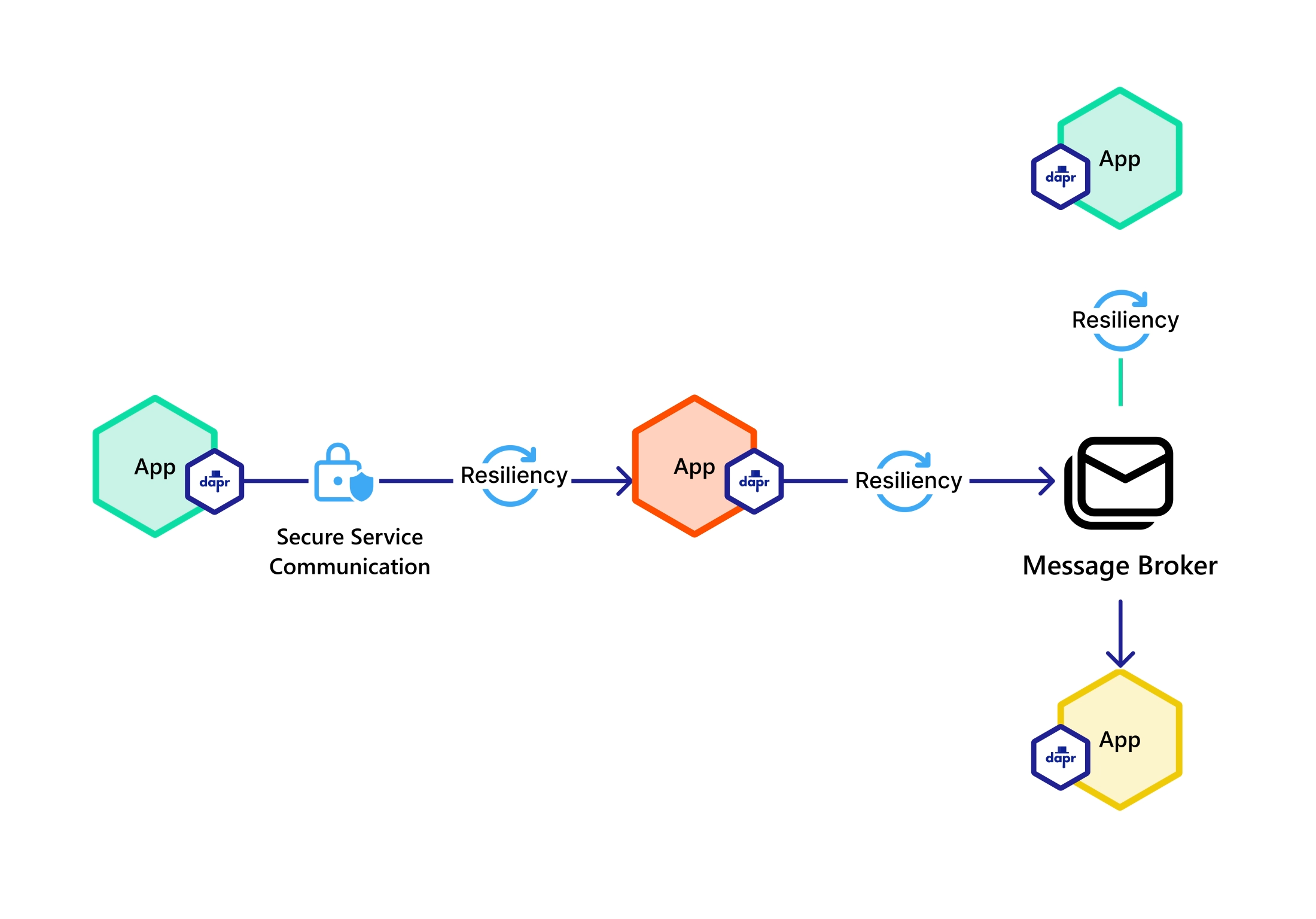
This means your services never communicate directly with each other. All communication goes through the Dapr sidecars, which gives you observability, security, and resilience for free.
What about an overhead when talking to the sidecar on each request? This overhead is minimal, as all requests are done on the localhost.
And the benefits you get outpass this small disadvantage.
Understanding Dapr Building Blocks
Dapr organizes its capabilities into building blocks. Each building block is an independent API that addresses a specific challenge in distributed systems.
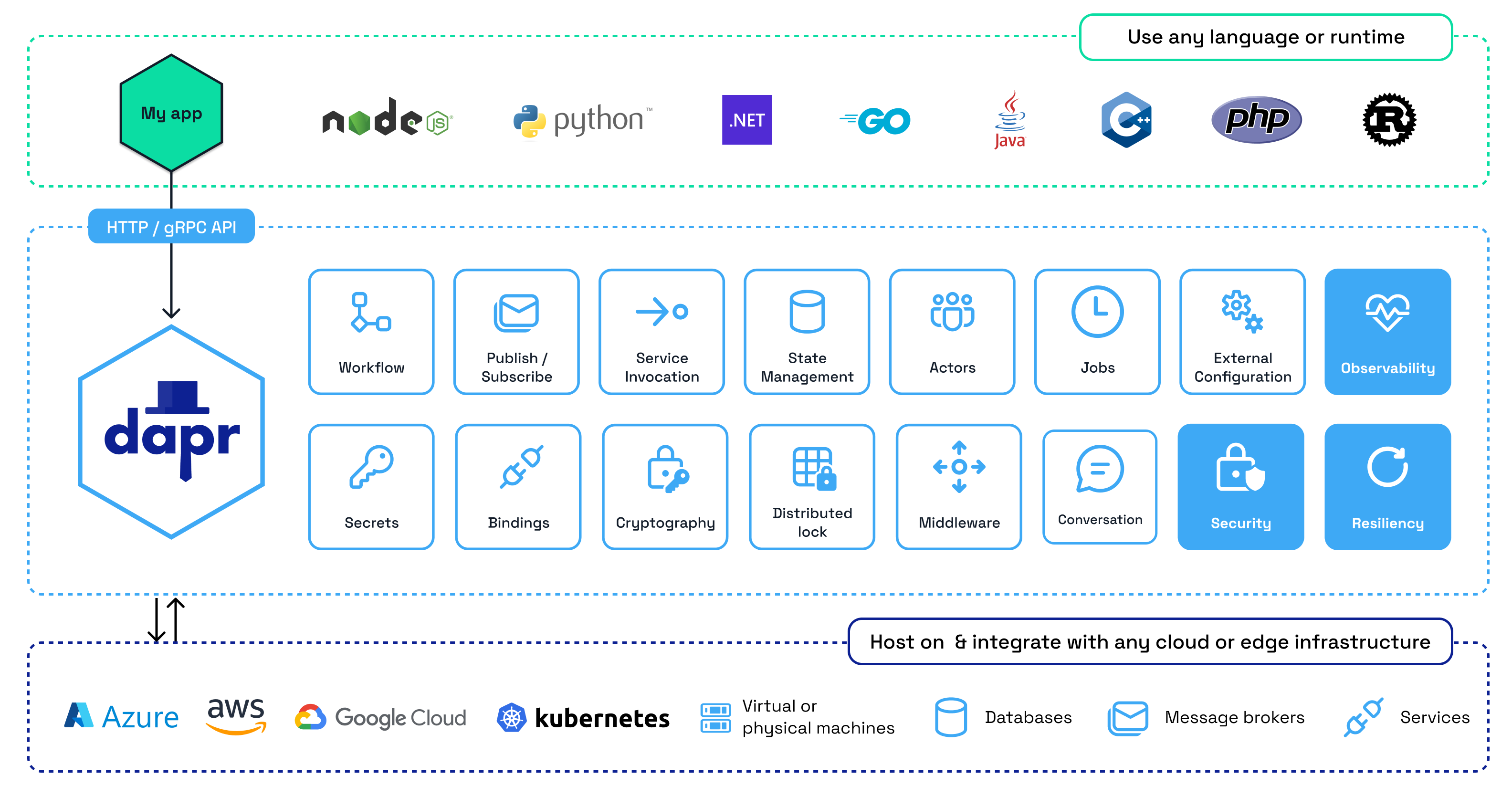
You can use any combination of building blocks.
Here are the main building blocks:
Service Invocation
Enables services to call each other reliably. Dapr handles service discovery, retries, and distributed tracing automatically.
Instead of hardcoding URLs or using a service registry, you reference services by their App ID:
csharp// Call the "hotels-api" service via Dapr var rooms = await daprClient.InvokeMethodAsync<RoomAvailabilityResponse>( HttpMethod.Get, "hotels-api", "hotels/1/rooms/available");
Dapr resolves the address of hotels-api service, routes the request through the sidecar network, and returns the response.
If the target service is temporarily unavailable, Dapr can retry the request based on your configured policies.
Publish and Subscribe
Allows services to communicate asynchronously through queues and topics. Publishers send events to a topic, and subscribers receive them.
The pub/sub building block supports at-least-once delivery guarantees. It works with any supported message broker: RabbitMQ, Kafka, Azure Service Bus, Redis Streams, and more.
csharpawait daprClient.PublishEventAsync("pubsub", "booking-created", bookingEvent);
Subscribers receive events through HTTP endpoints that Dapr calls automatically:
csharpapp.MapPost("/dapr/booking-created", [Topic("pubsub", "booking-created")] async (BookingCreatedEvent message) => { // Process the event return Results.Ok(); });
This model is fundamentally different from traditional background service consumers. Dapper Sidecar subscribes to a message queue, receives your message and pushes it to your application via HTTP POST requests.
State Management
Provides key/value state storage with pluggable backends. You can use Redis, PostgreSQL, MongoDB, Azure Cosmos DB, or any other supported state store.
csharp// Save state await daprClient.SaveStateAsync("statestore", "user-123", userData); // Get state var user = await daprClient.GetStateAsync<UserData>("statestore", "user-123"); // Delete state await daprClient.DeleteStateAsync("statestore", "user-123");
The state management building block also supports:
- Concurrency control with ETags for optimistic locking
- TTL (Time-to-Live) for automatic expiration
- Transactions for atomic operations across multiple keys
Secrets Management
Retrieves secrets from various secret stores without hardcoding credentials in your application. Supported stores include Azure Key Vault, AWS Secrets Manager, HashiCorp Vault, Kubernetes secrets, and local file-based stores.
csharpvar secrets = await daprClient.GetSecretAsync("secretstore", "payment-gateway"); var apiKey = secrets["api-key"];
Bindings
Creates connections to external systems. Input bindings trigger your application when an external event occurs. Output bindings let your application invoke external systems.
For example, you can use an output binding to write files to local storage, send emails, or trigger a cloud function:
csharpawait daprClient.InvokeBindingAsync("email-output", "create", emailContent);
Distributed Lock
Provides mutual exclusion for scenarios where multiple service instances might access the same resource concurrently:
csharpvar lockResponse = await daprClient.Lock( "statestore", "room-lock:101", "owner-id", expiryInSeconds: 30); if (lockResponse.Success) { // Exclusive access to the resource await daprClient.Unlock("statestore", "room-lock:101", "owner-id"); }
Other Building Blocks
Dapr also provides building blocks for:
- Workflows: Long-running, persistent processes that span multiple services
- Actors: Virtual actor model for stateful computations with single-threaded execution
- Configuration: Dynamic application configuration retrieval and subscription
- Cryptography: Encryption and decryption operations
- Jobs: Scheduled and triggered batch processing
How Dapr Components Work
Building blocks define what Dapr can do: pub/sub, state management, secrets, and so on.
Components define how Dapr does it: which specific technology implements each building block.
Think of it this way:
- The pub/sub building block is the API your application calls
- A pub/sub component (like RabbitMQ or Kafka) is the actual message broker behind that API
This separation is what makes Dapr infrastructure-agnostic. Your application code uses the building block API. The component configuration determines which technology fulfills the request.
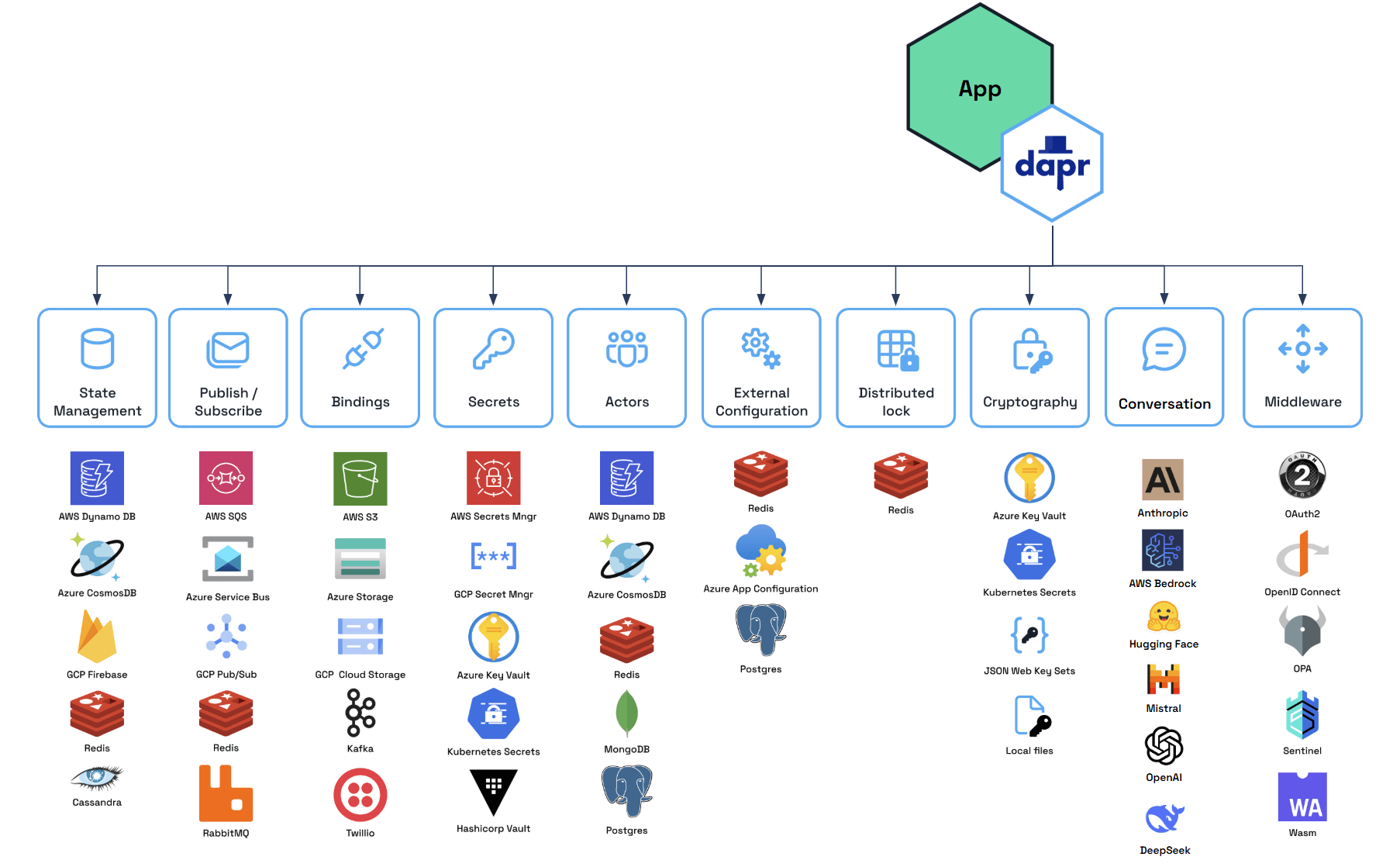
Components are configured using YAML files. Each file specifies the component type, version, and connection metadata.
Here is an example of a RabbitMQ pub/sub component:
yamlapiVersion: dapr.io/v1alpha1 kind: Component metadata: name: pubsub spec: type: pubsub.rabbitmq version: v1 metadata: - name: connectionString value: "amqp://guest:guest@localhost:5672" - name: durable value: "true" - name: autoAck value: "false"
And here is a PostgreSQL state store component:
yamlapiVersion: dapr.io/v1alpha1 kind: Component metadata: name: statestore spec: type: state.postgresql version: v1 metadata: - name: connectionString value: "host=localhost;port=5432;username=postgres;password=postgres;database=dapr_state"
The metadata.name field is the identifier you use in your application code.
- When you call
daprClient.PublishEventAsync("pubsub", ...), Dapr looks for a component namedpubsub. - When you call
daprClient.SaveStateAsync("statestore", ...), it uses the component namedstatestore.
To switch from RabbitMQ to Kafka, you change only the YAML file:
yamlapiVersion: dapr.io/v1alpha1 kind: Component metadata: name: pubsub spec: type: pubsub.kafka version: v1 metadata: - name: brokers value: "localhost:9092"
Your application code remains identical.
The pubsub name in your code maps to whatever component is configured, regardless of the underlying technology.
This is one of Dapr's most powerful features. You can use different tools in development and in production.
In development, you might use RabbitMQ and a local file-based secret store. In production, you switch to Azure Service Bus and Azure Key Vault by changing the component YAML files.
How to set up Dapr with .NET Aspire
.NET Aspire is an application framework for building observable, production-ready, cloud-native applications. It handles service orchestration, configuration, health checks, and telemetry out of the box.
When you combine Aspire with Dapr, Aspire manages the lifecycle of Dapr sidecars alongside your services. Each service gets a Dapr sidecar automatically, and the Aspire dashboard shows both your services and their sidecars.
Before getting started, you need:
- .NET 10 SDK installed
- Docker Desktop or Podman running
- Dapr CLI installed and initialized
Install the Dapr CLI, follow the instructions on the official website for your target OS.
Install Aspire templates and CLI:
bashdotnet new install Aspire.ProjectTemplates dotnet tool install --global aspire.cli
Creating the Aspire AppHost
The AppHost project is the orchestrator that defines your application's architecture and dependencies.
Create a new Aspire AppHost project and install the required NuGet packages:
bashdotnet add package CommunityToolkit.Aspire.Hosting.Dapr dotnet add package Aspire.Hosting.PostgreSQL
Note: The Aspire.Hosting.Dapr package from Microsoft is limited to version 9.1.0.
Use the CommunityToolkit.Aspire.Hosting.Dapr package, which is actively maintained and supports Aspire 13+.
Here is how to configure the AppHost with Dapr sidecars:
csharpusing CommunityToolkit.Aspire.Hosting.Dapr; using Microsoft.Extensions.Hosting; var builder = DistributedApplication.CreateBuilder(args); // Infrastructure var postgres = builder.AddPostgres("postgres") .WithDataVolume(isReadOnly: false); // Dapr components path var daprComponentsPath = Path.Combine("..", "dapr", "components"); // Hotels Service with Dapr sidecar var hotelsApi = builder.AddProject<Projects.Hotels_Api>("hotels-api") .WithReference(postgres) .WithDaprSidecar(new DaprSidecarOptions { AppId = "hotels-api", ResourcesPaths = [daprComponentsPath] }) .WithExternalHttpEndpoints(); // Bookings Service with Dapr sidecar var bookingsApi = builder.AddProject<Projects.Bookings_Api>("bookings-api") .WithReference(postgres) .WithReference(hotelsApi) .WithDaprSidecar(new DaprSidecarOptions { AppId = "bookings-api", ResourcesPaths = [daprComponentsPath] }) .WithExternalHttpEndpoints(); builder.Build().Run();
Each call to WithDaprSidecar() creates a Dapr sidecar process for the service.
The AppId uniquely identifies the service in the Dapr ecosystem.
The ResourcesPaths points to the folder containing your Dapr component YAML files.
When you run the AppHost, Aspire:
- Starts PostgreSQL
- Launches each service with its configured Dapr sidecar
- Opens the Aspire dashboard in your browser
The Aspire dashboard shows all running services, their Dapr sidecars, health status, logs, and distributed traces.
Now let's see how to actually use Dapr's SDK to implement communication between services.
How to use Dapr to Publish Events to a Message Queue with Pub/Sub
Add the Dapr SDK to your service project:
bashdotnet add package Dapr.AspNetCore
Register DaprClient in the DI container:
csharpvar builder = WebApplication.CreateBuilder(args); builder.Services.AddDaprClient(); var app = builder.Build(); // Required for Dapr pub/sub app.UseCloudEvents(); app.MapSubscribeHandler(); await app.RunAsync();
UseCloudEvents() enables parsing of the CloudEvents envelope that Dapr wraps around pub/sub messages.
MapSubscribeHandler() exposes a /dapr/subscribe endpoint that Dapr calls to discover which topics your service subscribes to.
To publish an event, inject DaprClient and call PublishEventAsync:
csharppublic class CreateBookingHandler(DaprClient daprClient) { public async Task HandleAsync(CancellationToken cancellationToken = default) { var createdEvent = new BookingCreatedEvent( BookingId: bookingId, GuestName: request.GuestName, HotelId: request.HotelId, RoomId: request.RoomId, TotalPrice: totalPrice, Timestamp: DateTime.UtcNow); await daprClient.PublishEventAsync("pubsub", "booking-created", createdEvent, cancellationToken); } }
How to use Dapr to Consume Events from a Message Queue
Dapr delivers pub/sub messages by calling HTTP POST endpoints on your service.
You declare subscriptions using the [Topic] attribute:
csharpusing Carter; using Dapr; public class BookingCreatedSubscription : ICarterModule { public void AddRoutes(IEndpointRouteBuilder app) { app.MapPost("/dapr/booking-created", [Topic("pubsub", "booking-created")] async (BookingCreatedEvent message, PaymentProcessingService paymentService) => { await paymentService.ProcessBookingPaymentAsync(message, CancellationToken.None); return Results.Ok(); }); } }
The [Topic("pubsub", "booking-created")] attribute tells Dapr to route messages from the booking-created topic on the pubsub component to this endpoint.
This is a key difference from traditional message consumers.
With Azure Service Bus or direct RabbitMQ, you typically use a BackgroundService that polls for messages.
With Dapr, messages arrive as HTTP requests, which fit naturally into the ASP .NET Core middleware pipeline.
When working with Dapr, I recommend creating a static class with all the constants in the Shared constants, which you will reuse across your services:
csharppublic static class DaprConstants { public const string PubSubName = "pubsub"; public const string StateStoreName = "statestore"; public const string SecretStoreName = "secretstore"; public const string EmailBindingName = "email-output"; public static class Topics { public const string BookingCreated = "booking-created"; public const string PaymentProcessed = "payment-processed"; public const string BookingConfirmed = "booking-confirmed"; public const string BookingCancelled = "booking-cancelled"; } public static class AppIds { public const string HotelsApi = "hotels-api"; public const string BookingsApi = "bookings-api"; public const string PaymentsApi = "payments-api"; public const string NotificationsApi = "notifications-api"; } }
How to use Dapr to Call REST Services with Service Invocation
To call another service through Dapr, use DaprClient.InvokeMethodAsync:
csharp// GET request to another service var availableRooms = await daprClient.InvokeMethodAsync<List<RoomAvailabilityResponse>>( HttpMethod.Get, "hotels-api", $"hotels/{hotelId}/rooms/available?checkIn={checkIn}&checkOut={checkOut}&guests=1"); // POST request with a body var reserveRequest = new ReserveRoomRequest(roomId, bookingId, checkIn, checkOut); var reserveResponse = await daprClient.InvokeMethodAsync<ReserveRoomRequest, ReserveRoomResponse>( HttpMethod.Post, "hotels-api", $"hotels/{hotelId}/rooms/reserve", reserveRequest);
The second parameter is the App ID of the target service (as configured in DaprSidecarOptions).
The third is the relative path on the target service.
Dapr handles service discovery, routing, and distributed tracing. You do not need to know the target service's address or port.
How to use Dapr to Manage State with State Management
To use Dapr state management, call the following methods on DaprClient:
csharppublic class DaprStateManager( DaprClient daprClient, ILogger<DaprStateManager> logger) : IDaprStateManager { public async Task<T?> GetStateAsync<T>(string key, CancellationToken cancellationToken = default) { return await daprClient.GetStateAsync<T>("statestore", key, cancellationToken: cancellationToken); } public async Task SaveStateAsync<T>(string key, T value, TimeSpan? ttl = null, CancellationToken cancellationToken = default) { if (ttl.HasValue) { var metadata = new Dictionary<string, string> { { "ttlInSeconds", ((int)ttl.Value.TotalSeconds).ToString() } }; await daprClient.SaveStateAsync("statestore", key, value, metadata: metadata, cancellationToken: cancellationToken); } else { await daprClient.SaveStateAsync("statestore", key, value, cancellationToken: cancellationToken); } } public async Task DeleteStateAsync(string key, CancellationToken cancellationToken = default) { await daprClient.DeleteStateAsync("statestore", key, cancellationToken: cancellationToken); } }
Use it to implement caching:
csharpvar cacheKey = $"availability:{hotelId}:{checkIn}:{checkOut}:{guests}"; // Try cache first var cached = await stateManager.GetStateAsync<RoomAvailabilityResponse[]>(cacheKey); if (cached is { Length: > 0 }) { return cached; } // Fall back to the database var rooms = await roomRepository.GetAvailableRoomsAsync(hotelId, checkIn, checkOut, guests); var response = rooms.Select(r => new RoomAvailabilityResponse(...)).ToArray(); // Save to cache with TTL await stateManager.SaveStateAsync(cacheKey, response, TimeSpan.FromMinutes(5)); return response;
Summary
Dapr is a modern, powerful framework for building distributed applications. It provides a consistent API for all building blocks, and a simple way to configure infrastructure.
When compared to other messaging libraries, which only abstract publishing and consuming events from the message queue. Dapr also provides a consistent API for state management, secrets management, workflows, service discovery, basically all you need to build modern apps.
The main advantage of Dapr is portability. You write your business logic once, and the infrastructure can change independently through component configuration. This makes your microservices truly cloud-native and vendor-agnostic.
To get started with Dapr, I recommend checking out their official documentation.
Hope you find this newsletter useful. See you next time.

Comments