
Vertical Slice Architecture (VSA) is one of the most popular ways to structure .NET projects today.
It structures an application by features instead of technical layers.
In a traditional layered project, you have a Controllers folder, a Services folder, and a Repositories folder (and probably way more). To change one feature, you jump between three or four folders (or even projects).
In VSA, every feature is a single slice. The endpoint, business logic, validation, and data access for that feature live next to each other.
This brings several benefits:
- High cohesion within a feature
- Loose coupling between features
- Faster navigation in the codebase
- Independent changes to one feature do not take effect on the others
I have built many systems with VSA and shipped them to production, and over the years, my layout has settled into a single shape that I now reuse in every new project.
In this post, we will explore:
- How I Structure my Projects with Vertical Slice Architecture
- The Shared folder within a module
- Auto-registration of endpoints, and handlers
- Cross-slice side effects via events
- Inter-module communication via PublicApi
Let's dive in.
How I Structure my Projects with Vertical Slice Architecture
There are many ways to structure a slice. In all of them, each vertical slice is placed in its own folder named after the use case.
Here are the most popular ones:
1. Each class for a feature is in a separate file name
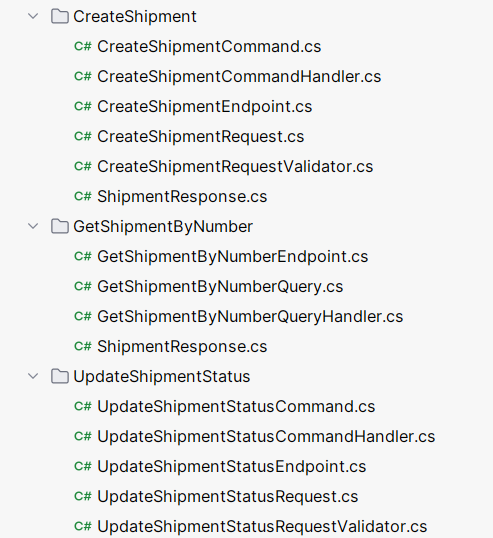
2. Single file per slice with nested classes
csharppublic static class CreateShipment { public sealed record Request(...); public sealed record Response(...); public class Validator : AbstractValidator<Request> { } public static void MapEndpoint(WebApplication app) { app.MapPost("/api/shipments", Handle); } private static async Task<IResult> Handle() { } }
3. Separate file with each concern
This code structure combines the advantages of the first two options:
- You put the request and response modules together in the endpoint file
- You don't have too many files, as concerns are separated
- You don't have a static file that nests other classes
This is the exact approach I use in production.
Each slice is a folder named after the use case. Inside the folder, I keep four files, each focused on one concern.
For the "Create Shipment" use case, the layout looks like this:
Features/ └── CreateShipment/ ├── CreateShipment.Endpoint.cs ├── CreateShipment.Handler.cs ├── CreateShipment.Mapping.cs └── CreateShipment.Validators.cs
When a slice raises events that other modules react to, I add an Events subfolder:
Features/ └── CreateShipment/ ├── CreateShipment.Endpoint.cs ├── CreateShipment.Handler.cs ├── CreateShipment.Mapping.cs ├── CreateShipment.Validators.cs └── Events/ ├── ShipmentCreatedEvent.cs ├── UpdateStockEventHandler.cs └── CreateCarrierEventHandler.cs
The naming convention uses a dot suffix: {Slice}.Endpoint.cs, {Slice}.Handler.cs, and so on.
This keeps files easy to find in the IDE search and easy to scan in the file tree.
I also extract cross-cutting concerns, such as validators and mappers, into separate files, so I don't clutter the main file with too many classes.
The Endpoint File
The endpoint file contains the request, response records and the Minimal API endpoint class.
The endpoint is responsible for:
- Parsing the HTTP request
- Running validation
- Calling the handler
- Translating the handler result into an HTTP response
Here is CreateShipment.Endpoint.cs:
csharppublic sealed record CreateShipmentRequest( string OrderId, Address Address, string Carrier, string ReceiverEmail, List<ShipmentItemRequest> Items); public class CreateShipmentApiEndpoint : IApiEndpoint { public void MapEndpoint(WebApplication app) { app.MapPost(RouteConsts.BaseRoute, Handle); } private static async Task<IResult> Handle( [FromBody] CreateShipmentRequest request, IValidator<CreateShipmentRequest> validator, ICreateShipmentHandler handler, CancellationToken cancellationToken) { var validationResult = await validator.ValidateAsync(request, cancellationToken); if (!validationResult.IsValid) { return Results.ValidationProblem(validationResult.ToDictionary()); } var response = await handler.HandleAsync(request, cancellationToken); if (response.IsError) { return response.Errors.ToProblem(); } return Results.Ok(response.Value); } }
The endpoint class implements a small marker interface called IApiEndpoint:
csharppublic interface IApiEndpoint { void MapEndpoint(WebApplication app); }
This interface lets me discover and register all endpoints in a single line at startup (more on that later).
response.Errors.ToProblem() is an extension method that maps error types (Conflict, NotFound, Validation, and so on) to the appropriate HTTP status codes.
Validation runs explicitly in the endpoint, before the handler is called. I do not use a MediatR pipeline behavior, like in many implementations. The validation flow stays simple and easy to follow.
The Handler File
I implement the business logic inside the Handler class.
I use a manual handler pattern, which is a simple class without an interface.
I do not use MediatR. Instead, I have a small marker interface called IHandler:
csharppublic interface IHandler;
Every handler class in the project extends IHandler.
This lets me auto-register handlers with assembly scanning.
Here is CreateShipment.Handler.cs:
csharpinternal sealed class CreateShipmentHandler( ShipmentsDbContext context, IStockModuleApi stockApi, IEventPublisher eventPublisher, ILogger<CreateShipmentHandler> logger) : IHandler { public async Task<Result<ShipmentResponse>> HandleAsync( CreateShipmentRequest request, CancellationToken cancellationToken) { var shipmentExists = await context.Shipments .AnyAsync(x => x.OrderId == request.OrderId, cancellationToken); if (shipmentExists) { logger.LogInformation("Shipment for order '{OrderId}' already exists", request.OrderId); return ShipmentErrors.AlreadyExists(request.OrderId); } var stockRequest = CreateCheckStockRequest(request); var stockResponse = await stockApi.CheckStockAsync(stockRequest, cancellationToken); if (!stockResponse.IsSuccess) { logger.LogInformation("Stock check failed: {@Errors}", stockResponse.Errors); return stockResponse.Errors; } var shipmentNumber = new Faker().Commerce.Ean8(); var shipment = request.MapToShipment(shipmentNumber); await context.Shipments.AddAsync(shipment, cancellationToken); await context.SaveChangesAsync(cancellationToken); logger.LogInformation("Created shipment: {@Shipment}", shipment); var shipmentCreatedEvent = new ShipmentCreatedEvent(shipment); await eventPublisher.PublishAsync(shipmentCreatedEvent, cancellationToken); return shipment.MapToResponse(); } private static CheckStockRequest CreateCheckStockRequest(CreateShipmentRequest request) { return new CheckStockRequest( request.Items .Select(x => new ProductStock(x.Product, x.Quantity)) .ToList() ); } }
Notice how simple the structure is. No extra interfaces, no commands, no command handlers, no mediator, no magic navigation to implementation, just a direct call to an exact class.
Instead of throwing exceptions for expected errors, the handler uses a Result Pattern and returns Result<ShipmentResponse>.
Errors for the module live in a single static class, so they stay consistent and easy to find:
csharpinternal static class ShipmentErrors { private const string ErrorPrefix = "Shipments"; internal static Error NotFound(string shipmentNumber) => Error.NotFound($"{ErrorPrefix}.{nameof(NotFound)}", $"Shipment with number '{shipmentNumber}' not found"); internal static Error AlreadyExists(string orderId) => Error.Conflict($"{ErrorPrefix}.{nameof(AlreadyExists)}", $"Shipment for order '{orderId}' already exists"); }
Cross-module calls go through public APIs.
The handler does not reference any internals of the Stocks module.
It only uses IStockModuleApi, which is exposed by a separate Modules.Stocks.PublicApi project.
Events fire after the save.
Once the shipment is persisted, the handler publishes a ShipmentCreatedEvent.
Other slices and other modules can react to this event without the handler knowing about them.
The Mapping and Validation Concerns
I do all object mapping manually, in static extension methods (I don't use mapping libraries like AutoMapper, Mapster or Mapperly).
csharpinternal static class CreateShipmentMappingExtensions { public static Shipment MapToShipment(this CreateShipmentRequest request) { // Mapping code omitted for brevity } public static ShipmentResponse MapToResponse(this Shipment shipment) { // Mapping code omitted for brevity } }
Manual mapping has two big advantages:
- It is explicit: you can navigate to it directly and know exactly what happens
- It has no reflection overhead
If a mapping is reused across multiple slices, I move it into the Shared/ folder of the module instead of duplicating it.
For validation, I use FluentValidation. I keep all validators for a slice in one file:
csharppublic class CreateShipmentRequestValidator : AbstractValidator<CreateShipmentRequest> { public CreateShipmentRequestValidator() { RuleFor(shipment => shipment.OrderId).NotEmpty(); RuleFor(shipment => shipment.Carrier).NotEmpty(); RuleFor(shipment => shipment.ReceiverEmail).NotEmpty(); RuleFor(shipment => shipment.Items).NotEmpty(); RuleFor(shipment => shipment.Address) .Cascade(CascadeMode.Stop) .NotNull() .WithMessage("Address must not be null") .SetValidator(new AddressValidator()); } } public class AddressValidator : AbstractValidator<Address> { public AddressValidator() { RuleFor(address => address.Street).NotEmpty(); RuleFor(address => address.City).NotEmpty(); RuleFor(address => address.Zip).NotEmpty(); } }
The Shared Folder Within a Module
Some things are needed by more than one slice in the same module (of a Modular Monolith): route constants, errors and response shapes for related slices.
To avoid duplication, I put them in a Shared/ folder inside the module's Features project.
Features/ ├── CreateShipment/ ├── DispatchShipment/ ├── GetShipmentByNumber/ └── Shared/ ├── Errors/ │ └── ShipmentErrors.cs ├── Requests/ │ └── ShipmentItemRequest.cs ├── Responses/ │ ├── ShipmentResponse.cs │ └── ShipmentItemResponse.cs └── Routes/ └── RouteConsts.cs
For all the API endpoint names, I used a static class called RouteConsts:
csharpinternal static class RouteConsts { internal const string BaseRoute = "/api/shipments"; internal const string GetByNumber = $"{BaseRoute}/{{shipmentNumber}}"; internal const string CancelShipment = $"{BaseRoute}/cancel/{{shipmentNumber}}"; internal const string DispatchShipment = $"{BaseRoute}/dispatch/{{shipmentNumber}}"; // ... and so on }
I wrote a detailed guide on how to share code and avoid code duplication in Vertical Slices. Read it here.
Auto-Registration of Endpoints, Handlers, and Validators
With four files per slice, you would expect a lot of DI registration code. Instead, I use a small helper that scans the module's assembly and registers everything at startup.
I have small reflection helpers that scan an assembly and register all its members.
1. Endpoints
csharppublic static IServiceCollection RegisterApiEndpointsFromAssemblyContaining( this IServiceCollection services, Type marker) { var assembly = marker.Assembly; var endpointTypes = assembly.GetTypes() .Where(t => t.IsAssignableTo(typeof(IApiEndpoint)) && t is { IsClass: true, IsAbstract: false, IsInterface: false }); var serviceDescriptors = endpointTypes .Select(type => ServiceDescriptor.Transient(typeof(IApiEndpoint), type)) .ToArray(); services.TryAddEnumerable(serviceDescriptors); return services; } public static WebApplication MapApiEndpoints(this WebApplication app) { var endpoints = app.Services.GetRequiredService<IEnumerable<IApiEndpoint>>(); foreach (var endpoint in endpoints) { endpoint.MapEndpoint(app); } return app; }
2. Handlers
csharppublic static IServiceCollection RegisterHandlersFromAssemblyContaining( this IServiceCollection services, Type marker) { var assembly = marker.Assembly; RegisterCommandHandlers(services, assembly); RegisterEventHandlers(services, assembly); return services; } private static void RegisterCommandHandlers(IServiceCollection services, Assembly assembly) { var handlerTypes = assembly.GetTypes() .Where(t => t is { IsClass: true, IsAbstract: false } && t.IsAssignableTo(typeof(IHandler)) && !t.IsAssignableTo(typeof(IEventHandler))) .ToList(); foreach (var implementationType in handlerTypes) { var interfaceType = implementationType.GetInterfaces() .FirstOrDefault(i => i != typeof(IHandler) && i.IsAssignableTo(typeof(IHandler))); if (interfaceType is not null) { services.AddScoped(interfaceType, implementationType); } } }
Cross-Slice Side Effects via Events
Slices and modules can communicate via events and method calls.
For example, for a "Create Shipment", we need to:
- Update stock levels in the Stocks module
- Register the shipment with a carrier in the Carriers module
Each event and handler is a separate file inside the slice's Events/ folder:
csharppublic sealed class UpdateStockEventHandler( IStockModuleApi stockApi, ILogger<UpdateStockEventHandler> logger) : IEventHandler<ShipmentCreatedEvent> { public async Task HandleAsync(ShipmentCreatedEvent @event, CancellationToken cancellationToken) { logger.LogInformation("Updating stock for order {OrderId}", @event.Shipment.OrderId); var updateRequest = CreateDecreaseStockRequest(@event.Shipment); var response = await stockApi.DecreaseStockAsync(updateRequest, cancellationToken); if (!response.IsSuccess) { logger.LogError("Failed to update stock for order {OrderId}: {@Errors}", @event.Shipment.OrderId, response.Errors); throw new Exception($"Failed to update stock: {response.Errors}"); } logger.LogInformation("Successfully updated stock for order {OrderId}", @event.Shipment.OrderId); } private static DecreaseStockRequest CreateDecreaseStockRequest(Shipment shipment) { return new DecreaseStockRequest( Products: shipment.Items .Select(x => new ProductStock(x.Product, x.Quantity)) .ToList() ); } }
The handler dispatches events through IEventPublisher.
Inter-Module Communication via PublicApi
In a Modular Monolith, modules must not reach into each other's internals. They communicate only through a public interface or an event.
For each module, I have a separate project named Modules.{Module}.PublicApi. This project contains:
- The interface that other modules use to call the module
- The request and response records used by that interface
Here is the Stocks module's PublicApi:
csharppublic interface IStockModuleApi { Task<Result<Success>> CheckStockAsync( CheckStockRequest request, CancellationToken cancellationToken); Task<Result<Success>> DecreaseStockAsync( DecreaseStockRequest request, CancellationToken cancellationToken); }
The Shipments module references only Modules.Stocks.PublicApi.
It cannot reference the Stocks domain entities, DbContext, or internal services.
The implementation of IStockModuleApi lives inside the Stocks module and is internal sealed.
This gives you the separation benefits of microservices (clear contracts, no shared internals) while keeping the simplicity of a single deployable application. If you ever extract a module into its own service, the PublicApi contract remains unchanged, and only the implementation of underlying transport changes.
If you need to read data or perform transactions across multiple modules, I created a detailed guide outlining the trade-offs involved. Read it here.
Summary
This is the slice layout I now use in every new .NET project:
- One folder per feature, named after the use case
- Four files per slice:
Endpoint,Handler,Mapping,Validators - Optional
Events/subfolder when the slice raises events - Manual handlers via an
IHandlermarker interface without extra interfaces and MediatR - Minimal API endpoints via an
IApiEndpointmarker interface - FluentValidation called explicitly in the endpoint
- Direct
DbContextin handlers without repositories Result<T>for business errors instead of exceptions- A
Shared/folder per module for cross-slice things - Cross-module calls only through
PublicApiprojects - Auto-registration of endpoints, handlers
In practice, this layout is fast to navigate, predictable across the team, easy to debug (no decorators, no magic), simple to test, and free of too many 3rd party dependencies.
Hope you find this newsletter useful. See you next time.
