
Choosing the proper project structure is one of the most impactful decisions for a .NET development team. It shapes everything from onboarding speed and code maintainability to feature delivery speed.
In modern software development, there are 3 popular approaches to structuring your projects:
- N-Layered Architecture (Controller-Service-Repository)
- Clean Architecture
- Vertical Slice Architecture
Over the past years, I've built and scaled .NET solutions using all three approaches.
I'll break down the real trade-offs, share the pitfalls I've seen in practice, and show my personal preference that helps teams build for both speed and maintainability.
One of these will speed up your code development with AI and also allow you to spend 3 to 5 fewer AI tokens. So stay tuned until the end.
In this post, we will explore each approach with pros and cons:
- N-Layered Architecture
- Clean Architecture
- Vertical Slice Architecture
- Combining Clean Architecture with Vertical Slices
- The Best Architecture to use in 2026
Let's dive in.
N-Layered Architecture
The N-Layered approach is still the default in most codebases — it is widely adopted from simple to enterprise .NET applications.
It's built around separating responsibilities into logical layers, most often:
- Presentation Layer: Controllers, API endpoints, or UI components
- Business Logic Layer (Service): Application services encapsulating business rules
- Data Access Layer (Repository): Abstraction over data persistence
This structure is simple to understand, widely taught, and familiar to almost every .NET developer. It's common to see projects organized as:
- /Controllers
- /Services
- /Repositories
- /Models
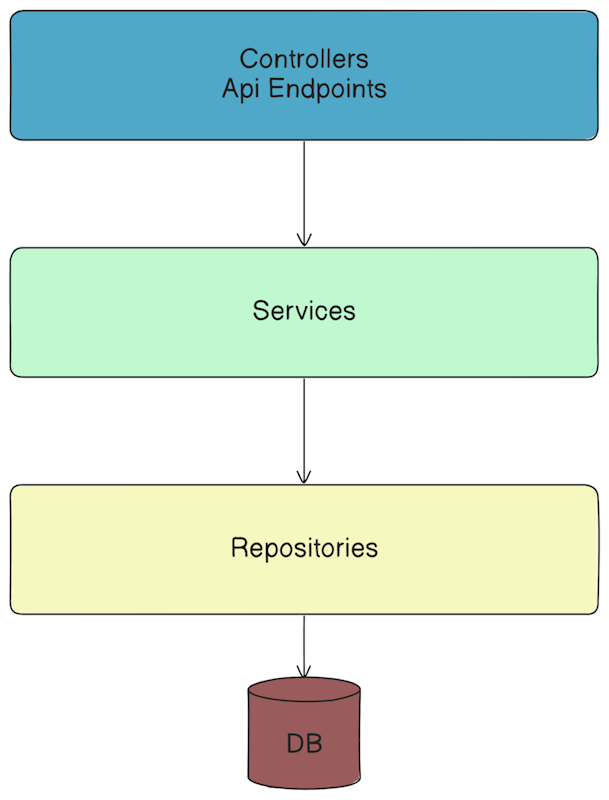
The main reason N-Layered Architecture is so popular is that it's easy to understand. If you join a new team or project, you quickly know where to put new code, making developer onboarding easy.
On the other hand, this approach uses technical folders (Controllers, Services) so developers spend much more time searching the whole code for the Create Order or Cancel Order feature implementation. That's why this approach makes onboarding for developers on a complex project pretty hard.
N-Layered Architecture enforces a basic separation of concerns, and for small to mid-size CRUD applications, it's an easy default.
A typical .NET Web API project using N-Layered might look like this:
csharp[ApiController] [Route("api/shipments")] public class ShipmentsController : ControllerBase { private readonly IShipmentService _service; public ShipmentsController(IShipmentService service) { _service = service; } [HttpGet("{id}")] public async Task<IActionResult> Get(int id) { var shipment = await _service.GetShipmentByIdAsync(id); return Ok(shipment); } }
csharppublic class ShipmentService : IShipmentService { private readonly IShipmentRepository _repository; public ShipmentService(IShipmentRepository repository) { _repository = repository; } public async Task<ShipmentDto> GetShipmentByIdAsync(int id) { return await _repository.GetByIdAsync(id); } }
csharppublic class ShipmentRepository : IShipmentRepository { private readonly ShipmentDbContext _dbContext; public ShipmentRepository(ShipmentDbContext dbContext) { _dbContext = dbContext; } public async Task<ShipmentDto> GetByIdAsync(int id) { return await _dbContext.Shipments .Where(s => s.Id == id) .Select(s => new ShipmentDto { Number = s.Number, OrderId = s.OrderId }) .FirstOrDefaultAsync(); } }
While this approach may seem simple, it can lead to problems you might encounter in your codebases.
1. Fat Controllers and Fat Services
One of the most common problems with N-Layered Architecture is that Controllers and Services tend to grow rapidly as business requirements evolve.
What starts as a simple CRUD operation with 4 methods quickly becomes a large class handling dozens of responsibilities.
Here's what a typical ShipmentsController looks like after a few months or years of development:
csharp[ApiController] [Route("api/[controller]")] public class ShipmentsController : ControllerBase { private readonly IShipmentService _shipmentService; public ShipmentsController(IShipmentService shipmentService) { _shipmentService = shipmentService; } [HttpGet("{id}")] public async Task<IActionResult> GetShipment(int id); [HttpGet("user/{userId}")] public async Task<IActionResult> GetShipmentsByUser(int userId); [HttpGet("date-range")] public async Task<IActionResult> GetShipmentsByDateRange(DateTime from, DateTime to); [HttpPost] public async Task<IActionResult> CreateShipment(CreateShipmentRequest request); [HttpPut("{id}")] public async Task<IActionResult> UpdateShipment(int id, UpdateShipmentRequest request); [HttpPatch("{id}/status")] public async Task<IActionResult> UpdateShipmentStatus(int id, ShipmentStatus status); [HttpDelete("{id}")] public async Task<IActionResult> DeleteShipment(int id); [HttpPost("{id}/track")] public async Task<IActionResult> TrackShipment(int id); [HttpPost("{id}/cancel")] public async Task<IActionResult> CancelShipment(int id); [HttpPost("{id}/approve")] public async Task<IActionResult> ApproveShipment(int id); }
Yes, you can separate these endpoints into multiple Controllers, but adding just another method feels easier for a developer than extracting a new Controller. Service and Repository classes can grow even worse than this.
2. Too Many Small Services and Repositories
As your domain grows, you face a critical decision: should you create a Service and Repository for each entity?
When dealing with Shipments, ShipmentItems, and Orders, following the traditional N-Layered approach leads to:
csharppublic interface IShipmentRepository { Task<ShipmentDto> GetByIdAsync(int id); Task<IEnumerable<ShipmentDto>> GetAllAsync(); // ... } public interface IShipmentItemRepository { Task<ShipmentItemDto> GetByIdAsync(int id); Task<IEnumerable<ShipmentItemDto>> GetByShipmentIdAsync(int shipmentId); // ... } public interface IOrderRepository { Task<OrderDto> GetByIdAsync(int id); Task<IEnumerable<OrderDto>> GetByUserIdAsync(int userId); // ... }
But what happens when you need to fetch related entities together? For example:
- Get a shipment with all its items
- Get an order with its associated shipments
- Get shipment historical data that loads multiple entities
Where do these cross-entity methods belong?
Many developers end up with a lot of services and repositories that don't do enough. And when you implement a new feature, you start thinking where to add a new method in one of the three repositories.
3. Weak Business Logic and Hard to Test Solutions
Business rules are often scattered across multiple service classes, making them challenging to identify and understand.
In N-Layered Architecture, there are no strict rules; you can bypass any layer and use the Repository in the Controller directly, for example. Additionally, you can omit interfaces and pass implementations directly to layers, which can lead to hard-to-test code.
The result?
You end up with awkward solutions:
- Fat repositories that know too much about other entities
- Too many small repositories that have 1-2 methods
- Service methods that orchestrate multiple repositories, leading to N+1 queries
- Duplicate logic across different services when they need similar cross-entity operations
This is where the traditional N-Layered approach starts breaking down. Controllers and Services get bigger and bigger, Repositories either don't do enough or try to do too much, and your code becomes harder to understand and modify as business requirements change.
While this pattern isn't "bad" for small or simple projects, it's rarely the best option for teams who want faster changes, cleaner code, and true modularity.
Many .NET teams are now building more complex systems, like Modular Monoliths, DDD, or microservices. In my experience, I have built many projects with N-Layered Architecture, and I've realized it's holding me back.
This is where I began adopting Clean Architecture in my projects a few years ago.
Clean Architecture
I know some teams use N-Layered Architecture in microservices for CRUD operations and maintain a high level of discipline in writing quality code and following established rules. But this is not the case for most teams.
Clean Architecture gives you much better discipline out of the box.
Clean Architecture aims to separate the application's concerns into distinct layers, promoting high cohesion and low coupling.
It consists of the following layers:
- Domain: contains core business objects such as entities.
- Application: implementation of business use cases (like the Service Layer in N-Layered).
- Infrastructure: implementation of external dependencies like database, cache, message queue, authentication provider, etc.
- Presentation: implementation of an interface with the outside world, like WebApi, gRPC, GraphQL, MVC, etc.
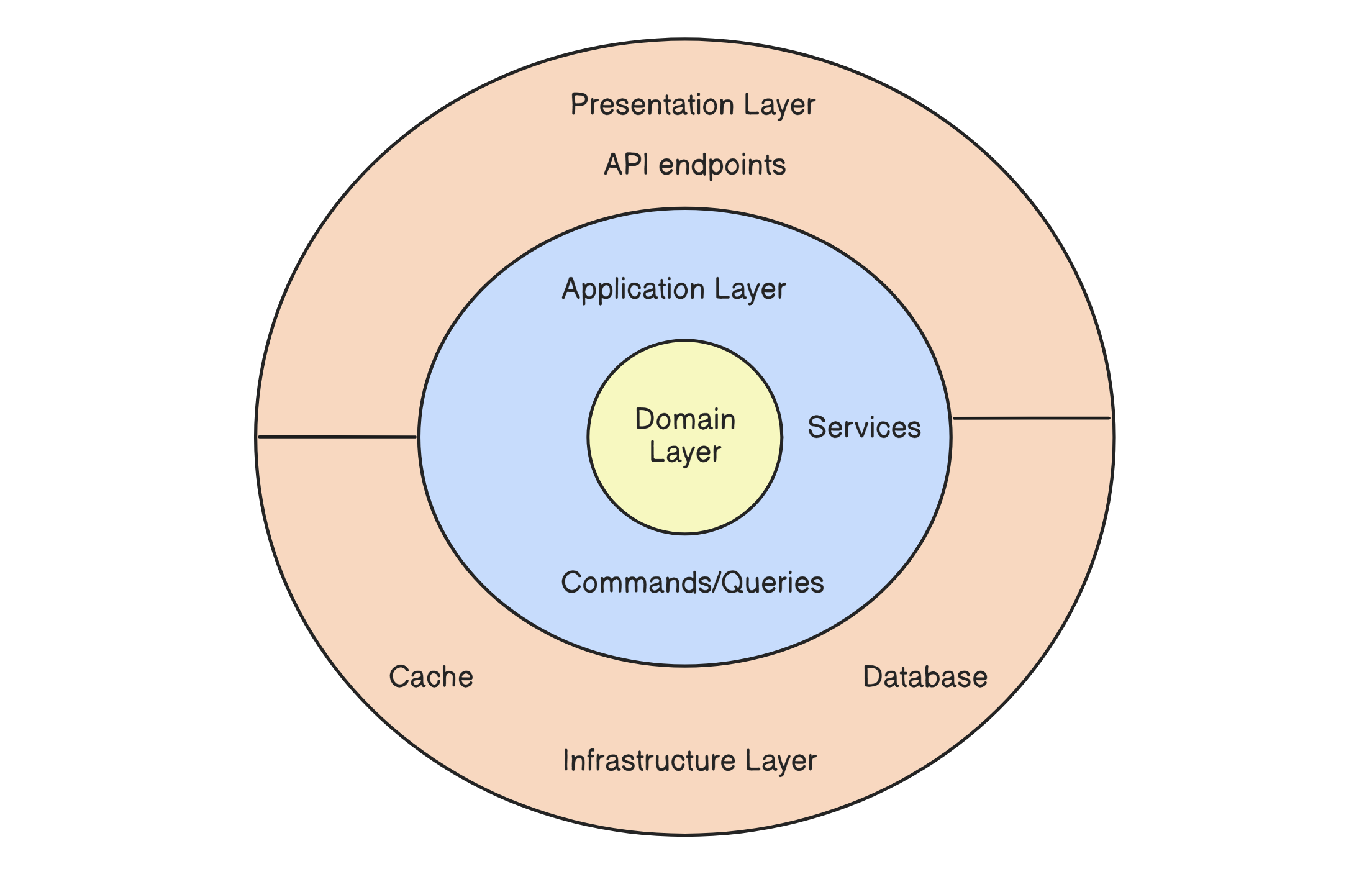
It's common to see solutions organized as:
- Domain
- Application
- /Queries
- /QueryHandlers
- /Commands
- /CommandHandlers
- Infrastructure
- Presentation
Clean Architecture solves many drawbacks of N-Layered Architecture:
-
Separation of Concerns: Clean Architecture enforces a clear separation between different layers of the application. All layers point inside: you can't call Application use cases from the Domain Layer. This makes the codebase more maintainable and easier to understand.
-
Testability: By isolating the business logic from the infrastructure and UI, Clean Architecture makes it easier to write unit tests. The core of the application (use cases and entities) can be tested without worrying about external dependencies or concrete implementations.
-
Flexibility: Clean Architecture allows you to change the technology stack (e.g., switching from one database provider to another) with minimal impact on the core business logic. This flexibility is achieved by abstracting infrastructure concerns behind interfaces that the core application depends on.
-
Code Reusability: By decoupling the core business logic from the implementation details, Clean Architecture encourages code reusability across different projects or layers within the same project.
From my own experience, I can tell you that Clean Architecture is highly adaptable and can survive changing business requirements while maintaining the same code quality. In N-Layered, it can be challenging to maintain the same level of code quality in the face of ever-evolving changes.
The typical Clean Architecture anticipates using MediatR or manual handlers in the API endpoints:
csharppublic class CreateShipmentEndpoint : IEndpoint { public void MapEndpoint(WebApplication app) { app.MapPost("/api/shipments", Handle); } private static async Task<IResult> Handle( [FromBody] CreateShipmentRequest request, IValidator<CreateShipmentRequest> validator, ICreateShipmentHandler handler, CancellationToken cancellationToken) { var validationResult = await validator.ValidateAsync(request, cancellationToken); if (!validationResult.IsValid) { return Results.ValidationProblem(validationResult.ToDictionary()); } var response = await handler.Handle(request, cancellationToken); if (response.IsError) { return response.Errors.ToProblem(); } return Results.Ok(response.Value); } }
API endpoints are placed inside a Presentation project and call Application Layer Handlers (or Services).
In this case, CreateShipmentHandler uses IShipmentRepository and knows nothing about the actual ShipmentRepository implementation in the Infrastructure layer:
csharpinternal sealed class CreateShipmentHandler( IShipmentRepository repository, IUnitOfWork unitOfWork, ILogger<CreateShipmentHandler> logger) : ICreateShipmentHandler { public async Task<ErrorOr<ShipmentResponse>> Handle( CreateShipmentRequest request, CancellationToken cancellationToken) { var shipmentAlreadyExists = await repository.ExistsByOrderIdAsync(request.OrderId, cancellationToken); if (shipmentAlreadyExists) { logger.LogInformation("Shipment for order '{OrderId}' is already created", request.OrderId); return Error.Conflict($"Shipment for order '{request.OrderId}' is already created"); } var shipmentNumber = new Faker().Commerce.Ean8(); var shipment = request.MapToShipment(shipmentNumber); await repository.AddAsync(shipment, cancellationToken); await unitOfWork.SaveChangesAsync(cancellationToken); logger.LogInformation("Created shipment: {@Shipment}", shipment); var response = shipment.MapToResponse(); return response; } }
Pragmatic Clean Architecture
Okay, now we have a clear separation of layers that point inward, but we still face the same problem with Repositories as we did in N-Layered Architecture.
As time has passed, Clean Architecture has evolved into a more Pragmatic approach: where developers agreed that they can use EF Core inside the Application use cases.
Yes, you heard it right: using EF Core directly in the Handlers/Services without creating repositories.
But doesn't it break all the benefits Clean Architecture provides? Not exactly. Let me explain.
First, EF Core's DbSet already implements the Repository Pattern, and DbContext is a Unit of Work, as stated in the official DbContext's code summary. When we create a repository over EF Core, we create an abstraction over an abstraction, leading to over-engineered solutions.
Second, how many times have you changed your database in production?
In 99% of cases, you won't need to switch the database. However, even if you switch, it's more than just changing EF Core to MongoDB, for example.
If you switch to a completely different type of database, it may require a complete rewrite of your existing application, as data access patterns can change significantly.
On the other hand, when you switch from one SQL database to another (for example, Postgres → SQL Server), 95% of your code in EF Core won't change.
What about testability and duplicating EF calls over different classes?
For unit tests, you can use the In-Memory DbContext, and it's even better to test database logic with integration tests.
To eliminate duplicate EF Core queries, I do this:
- I extract shared code (complex search, for example) into static extension methods (or members in C# 14)
Specificationpattern when I need to combine dynamically different fruitless or sort conditions- It's okay to duplicate 3 lines of code in EF Core to search an entity across 3 files
At the end of the day, as a trade-off, you can create a Repository for a few queries to avoid code duplication.
Many developers push back on this approach and say, "We always need to use repositories."
I have a different point of view: for me, using EF Core directly in application use cases is a trade-off that offers more advantages than disadvantages.
But all projects are unique. And there is no single correct way to write the software; you need to pick whatever works best in each particular project and case.
Anyway, here is how the CreateShipmentHandler changes when we get rid of repositories:
csharpinternal sealed class CreateShipmentHandler( ShipmentsDbContext context, ILogger<CreateShipmentHandler> logger) : ICreateShipmentHandler { public async Task<ErrorOr<ShipmentResponse>> Handle( CreateShipmentRequest request, CancellationToken cancellationToken) { var shipmentAlreadyExists = await context.Shipments.AnyAsync(x => x.OrderId == request.OrderId, cancellationToken); if (shipmentAlreadyExists) { logger.LogInformation("Shipment for order '{OrderId}' is already created", request.OrderId); return Error.Conflict($"Shipment for order '{request.OrderId}' is already created"); } var shipmentNumber = new Faker().Commerce.Ean8(); var shipment = request.MapToShipment(shipmentNumber); await context.Shipments.AddAsync(shipment, cancellationToken); await context.SaveChangesAsync(cancellationToken); logger.LogInformation("Created shipment: {@Shipment}", shipment); var response = shipment.MapToResponse(); return response; } }
Clean Architecture and Rich Domain Model
Okay, we now have strict rules (you can further secure them with Architecture Tests), but what about business logic, which is often scattered and duplicated across service classes, leading to hard-to-maintain solutions? This is mainly due to the use of anemic Domain Entities.
Let's explore an example of such an anemic model:
csharppublic class Shipment { public Guid Id { get; set; } public string Number { get; set; } public string OrderId { get; set; } public Address Address { get; set; } public string Carrier { get; set; } public string ReceiverEmail { get; set; } public ShipmentStatus Status { get; set; } public List<ShipmentItem> Items { get; set; } public DateTime CreatedAt { get; set; } public DateTime? UpdatedAt { get; set; } }
When you look at this entity, you can only see properties with public getters and setters. This entity doesn't provide any information about how a Shipment's Status can change or what checks should be performed when adding Shipment Items.
Since all properties are exposed via public setters, nothing prevents a developer from updating them from another class, bypassing any checks in the Application Layer.
To address this issue, Clean Architecture has evolved as developers started to use the Rich Domain Model. A rich domain model enforces the encapsulation of business logic within Domain Entities.
csharppublic class Shipment { private readonly List<ShipmentItem> _items = []; public Guid Id { get; private set; } public string Number { get; private set; } public string OrderId { get; private set; } public Address Address { get; private set; } public string Carrier { get; private set; } public string ReceiverEmail { get; private set; } public ShipmentStatus Status { get; private set; } public IReadOnlyList<ShipmentItem> Items => _items.AsReadOnly(); public DateTime CreatedAt { get; private set; } public DateTime? UpdatedAt { get; private set; } private Shipment() { } public static Shipment Create( string number, string orderId, Address address, string carrier, string receiverEmail, List<ShipmentItem> items) { var shipment = new Shipment { ... }; shipment.AddItems(items); return shipment; } public void AddItem(ShipmentItem item) { ... }; public void AddItems(List<ShipmentItem> items) { ... }; public void RemoveItem(ShipmentItem item) { ... }; public void UpdateAddress(Address newAddress) { ... }; public ErrorOr<Success> Process() { if (Status is not ShipmentStatus.Created) { return Error.Validation("Can only update to Processing from Created status"); } Status = ShipmentStatus.Processing; UpdatedAt = DateTime.UtcNow; return Result.Success; } public ErrorOr<Success> Dispatch() { if (Status is not ShipmentStatus.Processing) { return Error.Validation("Can only update to Dispatched from Processing status"); } Status = ShipmentStatus.Dispatched; UpdatedAt = DateTime.UtcNow; return Result.Success; } public ErrorOr<Success> Transit() { ... }; public ErrorOr<Success> Deliver() { ... }; public ErrorOr<Success> Receive() { ... }; public ErrorOr<Success> Cancel() { ... }; }
Now, the Shipment class doesn't expose public setters for its properties; instead, you use a static Factory method Create to create a Shipment instance.
This way, you can encapsulate any logic and validation in this method, ensuring a single, correct way to create your entity.
Additionally, the Shipment class provides methods that update its state, including AddItem, Process, Dispatch, Cancel, and others.
This way, we encapsulate logic in a single place, eliminating business rules from being scattered and duplicated across different classes.
Clean Architecture and Features Folders
The traditional approach organized code by technical concerns - separating Controllers, QueryHandlers, Services, and Repositories into different folders. Much like in N-Layered Architecture, but in a more organized way.
However, developers quickly realized this made it difficult to understand and modify features, as related code was scattered across multiple folders.
Clean Architecture has naturally evolved from Technical Folders into Feature Folders.
The evolution toward Feature Folders groups all code related to a specific use case in one place.
Instead of navigating between /Controllers, /Handlers, /Services and /Repositories (duh!) to implement the CreateShipment use case, you now have a /Features/Shipments/CreateShipment folder containing everything needed for that feature.
This makes the codebase more intuitive to navigate and eliminates the need to jump between a few projects and 5-7 files to implement a single feature. This makes onboarding developers on a specific project much easier.
And a little surprise: it's easier and faster for AI to understand your code.
While Clean Architecture has many advantages, it's not a silver bullet.
Here are the drawbacks of Clean Architecture:
- Complexity: Clean Architecture introduces multiple layers and abstractions, which can increase the complexity of the codebase, especially for small projects. Developers may find it overwhelming if the architecture is applied unnecessarily to simple applications.
- Overhead: The separation of concerns and the use of interfaces can lead to additional boilerplate code, which might slow down the development process. This overhead can be particularly noticeable in smaller projects where the benefits of Clean Architecture may not be as noticeable.
- Learning Curve: For developers who are not familiar with Clean Architecture, there is a steep learning curve. Understanding the principles and correctly applying them can take time, especially for those new to software architecture patterns.
- Initial Setup Time: Setting up a Clean Architecture project from scratch requires careful planning and organization. The initial setup time can be longer compared to the N-Layered Architecture.
Now, let's explore a new, very popular approach to structuring code: Vertical Slice Architecture.
Vertical Slice Architecture
Vertical Slice Architecture is an extremely popular way to structure your projects nowadays. It strives for high cohesion within a slice (feature) and loose coupling between slices.
It structures an application by features rather than technical layers. Each slice encapsulates all aspects of a specific feature, including the API, business logic, and data access.
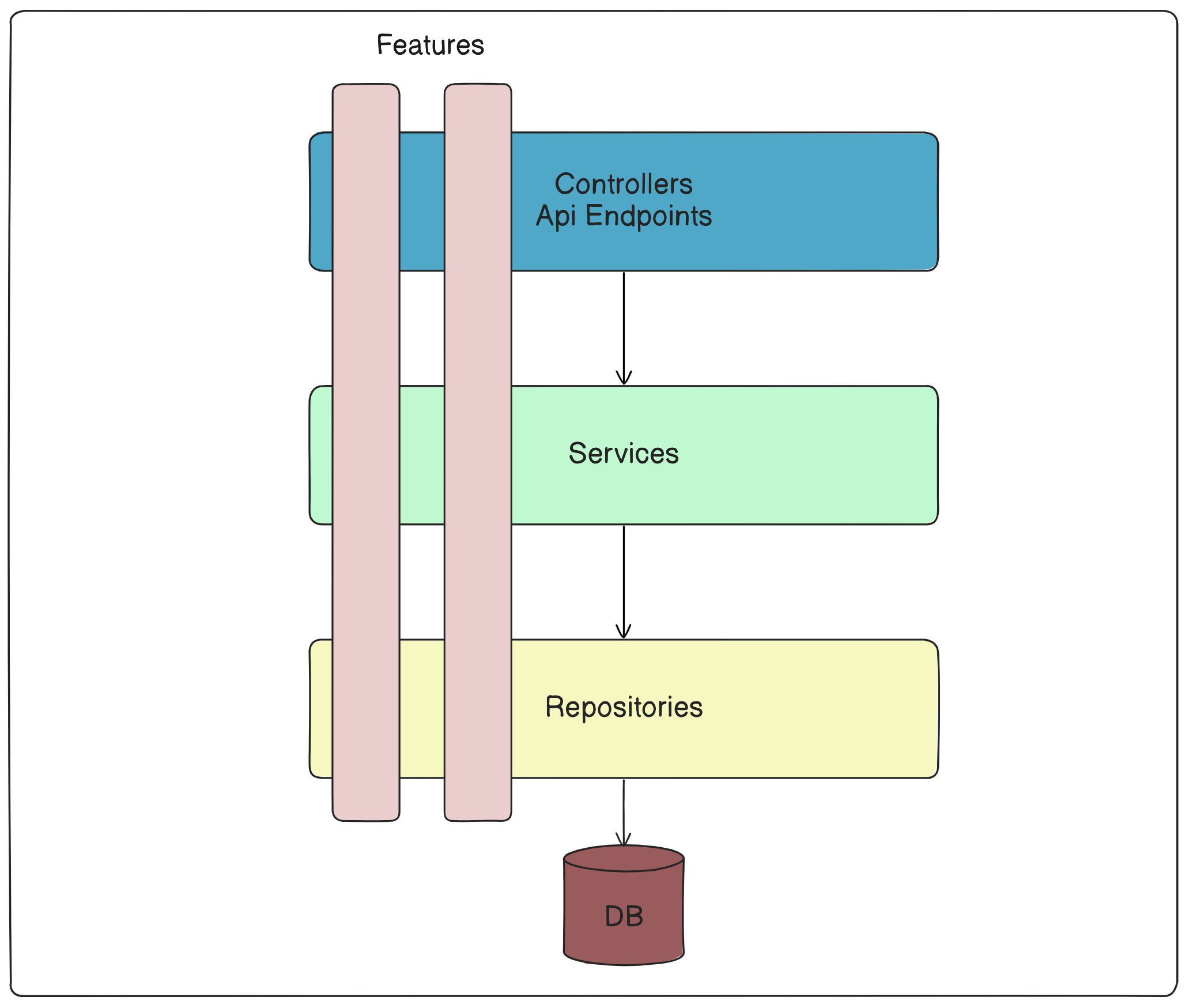
For the "Create Shipment" use case, the layout looks like this:
Features/ └── CreateShipment/ ├── CreateShipment.Endpoint.cs ├── CreateShipment.Handler.cs ├── CreateShipment.Mapping.cs └── CreateShipment.Validators.cs
Each folder represents a feature (use case), and each feature can consist of one or more files. For simple CRUD services with a few endpoints, it's more than enough to inject DbContext directly into the API endpoints.
For more complex projects, I create Handlers for each use case. I use manual handlers like here.
But since writing this article, I have modified this approach to use handlers without interfaces. They are redundant and bring no value. As all the code is tested with integration tests on a real database.
VSA has the following advantages:
- Feature Focused: Changes are isolated to specific features, reducing the risk of unintended side effects.
- Scalability: easier to scale development by allowing other developers and teams to work on different features independently.
- Flexibility: allows using different technologies or approaches within each slice as needed.
- Maintainability: easier to navigate in the solution, understand and maintain since all aspects of a feature are contained within a single slice.
- Reduced Coupling: minimizes dependencies between different slices.
Here are the drawbacks of Vertical Slice Architecture:
- Potential Code Duplication: potential for code duplication across slices.
- Consistency: Ensuring consistency across slices and managing cross-cutting concerns (e.g., error handling, logging, validation) requires careful planning.
- Large number of classes and files: A large application can have a lot of vertical slices, each containing multiple small classes.
You can address the first two disadvantages by carefully designing your architecture. For example, you can extract common functionality into its own classes.
To manage cross-cutting concerns, such as error handling, logging, and validation, you can use ASP .NET Core middlewares. A well-structured folder could solve the third disadvantage.
Compared to Clean Architecture, it provides a clear separation between the different layers of the application. On the other hand, you need to navigate multiple projects to explore the implementation of a single use case.
One of the best aspects of Clean Architecture is that it provides a Domain-centric design for your application, significantly simplifying the development of complex domains and projects.
Vertical Slice Architecture, on the other hand, allows you to organize your code for rapid navigation and development. A single use case implementation is in one place.
What if we could take the best parts of both worlds and combine Clean Architecture with Vertical Slices?
Combining Clean Architecture with Vertical Slices
I believe that the natural evolution of Clean Architecture, with its feature folders, has led to its transformation into Vertical Slice Architecture. Original Clean Architecture wasn't always about separating your solution into projects, but rather about your classes and their relationships.
The main point is that classes of inner layers can't call classes of outer layers. And the same goes for infrastructure: it should be decoupled from the actual use-case implementation.
We break this rule and use EF Core DbContext directly in the application layer. But as we saw before, the advantages of this approach outweigh the cons.
With Vertical Slice Architecture, you can achieve the same but with fewer projects.
I found that combining Clean Architecture with Vertical Slices is an excellent architecture design for complex applications. In small applications or in applications that don't have complex business logic, you can use Vertical Slices without a Clean Architecture.
As a core, I use Clean Architecture layers and combine them with Vertical Slices.
Here is how the layers are being modified:
- Domain: contains core business objects such as entities (remains unchanged).
- Infrastructure: implementation of external dependencies like database, cache, message queue, authentication provider, etc (remains unchanged).
- Application and Presentation Layers are combined with Vertical Slices.
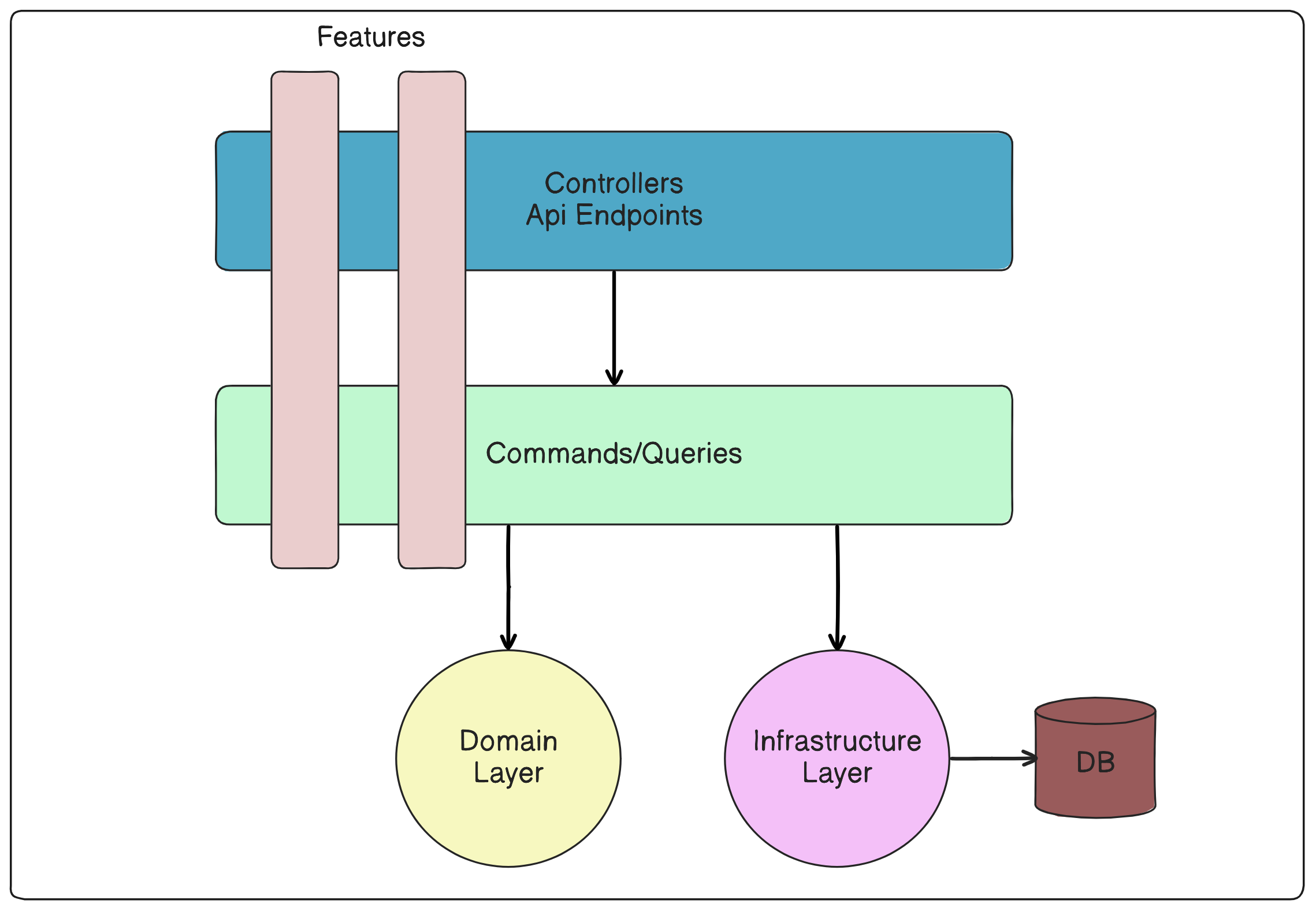
Here is what such a project structure looks like:
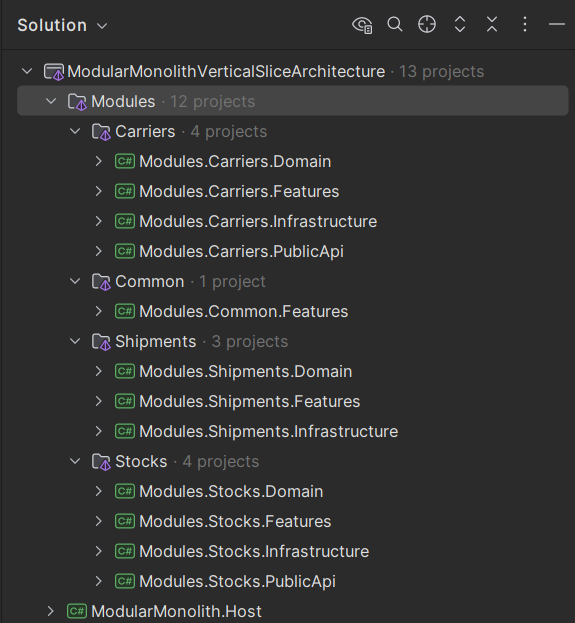
In the Infrastructure project, I like implementing external integrations such as databases, caching and authentication. If your projects don't require implementing repositories or other external integrations, you can omit the Infrastructure project.
The implementation of the CreateShipment use case is actually the same as in the Clean Architecture solution.
The endpoint in this approach is responsible for:
- Configuring it into minimal APIs
- Validating the request
- Passing the request to the handler (I'm not using an interface here)
- Mapping the handler response to the correct HTTP code and JSON body
csharppublic class CreateShipmentEndpoint : IEndpoint { public void MapEndpoint(WebApplication app) { app.MapPost("/api/shipments", Handle); } private static async Task<IResult> Handle( [FromBody] CreateShipmentRequest request, IValidator<CreateShipmentRequest> validator, CreateShipmentHandler handler, CancellationToken cancellationToken) { var validationResult = await validator.ValidateAsync(request, cancellationToken); if (!validationResult.IsValid) { return Results.ValidationProblem(validationResult.ToDictionary()); } var response = await handler.Handle(request, cancellationToken); if (response.IsError) { return response.Errors.ToProblem(); } return Results.Ok(response.Value); } }
Vertical Slices, together with Clean Architecture, require some time for new developers to onboard, but significantly reduce the time it takes for them to understand the actual use cases and domain.
The Best Architecture to use in 2026
After exploring N-Layered, Clean Architecture, and Vertical Slice Architecture, you might wonder: which one should you choose for your next project? The answer depends on your team size, project complexity, and business requirements.
When to Use N-Layered Architecture
Best for:
- Small teams (1-3 developers)
- Simple CRUD applications
- Projects with straightforward business logic
- When you need to get something working quickly and developers are already familiar only with N-Layered
Choose N-Layered when:
- Your application is primarily data-driven with minimal business rules
- You have junior developers who need a familiar, easy-to-understand structure
- The project scope is well-defined and unlikely to change significantly
- You're building prototypes or proof-of-concept applications
When to Use Clean Architecture
Best for:
- Medium to large teams (4-10 developers)
- Complex business domains with rich logic
- Long-term projects that need to adapt to changing requirements
- Applications requiring high testability
Choose Clean Architecture when:
- You have complex business rules that need to be isolated and protected
- Your team has experience with architectural patterns
- You need to integrate with multiple external systems
- The project will be maintained and extended over several years
- Building a Monolith or Modular Monolith application
When to Use Vertical Slice Architecture
Best for:
- Teams of any size that value fast development
- Feature-focused development workflows
- Applications with many independent features
- Projects where different features might use different technologies
Choose Vertical Slice Architecture when:
- You want to minimize the time to implement new features
- Your team works in feature-focused sprints
- You need to onboard new developers quickly into your domain
- Different parts of your application have different complexity levels
When to Use Clean Architecture + Vertical Slices
Best for:
- Medium or Large applications
- Teams that want both structure and flexibility
- Projects with rich business domains and many features
- Applications that need to scale both in terms of code and team size
Choose this combination when:
- You have a complex domain that benefits from Clean Architecture's structure
- You want the development speed benefits of Vertical Slices
- Your team has experience with both architectural patterns
- You're building a system that will grow significantly over time
- Building a Monolith or Modular Monolith application
My Recommendation for 2026
For most new projects starting in 2026, I recommend Clean Architecture combined with Vertical Slices.
This approach gives you:
- Structure when you need it: Clean Architecture provides solid foundations for complex business logic
- Speed when you want it: Vertical Slices allow rapid feature development
- Flexibility for the future: Easy to add new and change existing features
- Team scalability: Different teams can work on different features independently
Remember I promised you I'd show the best approach that lets agents spend fewer tokens and write code faster? Here we go: "Clean Architecture combined with Vertical Slices" is the one.
An AI agent doesn't know your codebase. Before it can change anything, it has to read it.
Every file it opens is loaded into the context window, and every token in that context window is your weekly limit (or money) and your waiting time.
Nowadays (in 2026), it’s pretty important how much code an agent has to read before it can safely change one feature.
In an N-Layered project, a single feature is spread across the whole solution. Ask an agent to add one field to "Create Shipment", and it has to pull in the controller, the service interface, the service, the repository interface, the repository, the DbContext, the DTOs and the entity.
It's even worse as those classes are shared.
ShipmentService and ShipmentRepository also contain code for 10 other use cases, so the agent loads all of it just to touch the feature.
With Vertical Slices, the same feature lives in one folder:
N-Layered - files the agent must read: Clean Architecture + Vertical Slices: Controllers/ShipmentsController.cs Features/CreateShipment/ Services/IShipmentService.cs |- CreateShipment.Endpoint.cs Services/ShipmentService.cs |- CreateShipment.Handler.cs Repositories/IShipmentRepository.cs |- CreateShipment.Mapping.cs Repositories/ShipmentRepository.cs |- CreateShipment.Validators.cs Models/ShipmentDto.cs Domain/Shipment.cs Models/CreateShipmentRequest.cs Models/Shipment.cs Data/ShipmentDbContext.cs
Nine files, most of them fat and shared, against five small ones that belong to this feature and nothing else. If the feature is simple, you can even have fewer files in Vertical Slices.
In my projects, this is where the 3x-5x difference in token usage comes from. The gap grows with the size of the codebase, because slices stay the same size while services and repositories keep growing.
The naming helps too. The agent finds the feature by searching for the use case name rather than scanning technical folders and guessing which service contains the logic.
Token cost is only half of the win. The other half is quality and time.
An agent that reads five focused files writes a better change than an agent that reads nine unrelated ones. It has less code to misread, fewer shared methods to break, and a diff that stays inside one folder.
That also makes the review easier. When every change lands in a single slice, you can read the whole diff and understand it, instead of jumping between four projects to figure out what the agent actually did.
Clean Architecture still earns its place here. Your Domain project stays small and stable, so the agent can load your business rules in full and follow them, and the Infrastructure project keeps the database and integration details out of the way.
Summary
When choosing code architecture for your project, the key is choosing an approach that matches your team's skills, project complexity, and business needs today while keeping future growth in mind.
Start with what makes sense for your current situation:
- Working on an existing project? No need to change N-Layered for anything else until you encounter situations where adding new features takes too much effort and time
- Building a Modular Monolith? Go with Clean Architecture + Vertical Slices
- Want maximum development speed? Choose pure Vertical Slice Architecture (I still create Domain and Infrastructure projects every time)
What code architecture do you use in your current project? Leave a comment to this post.
I've attached an add-new-webapi-feature-efcore skill to this post, that you can use to implement webapi features with Vertical Slice Architecture, Minimal APIs and EF Core.
Hope you find this newsletter useful. See you next time.

Comments