Every developer who uses AI has felt this.
You open a new chat.
You explain your architecture.
You explain your file naming.
You explain that you do not use repositories, prefer a rich domain model, and that your handlers and services return a Result<T>.
The AI writes good code.
The next day, you open another chat, and you explain it all over again.
This is the hidden tax of AI-assisted development. You repeat the same instructions in every session for every feature.
A CLAUDE.md file helps; it's added to every session, but you can't make it with a lot of instructions (it should be 100 lines or less). It holds the facts about your project and overall architecture, not the step-by-step recipe for every kind of task you do.
There is a better way: skills.
A skill packages a set of instructions, and even example files, that Claude loads only when it needs them. You write the recipe once, and Claude follows it every time, in every session.
Skills also work if you are using the OpenAI Codex agent
In this post, we will explore:
- What Claude skills are and why they beat repeating yourself
- The building blocks of a skill
- When a skill should trigger, and when it should not
- How to create a skill with the Skill Creator
- Where your skills live: Claude Code, Desktop, and CoWork
- How to encode your project's conventions as skills
- Skills for gRPC, GraphQL, messaging, and new services
- The ready-made .NET skills published by Microsoft
Let's dive in.
What Are Claude Skills (and Why They Beat Repeating Yourself)
A skill is a folder with instructions that Claude reads when a task matches.
it's placed in your repository root: .claude/skills/*
At its simplest, a skill is a single file called SKILL.md.
It has a short header that tells Claude what the skill does and when to use it, followed by the instructions themselves.
Here is a tiny skill:
markdown--- name: create-endpoint description: Create a new ASP.NET Core Minimal API endpoint following our project conventions. Use whenever the user asks to add an endpoint, route, or API operation. --- # Create a Minimal API Endpoint 1. Create the endpoint in `Features/<UseCase>/<UseCase>.Endpoint.cs`. 2. Implement `IApiEndpoint` and map the route from `RouteConsts`. 3. Call the handler, and convert a failed `Result<T>` with `ToProblem()`.
That is a complete, working skill.
When you ask Claude to "add an endpoint for canceling a shipment," it reads this skill and follows your steps, instead of inventing its own structure.
The difference between a skill and a one-off prompt is reuse.
A prompt lives and dies in a single chat session. A skill is written once and then reused, shared, and version-controlled like any other file in your project.
This means every team member can use it.
Skills also keep your context small through progressive disclosure.
Claude always sees the skill's name and description, which is about one line of text.
It loads the full SKILL.md only when your task matches that description.
And it opens any bundled files only when it actually needs them.
This means you can have dozens of skills installed without flooding the model with text it does not need right now. The skill remains quiet until it is useful.
Now that you know what a skill is, let's look at what goes inside one.
The Building Blocks of a Skill
Every skill is a folder. The only required file is SKILL.md.
Everything else is optional.
Here is the anatomy of a fuller skill:
create-feature/ ├── SKILL.md (required: instructions + when to use) ├── references/ (optional: detailed docs loaded on demand) │ └── architecture.md ├── scripts/ (optional: scripts Claude can run) │ └── scaffold.ps1 └── assets/ (optional: files used in the output) └── Endpoint.template.cs
The SKILL.md file has two parts.
The first part is the YAML frontmatter at the top, between the --- markers. Two fields matter most:
name- a short identifier in kebab-case, likecreate-feature.description- one or two sentences that tell Claude what the skill does and when to use it.
This is the most important line in the skill because it determines when the skill triggers. We will cover that in the next section.
The second part is the Markdown body. This is where you write the actual instructions: the steps, the rules, the examples, and the things to avoid.
The references/ folder holds detailed documents that Claude reads only when needed. Keep SKILL.md short and focused, and push long material - a full coding standard, an API reference, a list of edge cases - into separate files.
Claude opens them on demand, so your main instructions stay easy to follow.
The scripts/ folder holds code Claude can run instead of writing it from scratch.
A PowerShell or bash script that scaffolds a folder, or a small script that formats output, belongs here.
The assets/ folder holds files used in the result, like a project template, a Dockerfile, or a .cshtml view.
Note: Keep
SKILL.mdshort, ideally a few hundred lines at most. If it grows large, that is a signal to move the details intoreferences/and point to them from the body. A focused skill is easier for Claude to follow than one giant wall of rules.
A skill is only useful if Claude opens it at the right moment. Let's look at what controls that.
When a Skill Should Trigger (and When It Should Not)
The description field is the trigger.
Claude reads the name and description of every installed skill. When your request matches a description, Claude loads that skill. When it does not match, the skill stays out of the way.
So the description has one job: describe both what the skill does AND when to use it.
Here is a weak description:
markdowndescription: Helps with endpoints.
It is too vague. Claude cannot tell a "help with endpoints" request from a hundred other things, so the skill will trigger at the wrong times or not at all.
Here is a strong one:
markdowndescription: Create a new ASP.NET Core Minimal API endpoint following our project conventions (IApiEndpoint, RouteConsts, Result<T>). Use whenever the user asks to add an endpoint, route, or API operation to a module. Do not use for gRPC or GraphQL - those have their own skills.
This version says what it does, lists the phrases a user would type, and rules out cases where another skill should win.
A few rules for good triggering:
- Be specific about what the skill does. Name the concrete task and the technology, not a vague category.
- List the phrases a user would actually type. "add an endpoint," "create a route," "new API operation."
- Say when NOT to use it. This stops one skill from hijacking requests that belong to another.
It also helps to know how a skill differs from the other two ways you guide Claude:
CLAUDE.mdis always-on context. It holds the facts that are true for the whole project - your tech stack, your conventions, your folder layout.- A skill is an on-demand capability. It holds the procedure for a specific kind of task and is loaded only when that task comes up.
- A slash command is something you invoke by hand, when you decide you want it.
You can also trigger a skill manually by using the slash command /skill-name and providing the skill's name.
Use CLAUDE.md for what is always true. Use a skill for a repeatable how-to that you do not want cluttering every conversation.
You do not have to write all of this by hand. Claude ships with a skill that builds skills.
Creating a Skill with the Skill Creator
The fastest way to create a skill is to use the built-in /skill-creator skill.
It is a skill whose job is to help you write other skills.
You describe what you want, and it interviews you, drafts the SKILL.md, sets up the folder, and can even test the result.
Start by telling Claude what you want:
markdownUse the /skill-creator to build a skill for adding a new feature to our modular monolith. Our features follow Vertical Slice Architecture: an Endpoint, a Handler, a Validator, and a Mapping, all in one folder under Features/. Explore an existing codebase before creating a skill. Present me its structure for confirmation. If something is unclear or you are not sure, ask me questions.
The skill creator will ask you questions to fill the gaps - the file naming, where code goes, the patterns you use and the ones you avoid. Answer them, and it produces a complete skill.
The best part comes in Claude Code: you can point the skill creator at real files, and it will bundle them into the skill for you.
markdownAdd these as reference examples in the skill: CreateShipment.Endpoint.cs CreateShipment.Handler.cs CreateShipment.Validator.cs
Claude copies them into the skill's references/ or assets/ folder and updates the instructions to point at them.
Now every time the skill runs, Claude has your real code to follow.
Note: You do not need to memorize the skill format. Describe the task, hand over your example files, and let the skill creator handle the structure. Your job is to know what good looks like in your project.
Once a skill exists, where does it live - and who can use it?
Where Your Skills Live: Claude Code, Desktop, and Cowork
You can use skills in three places. Where you save a skill decides who can use it.
Claude Code: in your git repository
This is the most powerful option for a development team.
In Claude Code, a project skill lives in a .claude/skills/ folder in the root of your repository:
your-repo/ ├── .claude/ │ └── skills/ │ └── create-feature/ │ └── SKILL.md ├── src/ └── CLAUDE.md
Because the skill is part of the repository, it is committed to git. When a teammate pulls the latest code, they also get the skill.
Your whole team now builds features the same way, guided by the same instructions. A new hire writes code in your house style on day one, because the rules ship with the code.
If you want a skill only for yourself, across all your projects, save it to your personal folder at ~/.claude/skills/ instead.
This one is not committed to any repository.
Claude Desktop and Cowork: in the cloud
In the Claude desktop and web apps, you manage skills under Settings, in the Capabilities section. You can create or upload a skill there, and Claude uses it in your conversations.
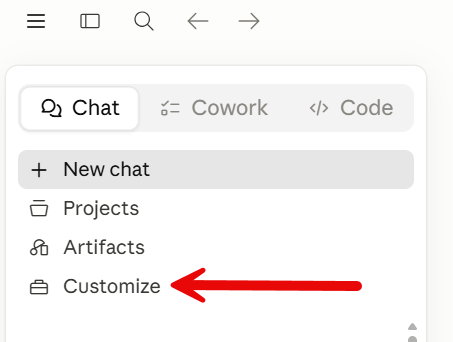
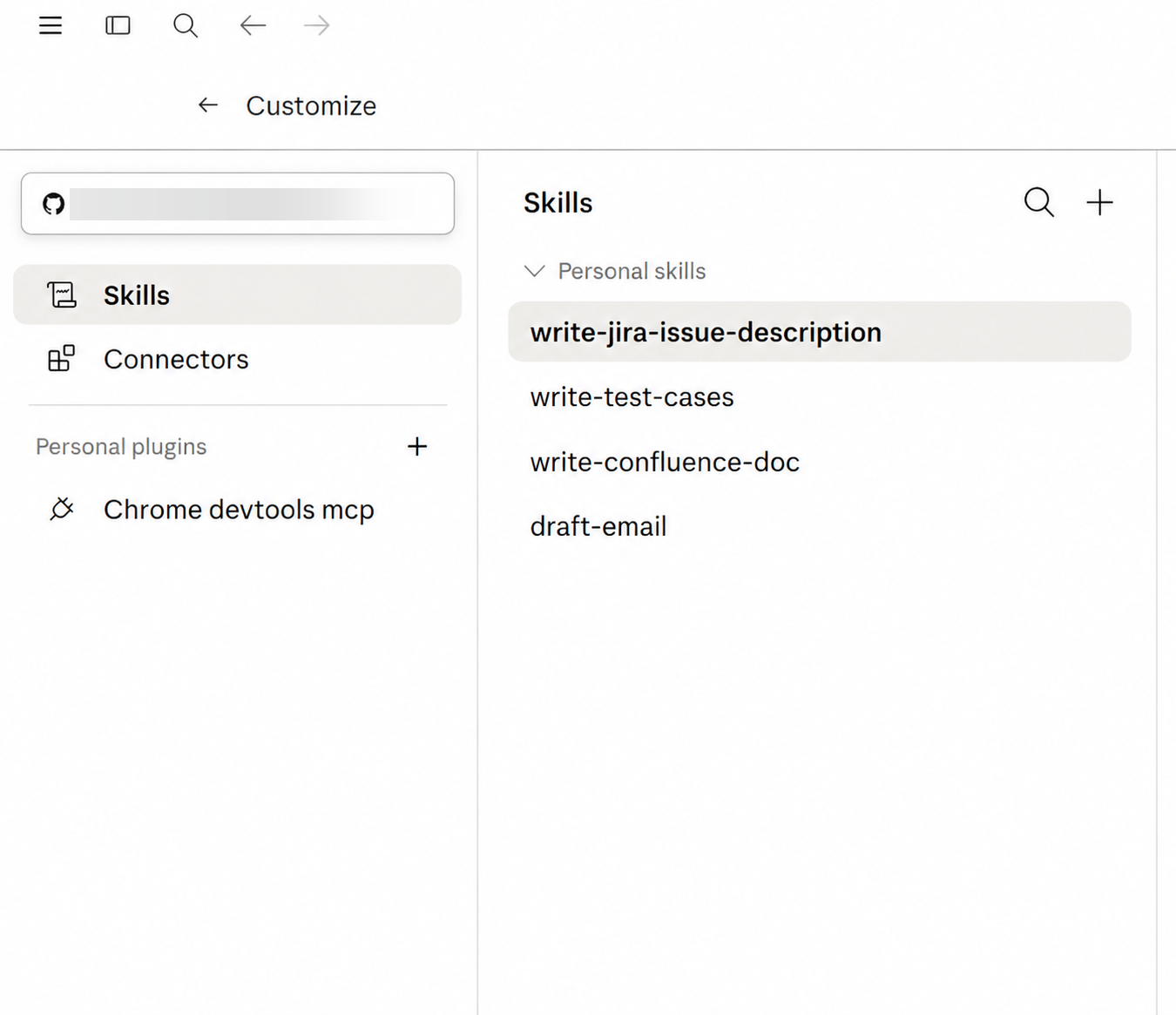
This is a good fit for skills that are not tied to a single repository - a writing style, a research workflow, or a personal checklist. These skills are saved in the cloud.
In Cowork, you also save skills to the cloud, so they travel with you across tasks and machines without living in any one repository.
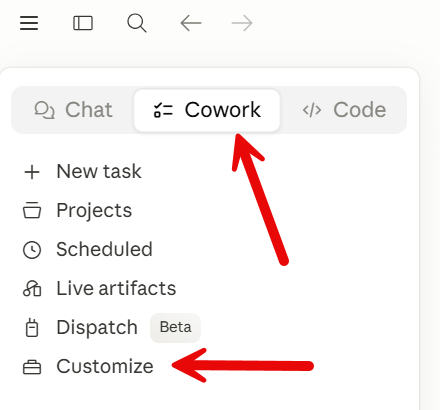
Here is how the options compare:
| Where | Stored in | Shared with team | Best for |
|---|---|---|---|
| Claude Code (project) | .claude/skills/ in your repo | Yes, via git | Project conventions your whole team follows |
| Claude Code (personal) | ~/.claude/skills/ | No | Your own cross-project habits |
| Claude Desktop & CoWork | The cloud | Across your tasks | Reusable skills without a repo |
For a .NET team, the project folder in Claude Code is the one that matters most. Your conventions become part of the codebase, reviewed and versioned like everything else.
That brings us to the real payoff - encoding the way your project works.
Encoding Your Project's Conventions as Skills
This is where skills change how you build production apps.
Most AI-generated code is generic because the AI has no idea how your project works. It does not know where you put things, what your entities should look like, or which patterns you have banned.
A skill fixes this. It captures exactly how your project builds things, so Claude stops guessing and starts following your rules.
Here are the skills I would create for a modular monolith built with Vertical Slice Architecture.
A skill for adding a new feature. This is the big one. It describes the vertical slice: an Endpoint, a Handler, a Validator, and a Mapping, all in one folder. It says where the folder goes and how the files are named.
markdown--- name: create-feature description: Add a new feature (use case) to a module following our Vertical Slice Architecture. Use whenever the user asks to add a use case, command, or query to a module. --- # Add a Feature Create one folder per use case: `Features/<UseCase>/`. Inside it: 1. `<UseCase>.Endpoint.cs` - implements `IApiEndpoint`, maps the route from `RouteConsts`, validates the request, and calls the handler. 2. `<UseCase>.Handler.cs` - one class, no interface, returns `Result<T>`. 3. `<UseCase>.Validator.cs` - a FluentValidation validator for the request. 4. `<UseCase>.Mapping.cs` - manual mapping extension methods (no AutoMapper). Follow these reference files exactly: CreateShipment.Endpoint.cs CreateShipment.Handler.cs Perform validation in the endpoint, use FluentValidation. Use `Result<T>` to return results from handlers. Never use Exceptions for business errors. Endpoints should return `TypedResults`.
With this skill installed, "add a feature to cancel a shipment" produces files in the right place, with the right names, in your exact style.
If you use Vertical Slice Architecture, you can have a single skill to implement the entire feature.
If you are using Clean Architecture, which separates code into technical folders, or N-layered architecture, you need to create a skill for each, as the code is spread across multiple projects.
A skill for creating an endpoint. A focused version of the above for when you only need a new route: implement IApiEndpoint, pull the route from RouteConsts, and convert a failed Result<T> into a problem response with ToProblem().
A skill for where application code goes. It teaches the project map: entities and value objects in Domain, endpoints and handlers in Core, the DbContext and external integrations in Infrastructure, and cross-module contracts in PublicApi. No more files landing in the wrong project.
A skill for what to do in entities. This encodes a rich domain model. Properties have private setters. You create an entity through a static Create factory method that validates its inputs. State changes go through behavior methods, not public setters.
This is the kind of entity such a skill teaches Claude to produce:
csharppublic class Shipment { public Guid Id { get; private set; } public string Number { get; private set; } public ShipmentStatus Status { get; private set; } private Shipment() { } public static Shipment Create(string number, string orderId, Address address) { return new Shipment { Id = Guid.NewGuid(), Number = number, Status = ShipmentStatus.Created }; } public Result Dispatch() { if (Status is not ShipmentStatus.Processing) { return Error.Validation("Can only dispatch from Processing status"); } Status = ShipmentStatus.Dispatched; return Result.Success; } }
The skill writes these rules down so Claude applies them every time:
markdown# Domain Entity Rules - No public setters. Use `private set` for all properties. - Create entities only through a static `Create(...)` factory that validates inputs and returns the entity. - Change state through behavior methods (Process, Dispatch, Cancel), each returning a `Result` so callers can handle invalid transitions. - Keep collections private; expose them as `IReadOnlyList<T>`.
If your project uses an anemic model instead, you would write the opposite rules in the skill. The point is that the skill captures the decision you made.
A skill for repositories - or no repositories.
In my projects, I do not wrap EF Core in repositories.
So the skill says exactly that: use the DbContext directly in handlers, and when a query repeats, extract it to a shared Extension method or create a Specification.
markdown# Data Access Rules - Do NOT create repositories. Inject and use the DbContext directly in handlers. - For a query reused across features, extract it to a shared Extension method or a Specification. - Wrap multi-write operations in a single transaction.
This is the same advice I gave in my article on why you don't need a repository in EF Core, now encoded so Claude applies it to every feature.
Notice how skills and CLAUDE.md work together.
CLAUDE.md states the facts - "we use Vertical Slice Architecture, we do not use repositories."
The skill provides the procedure: "Here is how to add a feature, step by step, with example files."
The same idea extends far beyond CRUD features.
Going Further: gRPC, GraphQL, Messaging, and New Services
Once you see the pattern, you will find a skill for every repeatable task in your codebase.
Adding a gRPC service. A skill that describes where your .proto files live, how you generate the service base, and how you register it in Program.cs.
Adding a GraphQL query. A skill for your GraphQL setup - for example, HotChocolate - that describes how to add a query type, a resolver, and a data loader to avoid N+1 problems.
Event publishers and consumers. A skill that encodes your messaging pattern: how to publish a domain event, what schema to use, how to write a consumer, and how to use the outbox so a message is never lost when a transaction commits.
Scaffolding a new service or module. A skill that creates the full project structure for a new module - Domain, Core, Infrastructure, PublicApi - with the standard files already in place.
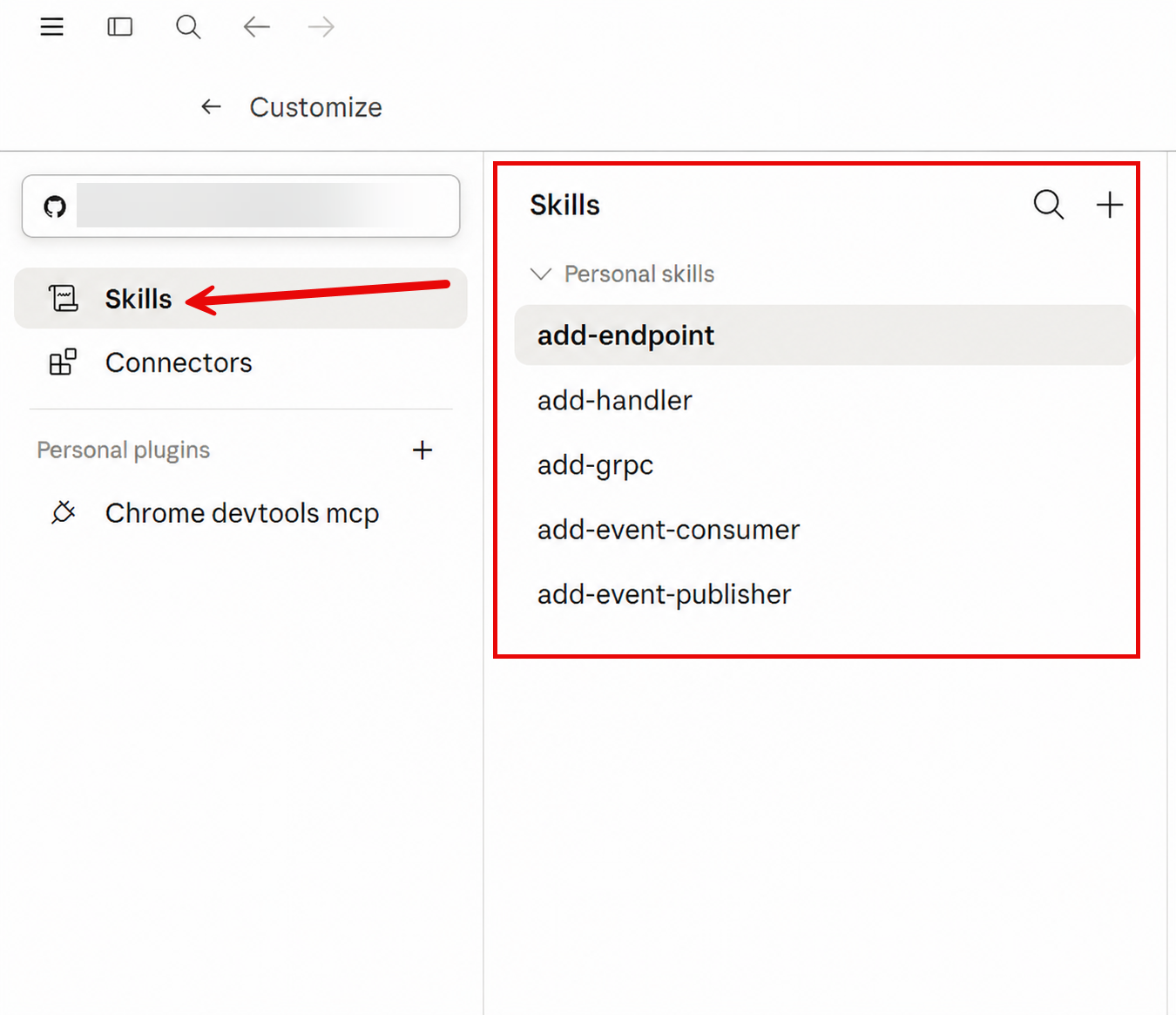
These skills get more powerful when you bundle real files with them.
A skill is a folder, so you can drop your actual code examples, Dockerfiles, docker-compose.yml files, CI pipeline scripts, and project templates right into it.
When Claude runs the skill, it adapts your existing files rather than inventing new ones.
new-service/ ├── SKILL.md ├── assets/ │ ├── Dockerfile │ ├── docker-compose.yml │ └── Module.csproj.template └── references/ └── project-structure.md
In Claude Code, the skill creator builds this for you. Point it at an existing service that you are happy with, and ask it to capture the structure:
markdownCreate a "new-service" skill from this module. Use the folder structure and the Dockerfile from @folder:src/Modules.Shipments as the template, and write instructions to reproduce it for a new module.
Claude copies the files into the skill's assets/ folder and writes the steps to reproduce them.
The next new service starts from your best existing one.
Before you build everything yourself, it is worth knowing that the .NET team has already published a large set of skills.
Ready-Made .NET Skills from Microsoft
You do not have to start from zero.
The .NET team at Microsoft publishes an official, open-source library of skills in the dotnet/skills repository. It is MIT-licensed and built on the open Agent Skills standard from agentskills.io, so the same skills work across Claude Code, Codex, GitHub Copilot and Cursor.
The repository ships 14 plugins with around 95 skills between them. A plugin is just a group of related skills.
Here are a few that are useful for everyday .NET work:
dotnet-aspnet- skills for ASP.NET Core, including creating Web API endpoints and file-upload endpoints in Minimal APIs.dotnet-data- theoptimizing-ef-core-queriesskill finds N+1 problems, fixes tracking modes, and removes common EF Core performance traps.dotnet-test- the largest plugin, with 22 skills for running, filtering, and migrating tests between frameworks.dotnet-upgrade- skills that migrate a project from .NET 8 to 9 to 10, and enable nullable reference types.dotnet-ai- skills for building, debugging, publishing, and testing MCP servers with the C# SDK.
Installing them in Claude Code takes four steps. Add the marketplace, install a plugin, restart, and list your skills:
bash/plugin marketplace add dotnet/skills /plugin install dotnet-aspnet@dotnet-agent-skills # restart Claude Code to load the plugin /skills
These official skills are a great base for general .NET tasks. Pair them with your own project skills, which capture the conventions that are unique to your codebase, and Claude has both the framework knowledge and your house rules.
Summary
Skills turn your repetitive conventions into instructions that AI follows every time.
Let's recap the key takeaways:
- A skill is a reusable instruction pack. It is a folder with a
SKILL.md, loaded on demand, so you write a recipe once instead of repeating it in every chat. - The description controls triggering. Say what the skill does, list the phrases that should trigger it, and say when not to use it.
CLAUDE.mdstates facts; a skill provides procedures. Use them together - the always-on context plus the step-by-step how-to.- Where you save a skill decides who gets it. In Claude Code, a
.claude/skills/folder in your repo shares the skill with your whole team through git. Desktop and Cowork cover personal and cloud use. - Encode your real conventions. Where code goes, rich versus anemic entities, repositories or none - capture the decisions you have already made, and bundle your real example files so Claude follows them.
- Reuse Microsoft's skills. The official
dotnet/skillslibrary gives you around 95 skills for common .NET tasks; add your own for what is unique to your project.
Skills do not replace your judgment. They capture it, so the AI applies it consistently across every feature, every developer, and every session.
If you want to go deeper, read these related articles:
- How to Build Production-Ready Projects with Claude Code
- How to Start a New .NET Project in 2026
- Building a Modular Monolith with Vertical Slice Architecture in .NET
Hope you find this newsletter useful. See you next time.

Comments