
.NET 10 and C# 14 were released on November 11, 2025.
Today, I want to show 10 reasons why you should consider upgrading your projects to .NET 10.
1. Long-Term Support (LTS) Release
Here is a lifecycle for the currently supported .NET versions:
.NET 10
- Release date: November 11, 2025
- Release type: LTS
- End of support: November 14, 2028
.NET 9
- Release date: November 12, 2024
- Release type: STS
- End of support: November 10, 2026
.NET 8
- Release date: November 14, 2023
- Release type: LTS
- End of support: November 10, 2026
As a Long-Term Support (LTS) release, .NET 10 will receive three years of support until November 14, 2028. This makes it a solid choice for production applications that need long-term stability.
Support for .NET 8 ends on November 10, 2026, so you should consider upgrading to .NET 10 as soon as possible.
2. Performance improvements in ASP.NET Core
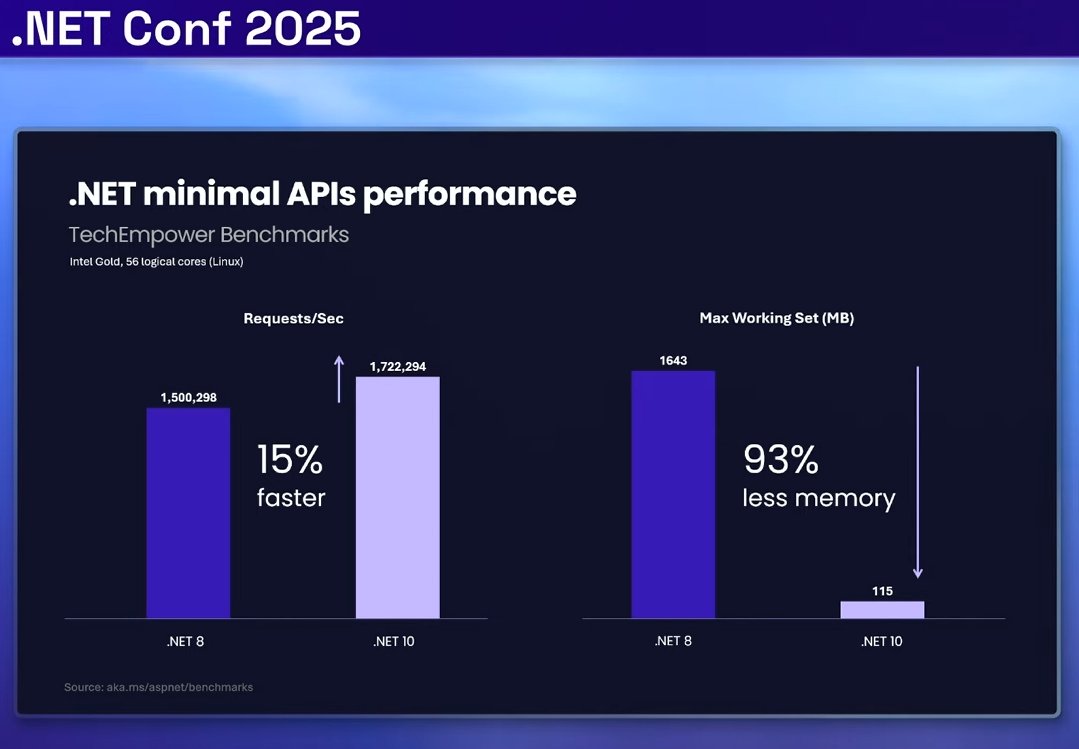
ASP.NET Core in .NET 10 received a major performance boost and can process 15% more requests per second compared to .NET 8.
In addition, ASP.NET Core now consumes 93% less memory than previous versions, significantly reducing the overall working set.
.NET 10 introduces significant garbage collection (GC) improvements, particularly through Dynamic Adaptation to Application Sizes (DATAS) and enhanced write barriers.
This automatically benefits both workstation and server GC modes (<ServerGarbageCollection> property in *csproj).
3. Performance improvements in .NET
Below are the most important and widely used .NET 10 performance improvements, with real % gains measured in the official benchmarks.
Lambdas & Closures
Used everywhere: LINQ, ASP.NET Core, callbacks
- 66% faster: 19.5 ns → 6.7 ns
- 73% fewer allocations: 88 B → 24 B
Temporary Arrays
Used everywhere: params, helpers, serializers
- 66% faster: 11.6 ns → 4.0 ns
- 100% allocation removed: 48 B → 0 B
Span & Buffer Operations
Used everywhere: JSON, IO, networking
- 91% faster: 9.8 ns → 0.9 ns
- 100% allocation removed
Array Loops Are Finally Faster Than Enumeration
Used everywhere: collections, hot loops
- 68% faster (
forloop): 1960 ns → 625 ns - 20% faster (
foreach)
LINQ Gets Faster Without Code Changes
Used everywhere: business logic
- 50% faster: 3.53 µs → 1.77 µs
Generic Code
Used everywhere: libraries, domain logic
- 46% faster: 2.82 ns → 1.51 ns
Number Formatting
Used everywhere: logging, serialization
- 36–45% faster
- Smaller generated code
Bounds Checks Are Removed More Often
Used everywhere: arrays, spans, strings
- Up to 100% bounds checks removed
- ~30% smaller code
Multiple Array Accesses Are Smarter
Used everywhere: loops and parsing
- 17–25% faster
- Fewer branches
Better Inlining Improves Everything Else
Used everywhere: hot methods
- 30–50% faster in affected paths
- Unlocks other optimizations
All these and hundreds of other performance improvements are available by just upgrading your project to .NET 10. Read the full article from Microsoft about all .NET 10 performance improvements.
4. File-Based Apps
The biggest addition in .NET 10 is support for file-based apps. This feature changes how you can write C# code for scripts and small utilities.
Traditionally, even the simplest C# application required three things: a solution file (sln), a project file (csproj), and your source code file (*.cs).
You would then use your IDE or the dotnet run command to build and run the app.
Starting with .NET 10, you can create a single *.cs file and run it directly:
bashdotnet run main.cs
This puts C# on equal with Python, JavaScript, TypeScript and other scripting languages. This makes C# a good option for CLI utilities, automation scripts, and tooling, without a project setup.
File-based apps can reference NuGet packages and SDKs using special # directives at the top of your file.
This lets you include any library you need without a project file.
You can even create a single-file app that uses EF Core and runs a Minimal API:
csharp#:sdk Microsoft.NET.Sdk.Web #:package Microsoft.EntityFrameworkCore.Sqlite@9.0.0 using Microsoft.EntityFrameworkCore; var builder = WebApplication.CreateBuilder(); builder.Services.AddDbContext<OrderDbContext>(options => { options.UseSqlite("Data Source=orders.db"); }); var app = builder.Build(); app.MapGet("/orders", async (OrderDbContext db) => { return await db.Orders.ToListAsync(); }); app.Run(); return; public record Order(string OrderNumber, decimal Amount); public class OrderDbContext : DbContext { public OrderDbContext(DbContextOptions<OrderDbContext> options) : base(options) { } public DbSet<Order> Orders { get; set; } }
You can also reference existing project files from your script:
csharp#:project ../ClassLib/ClassLib.csproj
Cross-Platform Shell Scripts
You can write cross-platform C# shell scripts that are executed directly on Unix-like systems.
Use the #! directive to specify the command to run the script:
bash#!/usr/bin/env dotnet
Then make the file executable and run it:
bashchmod +x app.cs ./app.cs
Converting to a Full Project
When your script grows and needs more structure, you can convert it to a regular project using the dotnet project convert command:
bashdotnet project convert app.cs
Note: Support for file-based apps with multiple files will likely come in future .NET releases.
5. Server-Sent Events (SSE)
Server-Sent Events (SSE) provide a lightweight, reliable way for ASP.NET Core apps to push continuous streams of data without the complexity of bidirectional protocols.
Server-Sent Events (SSE) is a web standard that enables a server to push real-time data to web clients over a single HTTP connection. Unlike traditional request-response patterns where clients must repeatedly poll the server for updates, SSE allows the server to initiate communication and send data whenever new information becomes available.
For sending Server-Sent Events, you need to provide a data stream via IAsyncEnumerable<T>.
Here's a service that generates stock price updates:
csharppublic record StockPriceEvent(string Id, string Symbol, decimal Price, DateTime Timestamp); public class StockService { public async IAsyncEnumerable<StockPriceEvent> GenerateStockPrices( [EnumeratorCancellation] CancellationToken cancellationToken) { var symbols = new[] { "MSFT", "AAPL", "GOOG", "AMZN" }; while (!cancellationToken.IsCancellationRequested) { var symbol = symbols[Random.Shared.Next(symbols.Length)]; var price = Math.Round((decimal)(100 + Random.Shared.NextDouble() * 50), 2); var id = DateTime.UtcNow.ToString("o"); yield return new StockPriceEvent(id, symbol, price, DateTime.UtcNow); await Task.Delay(TimeSpan.FromSeconds(2), cancellationToken); } } }
Use TypedResults.ServerSentEvents to create an endpoint that streams data:
csharpbuilder.Services.AddSingleton<StockService>(); app.MapGet("/stocks", (StockService stockService, CancellationToken ct) => { return TypedResults.ServerSentEvents( stockService.GenerateStockPrices(ct), eventType: "stockUpdate" ); });
Clients can connect to this endpoint and receive real-time updates as they're generated.
You can read an in-depth guide on Server-Sent Events with ASP.NET Core here.
6. Extension Members in C# 14
Extension members are my favorite feature in C# 14. They represent a modern evolution of extension methods that have been part of C# since version 3.0.
The new syntax separates the receiver (the type you're extending) from the members you're adding. Instead of putting this on each method parameter, you declare an extension block that specifies the receiver once:
csharppublic static class StringExtensions { extension(string value) { public bool IsNullOrEmpty() { return string.IsNullOrEmpty(value); } public string Truncate(int maxLength) { if (string.IsNullOrEmpty(value) || value.Length <= maxLength) return value; return value.Substring(0, maxLength); } } }
The extension block takes the receiver as a parameter.
Inside the block, you write your methods and properties just like they were actual members of the type.
The value parameter is available to all members within the block.
Both old and a new syntax compile to identical code, so they work the same way. You can even use both styles in the same static class.
The new extension syntax supports:
- Instance methods
- Instance properties
- Static methods
- Static properties
Extension properties make your code more readable and expressive. Instead of calling methods, you can use properties that feel more natural.
For example, when working with collections, you frequently check if they're empty.
Instead of writing !items.Any() everywhere, you can create an IsEmpty property:
csharppublic static class CollectionExtensions { extension<T>(IEnumerable<T> source) { public bool IsEmpty => !source.Any(); public bool HasItems => source.Any(); public int Count => source.Count(); } } public void ProcessOrders(IEnumerable<Order> orders) { if (orders.IsEmpty) { Console.WriteLine("No orders to process"); return; } foreach (var order in orders) { // Process order } }
You can read an in-depth guide on Extension Members in C# 14 here.
7. Validation and JSON Patch Support in Minimal APIs
To enable JSON Patch support with System.Text.Json, install the package:
bashdotnet add package Microsoft.AspNetCore.JsonPatch.SystemTextJson --prerelease
And you can now use JSON Patch in your Minimal APIs starting from .NET 10.
ASP.NET Core 10 adds built-in validation support for Minimal APIs. This feature automatically validates data sent to your endpoints, including query parameters, headers, and request bodies.
Register validation services by calling AddValidation:
csharpbuilder.Services.AddValidation();
The validation system automatically discovers types used in your Minimal API handlers and validates them using attributes from the System.ComponentModel.DataAnnotations namespace.
You can apply validation attributes directly to endpoint parameters:
csharpapp.MapPost("/products", ([Range(1, int.MaxValue)] int productId, [Required] string name) => { return TypedResults.Ok(new { productId, name }); });
Record types work with validation too:
csharppublic record Product( [Required] string Name, [Range(1, 1000)] int Quantity); app.MapPost("/products", (Product product) => { return TypedResults.Ok(product); });
When validation fails, the runtime automatically returns a 400 Bad Request response with details about the validation errors.
You can disable validation for specific endpoints:
csharpapp.MapPost("/products", (int productId, string name) => TypedResults.Ok(productId)) .DisableValidation();
You can customize error responses by implementing IProblemDetailsService and registering it in the dependency injection container.
This lets you create consistent, user-friendly error messages across your application.
8. LeftJoin and RightJoin Operators in EF 10
LEFT JOIN is common in database queries, but previous versions of EF Core made it complicated to write.
You needed to combine SelectMany, GroupJoin, and DefaultIfEmpty in a specific way.
.NET 10 adds first-class LINQ support for LeftJoin, making these queries much simpler:
csharpvar query = context.Students .LeftJoin( context.Departments, student => student.DepartmentID, department => department.ID, (student, department) => new { student.FirstName, student.LastName, Department = department.Name ?? "[NONE]" });
EF 10 also supports RightJoin, which keeps all data from the second collection and only matching data from the first.
Both methods translate to the appropriate SQL JOIN operations.
Note that C# query syntax (
from x select x.Id) doesn't yet support these operators.
9. Named Query Filters in EF 10
Global query filters let you define conditions that apply to all queries for an entity type. This simplifies implementing patterns like soft deletion and multi-tenancy.
Previously, EF Core supported only one query filter per entity type.
EF 10 introduces named query filters, letting you define multiple filters and control them independently:
csharpmodelBuilder.Entity<Blog>() .HasQueryFilter("SoftDeletionFilter", b => !b.IsDeleted) .HasQueryFilter("TenantFilter", b => b.TenantId == tenantId);
You can selectively disable specific filters in individual queries:
csharpvar allBlogs = await context.Blogs .IgnoreQueryFilters(["SoftDeletionFilter"]) .ToListAsync();
This gives you fine-grained control over which filters apply to each query.
You can read an in-depth guide on Named Query Filters with soft deletion and multitenancy use cases here.
10. Blazor Improvements
Blazor receives several improvements in .NET 10:
- Hot Reload for Blazor WebAssembly and .NET on WebAssembly
- Environment configuration in standalone Blazor WebAssembly apps
- Performance profiling and diagnostic counters for Blazor WebAssembly
NotFoundPageparameter for the Blazor router- Static asset preloading in Blazor Web Apps
- Improved form validation
You can see the complete list of ASP.NET Core 10 features here.
Additional resources for .NET 10:
- Breaking changes in .NET 10
- What's New in the .NET 10 SDK
- What's New in the .NET 10 runtime
- What's New in .NET libraries for .NET 10
- Performance Improvements in .NET 10
- What's New in .NET Aspire 13
P.S.: I recommend reading this article on getting started with .NET Aspire 13, the biggest release ever.
Summary
.NET 10 and C# 14 represent a significant step forward for the .NET ecosystem.
The file-based apps feature makes C# viable for scripting scenarios that were previously dominated by Python, Node.js and JavaScript.
Extension members give you flexibility by letting you add properties to types, not just methods.
The improvements to Minimal APIs, EF Core, and ASP.NET Core make it faster and more intuitive to build modern web applications.
As an LTS release, .NET 10 provides a stable foundation for both new and existing applications.
Whether you're building Web APIs, desktop applications, or CLI tools, this release offers features that improve productivity and code quality.
I have already migrated my commercial projects to .NET 10 and explored performance improvements right away.
Hope you find this newsletter useful. See you next time.
