You may need to integrate real-time updates in your .NET application from the backend to the frontend. You have a few options to implement this:
- Polling — frontend continuously checks the server for new data
- SignalR — frontend subscribes to an event, and the server sends this event using WebSockets
- Server-Sent Events (already available in .NET 10 preview)
Polling endpoints every few seconds can overload your server and waste bandwidth, while full-duplex WebSockets may be overkill for simple, one-way updates.
Server-Sent Events (SSE) provide a lightweight, reliable way for ASP.NET Core apps to push continuous streams of data without the complexity of bidirectional protocols.
Today, I want to show you how to use Server-Sent Events in .NET 10:
- How SSE works and why it matters
- Implementing an SSE endpoint with Minimal APIs
- Handling reconnections via the Last-Event-ID header
- Testing your SSE stream using an HTTP Request file in IDE
- Building a simple Frontend Application to test SSE
- Key differences between SSE and SignalR (WebSockets)
Let's dive in!
Join the public preview
What Are Server-Sent Events
Server-Sent Events (SSE) is a web standard that enables a server to push real-time data to web clients over a single HTTP connection. Unlike traditional request-response patterns where clients must repeatedly poll the server for updates, SSE allows the server to initiate communication and send data whenever new information becomes available.
Key Characteristics of SSE:
- Unidirectional Communication: Data flows only from server to client
- Built on HTTP/1.1: SSE works over plain HTTP, using the
text/event-streamMIME type. No special WebSocket handshake is needed. - Built-in Reconnection: Browsers automatically reconnect if the connection is lost
- Lightweight: Minimal overhead compared to other real-time solutions
Where is SSE supported?
Because SSE works over plain HTTP, all major browsers support it. You can also use HTTP request files in the IDE and tools like curl, Postman, Apidog to test SSE.
Common Use Cases:
- Live Data Feeds: Stock prices, sports scores, news updates
- Real-time Notifications: Social Media Notifications, system alerts, status updates
- Progress Tracking: File uploads, long-running operations
- Live Dashboards: Monitoring systems, analytics displays
SSE is perfect when you need to push updates from the server to the client, but don't require bidirectional communication. It's simpler to implement than WebSockets and works seamlessly with existing HTTP infrastructure.
Implementing SSE in ASP.NET Core 10
Starting in .NET 10 preview 4, ASP.NET Core adds support for Server-Sent Events.
Under the hood, it sets the Content-Type to text/event-stream, handles flushing, and integrates with cancellation.
You need to download a .NET 10 SDK preview to start using SSE
Let's create a StockService that generates an Async stream of stock price updates:
csharppublic record StockPriceEvent(string Id, string Symbol, decimal Price, DateTime Timestamp); public class StockService { public async IAsyncEnumerable<StockPriceEvent> GenerateStockPrices( [EnumeratorCancellation] CancellationToken cancellationToken) { var symbols = new[] { "MSFT", "AAPL", "GOOG", "AMZN" }; while (!cancellationToken.IsCancellationRequested) { // Pick a random symbol and price var symbol = symbols[Random.Shared.Next(symbols.Length)]; var price = Math.Round((decimal)(100 + Random.Shared.NextDouble() * 50), 2); var id = DateTime.UtcNow.ToString("o"); yield return new StockPriceEvent(id, symbol, price, DateTime.UtcNow); // Wait 2 seconds before sending the next update await Task.Delay(TimeSpan.FromSeconds(2), cancellationToken); } } }
This method yields an endless IAsyncEnumerable stream of StockPriceEvent items at a fixed interval.
We can use TypedResults.ServerSentEvents result to send Server-Sent Events.
Let's create a Minimal API endpoint that sends Stock Price updates SSE:
csharpbuilder.Services.AddSingleton<StockService>(); app.MapGet("/stocks", (StockService stockService, CancellationToken ct) => { return TypedResults.ServerSentEvents( stockService.GenerateStockPrices(ct), eventType: "stockUpdate" ); });
Reconnection Logic and the Last-Event-ID Header
One of SSE's most powerful features is automatic reconnection. When a connection drops, browsers automatically attempt to reconnect and can resume from where they left off using the Last-Event-ID header.
If the connection is lost, the browser will reopen the stream and include the Last-Event-ID:
httpLast-Event-ID: 20250616T150430Z
On the backend, we can inspect HttpRequest.Headers["Last-Event-ID"] to determine where to resume.
You can skip older items, replay missed entries, or log the reconnect event.
Here is how to implement such logic:
csharpapp.MapGet("/stocks2", ( StockService stockService, HttpRequest httpRequest, CancellationToken ct) => { // 1. Read Last-Event-ID (if any) var lastEventId = httpRequest.Headers.TryGetValue("Last-Event-ID", out var id) ? id.ToString() : null; // 2. Optionally log or handle resume logic if (!string.IsNullOrEmpty(lastEventId)) { app.Logger.LogInformation("Reconnected, client last saw ID {LastId}", lastEventId); } // 3. Stream SSE with lastEventId and retry var stream = stockService.GenerateStockPricesSince(lastEventId, ct) .Select(evt => { var sseItem = new SseItem<StockPriceEvent>(evt, "stockUpdate") { EventId = evt.Id }; return sseItem; }); return TypedResults.ServerSentEvents( stream, eventType: "stockUpdate" ); });
Here, we are creating SseItem and specifying the event identifier; this identifier will be sent from the client in the Last-Event-ID header when the reconnect happens.
Testing SSE Endpoint with an HTTP File
Almost every IDE (Visual Studio, Visual Studio Code, JetBrains Rider) supports HTTP request files, which you can use to test your API endpoints. And they support Server-Sent Events.
http@ServerSentEvents_HostAddress = http://localhost:5000 ### Test SSE stream from .NET 10 Minimal API GET {{ServerSentEvents_HostAddress}}/stocks Accept: text/event-stream
Let's run the application and send the request. You will get a new event as JSON every 2 seconds:
httpResponse code: 200 (OK); Time: 410ms (410 ms) event: stockUpdate data: {"id":"2025-06-16T05:31:10.5426180Z","symbol":"AMZN","price":122.67,"timestamp":"2025-06-16T05:31:10.5445659Z"} event: stockUpdate data: {"id":"2025-06-16T05:31:12.5838704Z","symbol":"AAPL","price":118.88,"timestamp":"2025-06-16T05:31:12.5838771Z"} event: stockUpdate data: {"id":"2025-06-16T05:31:14.5937683Z","symbol":"AAPL","price":104.01,"timestamp":"2025-06-16T05:31:14.593772Z"}
Our SSE endpoint is working as expected.
Now, let's build a simple frontend application to consume the SSE.
How to Subscribe to Server-Sent Events from the Frontend
You can consume Server-Sent Events on the frontend using the native EventSource API.
Let's create a simple HTML page that shows stock price updates with some Tailwind CSS styling:
csharp<!DOCTYPE html> <html lang="en"> <head> <meta charset="UTF-8" /> <title>Live Stock Ticker</title> <script src="https://cdn.tailwindcss.com"></script> <link href="styles.css" rel="stylesheet"> </head> <body class="bg-gray-50 min-h-screen p-8"> <div class="max-w-4xl mx-auto"> <h1 class="text-3xl font-bold text-gray-800 mb-6 flex items-center"> 📈<span class="ml-2">Live Stock Market Updates</span> </h1> <div class="bg-white rounded-lg shadow-md p-6"> <ul id="updates" class="divide-y divide-gray-200"></ul> </div> </div> <script src="scripts.js"></script> </body> </html>
We can use EventSource to subscribe to the "stockUpdate" event in JavaScript:
csharp// 1. Connect to the SSE endpoint const source = new EventSource('http://localhost:5000/stocks'); // 2. Listen for our named "stockUpdate" events source.addEventListener('stockUpdate', e => { // Parse the JSON payload const { symbol, price, timestamp } = JSON.parse(e.data); // Create and prepend a new list item with Tailwind classes const li = document.createElement('li'); li.classList.add('new', 'flex', 'justify-between', 'items-center'); // Create time element const timeSpan = document.createElement('span'); timeSpan.classList.add('text-gray-500', 'text-sm'); timeSpan.textContent = new Date(timestamp).toLocaleTimeString(); // Create symbol element const symbolSpan = document.createElement('span'); symbolSpan.classList.add('font-medium', 'text-gray-800'); symbolSpan.textContent = symbol; // Create price element const priceSpan = document.createElement('span'); priceSpan.classList.add('font-bold', 'text-green-600'); priceSpan.textContent = `$${price}`; // Append all elements to the list item li.appendChild(timeSpan); li.appendChild(symbolSpan); li.appendChild(priceSpan); const list = document.getElementById('updates'); list.prepend(li); // Remove highlight after a moment setTimeout(() => li.classList.remove('new'), 2000); }); // 3. Handle errors & automatic reconnection source.onerror = err => { console.error('SSE connection error:', err); }; // 4. (Optional) Inspect the last-received event ID source.onmessage = e => { console.log('Last Event ID now:', source.lastEventId); };
How it works:
new EventSource(url)opens a persistent HTTP connection to the/stocksendpoint with Accept header:text/event-stream.addEventListener('stockUpdate', …)listens for the stockUpdate event.source.lastEventId— represents the last event's id: value, which you can use for debugging or custom logic.- Automatic reconnection — if the connection drops, the browser waits for the server's retry interval before reopening, sending Last-Event-ID automatically.
To be able to test this locally, we need to allow CORS policies in Program.cs in development mode:
csharpif (builder.Environment.IsDevelopment()) { builder.Services.AddCors(options => { options.AddPolicy("AllowFrontend", policy => { policy.WithOrigins("*") .AllowAnyHeader() .AllowAnyMethod(); }); }); } var app = builder.Build(); if (app.Environment.IsDevelopment()) { app.UseCors("AllowFrontend"); }
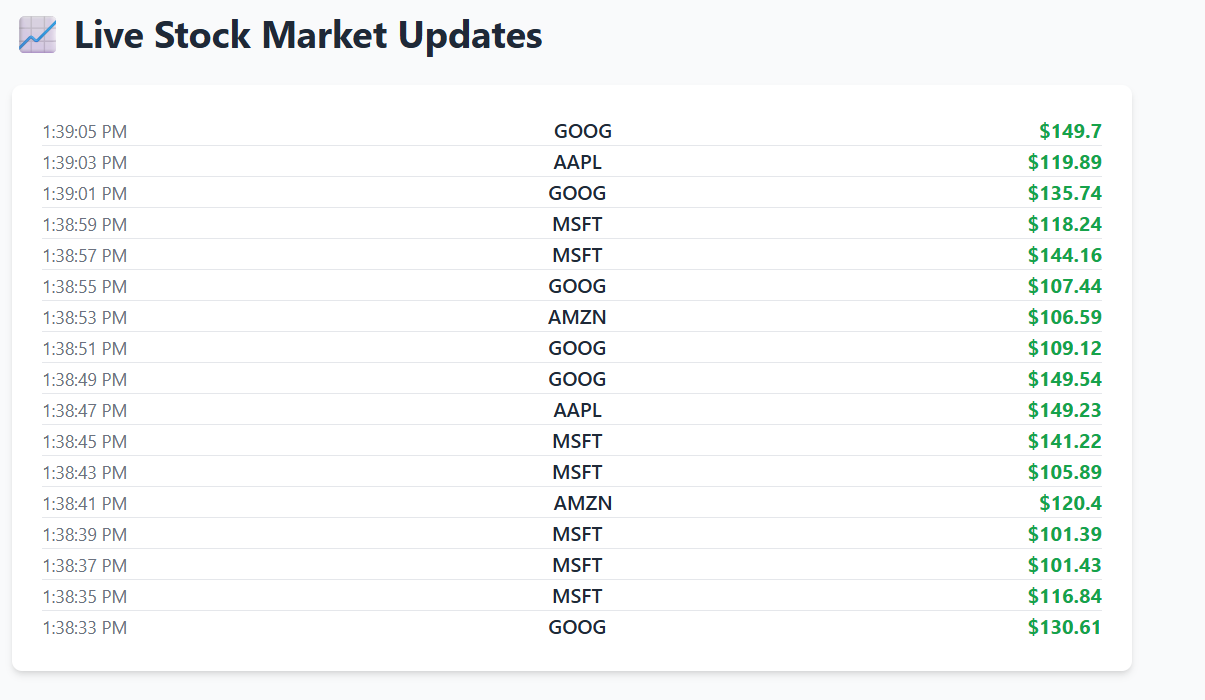
This is what our page looks like where we receive stock updates every 2 seconds:
And this is what it looks like in the web browser DevTools in the Network tab:
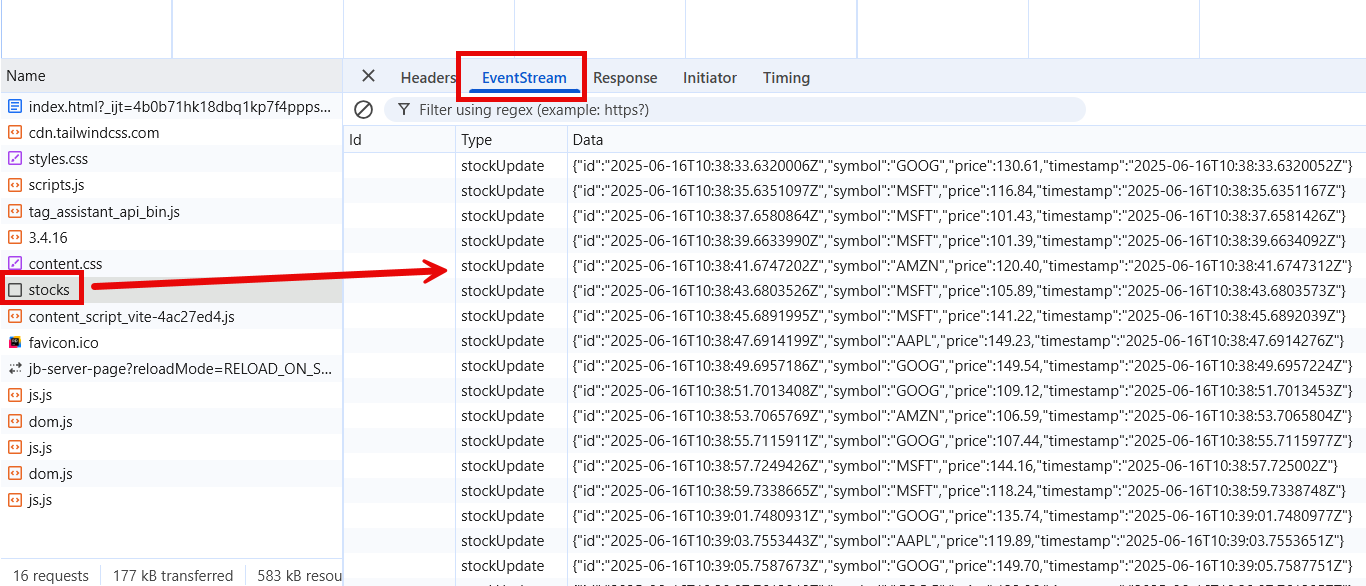
SSE works over plain HTTP/1, and web browsers natively support it; it's very easy to debug and test these events. If you have ever tried to view or debug WebSocket events, it's not that simple and requires 3rd party software tools.
SSE vs. SignalR (WebSockets)
While both Server-Sent Events (SSE) and SignalR enable real-time messaging in ASP.NET Core, they target different scenarios and trade-off complexity, features, and resource usage.
Here is the difference between them:
Protocol:
- SSE: HTTP/1.1 streaming (text/event-stream)
- SignalR: WebSocket (with HTTP fallback transports)
Communication direction:
- SSE: Unidirectional (server → client only)
- SignalR: Full-duplex (bi-directional)
Browser support:
- SSE: Native in most modern browsers
- SignalR: Native WebSocket + fallback via Long Polling
Connection overhead:
- SSE: Single HTTP request, minimal framing
- SignalR: WebSocket handshake + frame management
Automatic reconnect:
- SSE: Built-in configurable retries
- SignalR: Built-in configurable retries
Message types:
- SSE: text only
- SignalR: binary or text
Server API:
- SSE: Minimal:
TypedResults.ServerSentEvents - SignalR: Rich: Hubs, strongly-typed methods, groups
Scalability:
- SSE: Scales like any HTTP endpoint
- SignalR: Scales with backplane (Redis/Azure SignalR)
Use cases:
- SSE: One-way updates: notifications, alerts, stock tickers, logs
- SignalR: Interactive: chat apps, collaborative tools, live dashboards with user input
Summary
Server-Sent Events is an easy-to-integrate alternative to SignalR when you only need to push updates from the server to the client.
When to Choose SSE:
-
You only need server → client updates. If your clients never need to send messages back over the same channel, SSE is simpler.
-
Lightweight streaming. For dashboards, live metrics, logs, or stock-ticker feeds, SSE's minimal framing and HTTP base make it easy to manage and debug.
-
Non-complex implementation. Native browser support and built-in ASP.NET Core classes utilities you to build SSE driven applications with ease.
When to Choose SignalR:
-
Bi-directional communication. Chat rooms, collaborative whiteboards, or any scenario where clients push messages to the server and vice versa require WebSockets.
-
Advanced features. SignalR Hubs lets you call methods on groups of connections, manage user identities, and broadcast to subsets of clients with minimal code.
-
Scale-out support. If you expect to run your app on multiple servers or in a cloud environment, SignalR's Redis or Azure backplane integrations handle connection routing and message distribution automatically.
Hope you find this newsletter useful. See you next time.

Comments