
I was working on a payment system that processes mass payments, splitting a single payment request across multiple recipient accounts.
Everything worked fine in testing, but when we moved to production with real data volumes, our API started taking seconds to process a single payment request across a few thousand accounts.
In this post, I want to walk you through the steps to resolve this performance issue. I increased performance by 15x with 1 line of code in EF Core.
Let's dive in!
Real-World Payment System
Let's explore the real-world payment system I have been working on.
It was a mass payment system that allowed customers to pay on multiple accounts at once. The payment amount is distributed across all eligible accounts.
Some payments were even spread to thousands of accounts.
Here is the create-payment endpoint:
csharppublic record CreatePaymentRequest( decimal Amount, string GroupingProperty, string? Currency, string? CustomerId, string? CustomerName, string? PaymentMethod, string? Description); public record CreatePaymentResponse( string PaymentBatchReference, decimal TotalAmount, int PaymentsCreated, decimal AmountDistributed, decimal RemainingAmount, List<PaymentInfo> Payments); public record PaymentInfo( Guid PaymentId, string PaymentReference, decimal Amount, string RecipientName, string Status); public class CreatePaymentEndpoint : ICarterModule { public void AddRoutes(IEndpointRouteBuilder app) { app.MapPost("/api/payments/create-payment", HandleCreatePaymentAsync) .WithName("CreatePayment") .WithTags("Payments") .WithOpenApi(); } }
This endpoint accepts a CreatePaymentRequest that contains a GroupingProperty field. This field identifies which accounts should receive the payment.
The first step is to retrieve all eligible accounts from the database:
csharpprivate static async Task<List<PaymentAccount>> RetrievePaymentAccountsAsync( PaymentsDbContext dbContext, string groupingProperty, CancellationToken cancellationToken) { return await dbContext.PaymentAccounts .Where(x => x.GroupingProperty == groupingProperty) .Where(x => x.PaidAmount < x.AmountToPay) .OrderBy(x => x.Id) .ToListAsync(cancellationToken); }
We search the payment_accounts table for accounts that have not been fully paid yet.
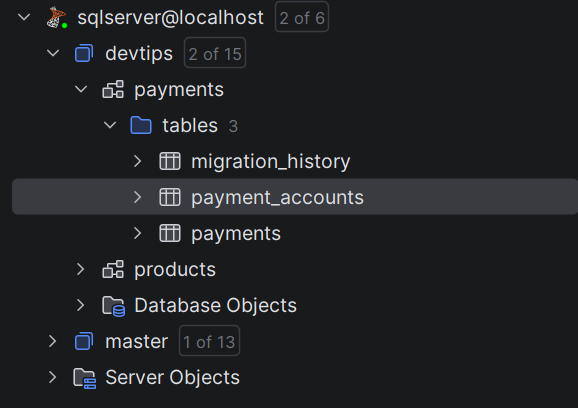
The next step is to insert the payment records into the payments table:
csharpprivate static async Task<Results<Ok<CreatePaymentResponse>, BadRequest<string>>> HandleCreatePaymentAsync( CreatePaymentRequest request, PaymentsDbContext dbContext, CancellationToken cancellationToken) { var paymentAccounts = await RetrievePaymentAccountsAsync( dbContext, request.GroupingProperty, cancellationToken); if (paymentAccounts.Count == 0) { return TypedResults.BadRequest( $"No payment accounts found for grouping property: {request.GroupingProperty}"); } var batchReference = GeneratePaymentBatchReference(); var distributionResult = CreatePaymentsForAccounts( request, paymentAccounts, batchReference); // Use standard SaveChangesAsync method dbContext.Payments.AddRange(distributionResult.Payments); await dbContext.SaveChangesAsync(cancellationToken); var response = MapToResponse(request, distributionResult, batchReference); return TypedResults.Ok(response); }
Here, we use the SaveChangesAsync method to insert the payments into the database.
I use SQL Server as the database provider:
csharpservices.AddDbContext<PaymentsDbContext>((_, options) => { options.UseSqlServer(connectionString, dbOptions => { dbOptions.MigrationsHistoryTable( DatabaseConsts.MigrationHistoryTable, DatabaseConsts.Schema); }); options.UseSnakeCaseNamingConvention(); });
Let's run the application and test the request performance from Postman:
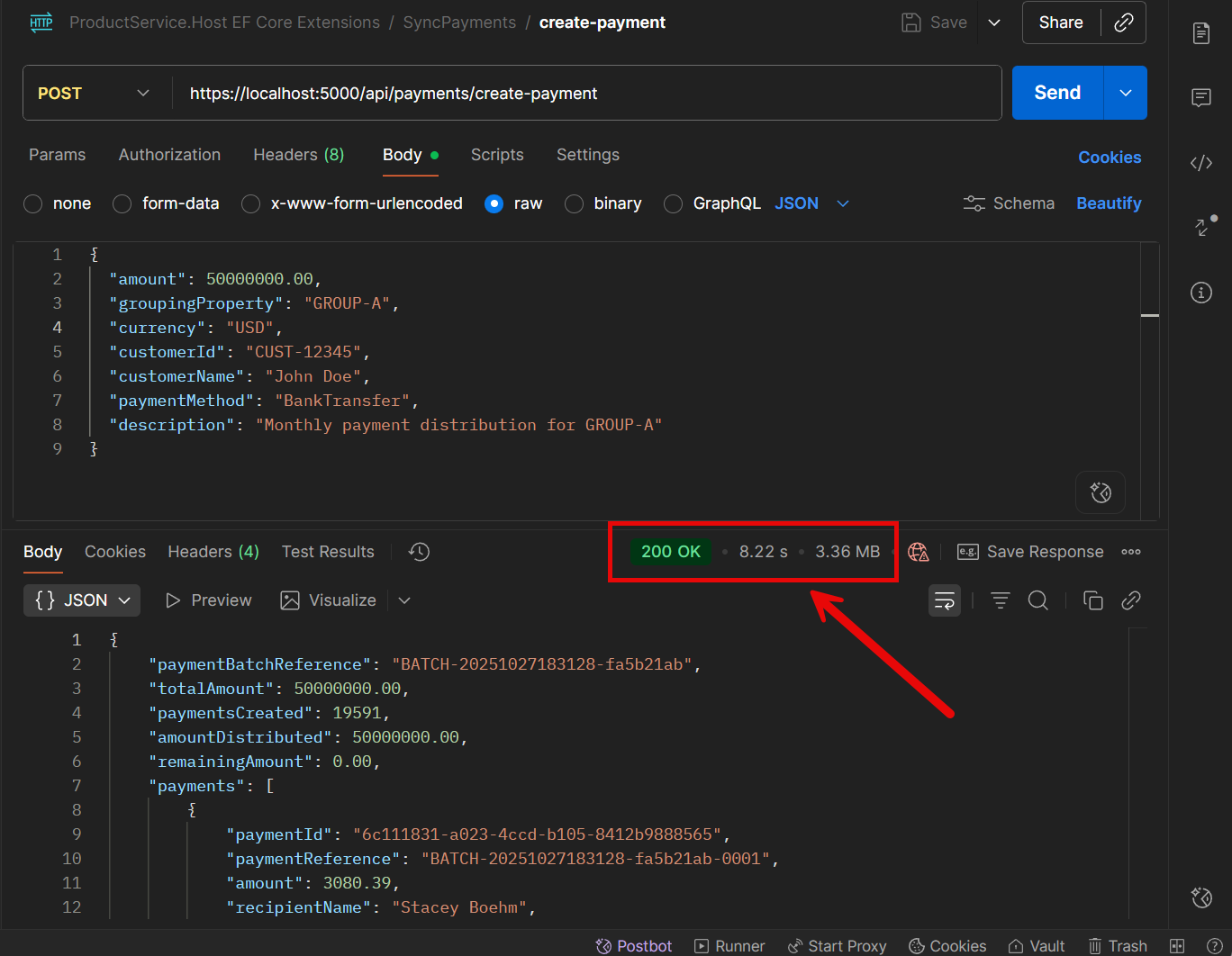
I tested the request with 19,000 accounts, and it took 8.22 seconds to process. Our p99 SLA was 1 second. The API was 8x slower than the SLA requirement.
The problem is with the SaveChangesAsync method.
In many databases, EF Core batches multiple inserts into a single command. But the database still executes these inserts one by one.
For SQL Server - EF Core uses a MERGE statement to insert multiple rows at once.
This is a similar strategy that Entity Framework Extensions introduced back in 2014.
However, EF Core's approach is limited by the number of SQL parameters (2,100 per batch). Performance drops quickly when entities have many columns.
I spent a day optimizing the code, but could not meet the SLA requirements.
How I Increased the Performance by 15X with 1 Line of Code with Entity Framework Extensions
Here is where I found the Entity Framework Extensions library.
Entity Framework Extensions library offers simpler, more elegant and configurable options for bulk inserts that allow inserting thousands of records in a single database call.
To get started with Entity Framework Extensions, install the following NuGet package:
bashdotnet add package Z.EntityFramework.Extensions.EFCore
Entity Framework Extensions allows you to bulk insert thousands of entities with a single line of code with the BulkInsertAsync method:
csharp// @nuget: Z.EntityFramework.Extensions.EFCore using Z.EntityFramework.Extensions; var paymentAccounts = await RetrievePaymentAccountsAsync(dbContext, request.GroupingProperty, cancellationToken); if (paymentAccounts.Count == 0) { return TypedResults.BadRequest($"No payment accounts found for grouping property: {request.GroupingProperty}"); } var batchReference = GeneratePaymentBatchReference(); var distributionResult = CreatePaymentsForAccounts(request, paymentAccounts, batchReference); // Bulk insert - one line of code with Entity Framework Extensions await dbContext.BulkInsertAsync(distributionResult.Payments, cancellationToken); var response = MapToResponse(request, distributionResult, batchReference); return TypedResults.Ok(response);
BulkInsert from Entity Framework Extensions lets you insert thousands of records in a single database call.
Both BulkInsert and BulkInsertAsync methods are available.
csharp// @nuget: Z.EntityFramework.Extensions.EFCore using Z.EntityFramework.Extensions; // Synchronous usage with Entity Framework Extensions dbContext.BulkInsert(payments); // Asynchronous usage with Entity Framework Extensions await dbContext.BulkInsertAsync(payments);
Entity Framework Extensions goes further by using SqlBulkCopy under the hood, which is much faster for large datasets in SQL Server.
It's even faster than using a native MERGE statement, especially when entities have many columns.
IncludeGraph option in Entity Framework Extensions lets you bulk insert an entire object graph without manually saving each level:
csharp// @nuget: Z.EntityFramework.Extensions.EFCore using Z.EntityFramework.Extensions; var productCarts = GenerateProductCarts(10_000); // Bulk insert with IncludeGraph option - one line of code with Entity Framework Extensions await dbContext.BulkInsertAsync(productCarts, options => options.IncludeGraph = true); private static List<ProductCart> GenerateProductCarts(int count) { var users = GenerateUsers(100); var products = GenerateProducts(200); return GenerateProductCarts(products, users, count); }
Let's run the application and test the request performance from Postman:
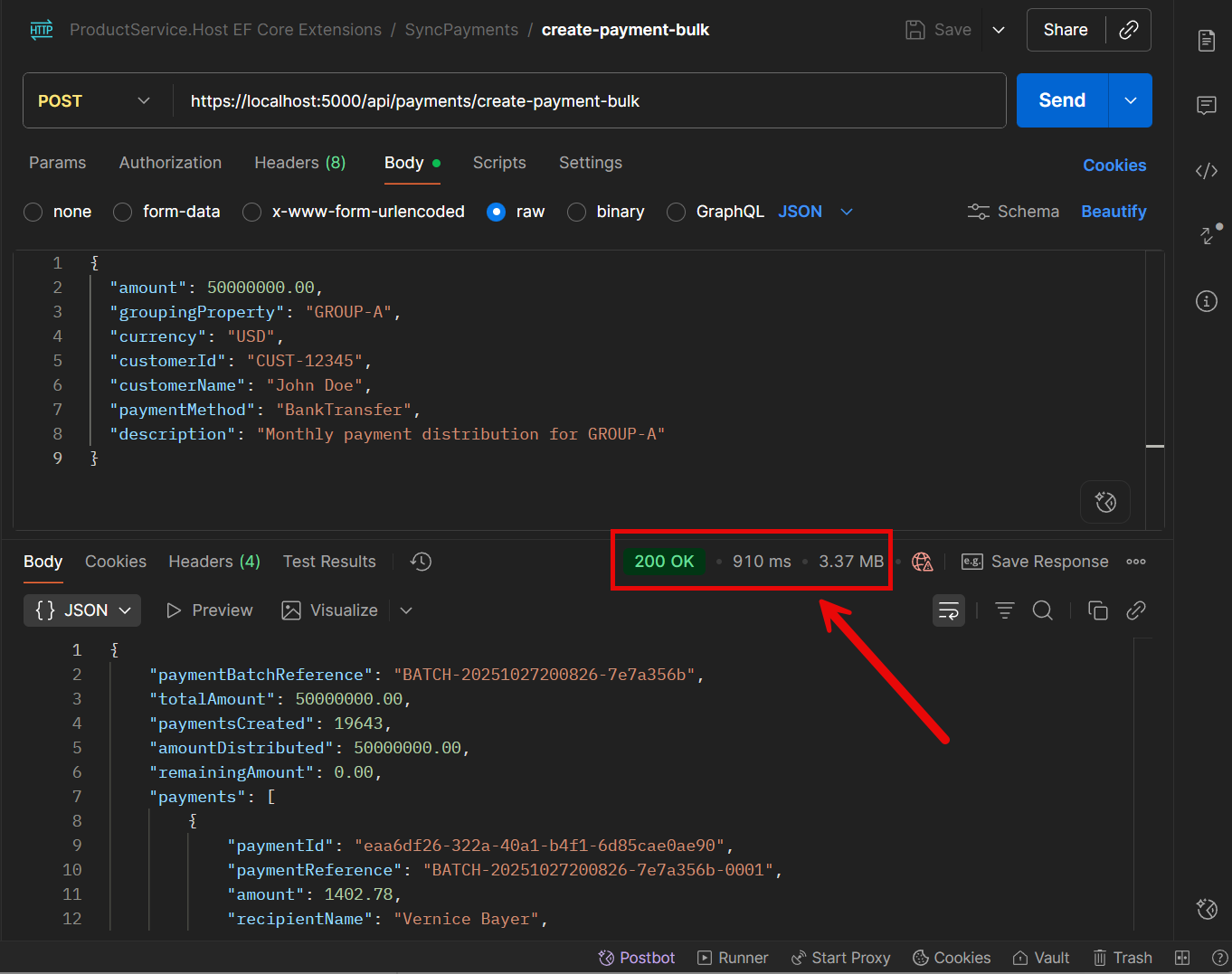
The request now takes 910 ms to process. That's finally under our SLA.
I continued to explore the Entity Framework Extensions library documentation and found the BulkInsertOptimized method.
If you don't need to return identity or other output values after insertion, you can use the BulkInsertOptimized method from Entity Framework Extensions.
Under the hood, Entity Framework Extensions uses a temporary table when outputting values.
Instead, BulkInsertOptimized uses the BulkCopy strategy directly into the destination table.
In general, BulkInsertOptimized acts the same as the BulkInsert method with the AutoMapOutputDirection = false option.
But the main difference is that BulkInsertOptimized provides hints and recommendations for better performance. It returns the following object:
csharp// @nuget: Z.EntityFramework.Extensions.EFCore using Z.EntityFramework.Extensions; public class BulkOptimizedAnalysis { /// <summary>True if the bulk insert is optimized.</summary> public bool IsOptimized { get; } /// <summary>Gets a text containing all tips to optimize the bulk insert method.</summary> public string TipsText { get; } /// <summary>Gets a list of tips to optimize the bulk insert method.</summary> public List<string> Tips { get; } }
Let's use the BulkInsertOptimized method to optimize the CreatePayment endpoint:
csharp// @nuget: Z.EntityFramework.Extensions.EFCore using Z.EntityFramework.Extensions; var paymentAccounts = await RetrievePaymentAccountsAsync(dbContext, request.GroupingProperty, cancellationToken); if (paymentAccounts.Count == 0) { return TypedResults.BadRequest($"No payment accounts found for grouping property: {request.GroupingProperty}"); } var batchReference = GeneratePaymentBatchReference(); var distributionResult = CreatePaymentsForAccounts(request, paymentAccounts, batchReference); // Bulk insert optimized - one line of code with Entity Framework Extensions await dbContext.BulkInsertOptimizedAsync(distributionResult.Payments, cancellationToken); var response = MapToResponse(request, distributionResult, batchReference); return TypedResults.Ok(response);
Let's run the application and test the request performance from Postman:
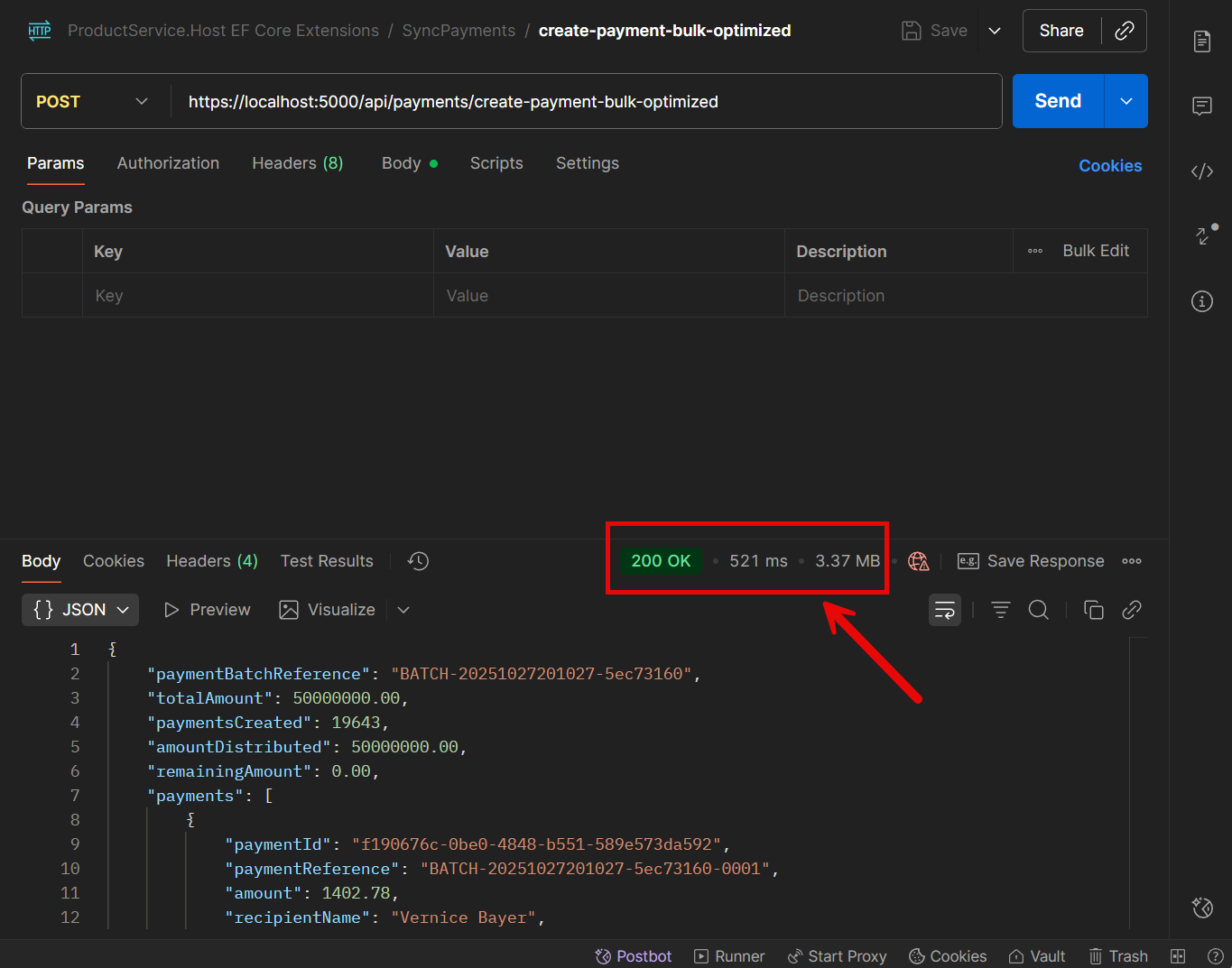
The request now takes 521 ms to process, which is almost 2x faster than the BulkInsert method from Entity Framework Extensions.
When comparing the SaveChanges and BulkInsertOptimized methods, we find that BulkInsertOptimized is 15x faster.
And it took only 1 line of code to increase the performance!
How EF Core Extensions Library Saved Me Hours of Development
In our Payment system, we faced another problem.
Each day at midnight, our service synchronizes payments with an external system to ensure that no payment requests are missed.
We need to update the ExternalStatus for the existing payments and insert new payments that were paid from another service.
Here is the sync-payments endpoint:
csharppublic record SyncPaymentsRequest( DateTime SyncDateTime, List<SyncPaymentItem> Payments); public record SyncPaymentItem( string AccountNumber, PaymentStatus Status); public class SyncPaymentsEndpoint : ICarterModule { public void AddRoutes(IEndpointRouteBuilder app) { app.MapPost("/api/payments/sync-payments", HandleSyncPaymentsAsync) .WithName("SyncPayments") .WithTags("Payments") .WithOpenApi(); } private static async Task<Results<Ok, BadRequest<string>>> HandleSyncPaymentsAsync( SyncPaymentsRequest request, PaymentsDbContext dbContext, CancellationToken cancellationToken) { var existingPayments = await RetrievePaymentsByAccountNumbersAsync(dbContext, request.SyncDateTime, request.Payments, cancellationToken); var syncItems = PreparePaymentsForSync(existingPayments, request.Payments, request.SyncDateTime); await MergePaymentsAsync(syncItems, cancellationToken: cancellationToken); return TypedResults.Ok(); } }
Here are the steps we need to take to sync the payments:
- Retrieve all payments that were paid on the same day as the
SyncDateTime - Update the
ExternalStatusfor the existing payments - Insert new payments that were paid from another service
- Save all changes to the database
A typical MergePaymentsAsync implementation would look like this:
csharpprivate static async Task MergePaymentsAsync( PaymentsDbContext dbContext, List<Payment> paymentsToMerge, CancellationToken cancellationToken) { var paymentIds = paymentsToMerge.Select(p => p.Id).ToList(); var existingPaymentIds = await dbContext.Payments .Where(p => paymentIds.Contains(p.Id)) .Select(p => p.Id) .ToHashSetAsync(cancellationToken); var paymentsToUpdate = paymentsToMerge .Where(p => existingPaymentIds.Contains(p.Id)) .ToList(); var paymentsToInsert = paymentsToMerge .Where(p => !existingPaymentIds.Contains(p.Id)) .ToList(); foreach (var payment in paymentsToUpdate) { dbContext.Payments.Update(payment); } if (paymentsToInsert.Count > 0) { dbContext.Payments.AddRange(paymentsToInsert); } await dbContext.SaveChangesAsync(cancellationToken); }
Here are a few problems with this manual approach:
- The
MergePaymentsAsyncmethod is very long and hard to read. - The
paymentIds.Contains(p.Id)is slow when used with many ids, even with an index. You can also hit a database limit with the number of ids - theWHERE INclause in SQL Server has a limit of a few thousand parameters SaveChangesAsyncis slow when used with thousands or tens of thousands of rows
The Entity Framework Extensions library solves all these problems with ease.
Entity Framework Extensions provides a WhereBulkContains method that allows you to filter a list of entities by a large list of values:
csharp// @nuget: Z.EntityFramework.Extensions.EFCore using Z.EntityFramework.Extensions; private static async Task<List<Payment>> RetrievePaymentsByAccountNumbersAsync( PaymentsDbContext dbContext, DateTime syncDateTime, List<SyncPaymentItem> paymentItems, CancellationToken cancellationToken) { var startOfDay = syncDateTime.Date; var endOfDay = startOfDay.AddDays(1).AddTicks(-1); var accounts = paymentItems .Select(x => new { RecipientAccountNumber = x.AccountNumber }) .ToList(); return await dbContext.Payments .Where(x => x.LastSyncDate == null || (x.LastSyncDate >= startOfDay && x.LastSyncDate <= endOfDay)) .WhereBulkContains(accounts, x => x.RecipientAccountNumber) .ToListAsync(cancellationToken); }
WhereBulkContains method is much faster than the Contains method.
You do not need to worry about the number of ids you pass or hitting database parameter limits.
And the MergePaymentsAsync method can be simplified to just one line of code:
csharp// @nuget: Z.EntityFramework.Extensions.EFCore using Z.EntityFramework.Extensions; private static async Task<Results<Ok, BadRequest<string>>> HandleSyncPaymentsAsync( SyncPaymentsRequest request, PaymentsDbContext dbContext, CancellationToken cancellationToken) { var existingPayments = await RetrievePaymentsByAccountNumbersAsync(dbContext, request.SyncDateTime, request.Payments, cancellationToken); var syncItems = PreparePaymentsForSync(existingPayments, request.Payments, request.SyncDateTime); // Perform a bulk merge - one line of code with Entity Framework Extensions await dbContext.BulkMergeAsync(syncItems, options => options.ColumnPrimaryKeyExpression = c => c.RecipientAccountNumber, cancellationToken: cancellationToken); return TypedResults.Ok(); }
BulkMergeAsync from Entity Framework Extensions performs an upsert operation, inserting new records and updating existing ones.
It is a much faster alternative to SaveChangesAsync.
Both sync BulkMerge and async BulkMergeAsync methods are available.
csharp// @nuget: Z.EntityFramework.Extensions.EFCore using Z.EntityFramework.Extensions; // Synchronous usage with Entity Framework Extensions dbContext.BulkMerge(payments); // Asynchronous usage with Entity Framework Extensions await dbContext.BulkMergeAsync(payments);
Let's run the application and test the sync request performance from Postman:
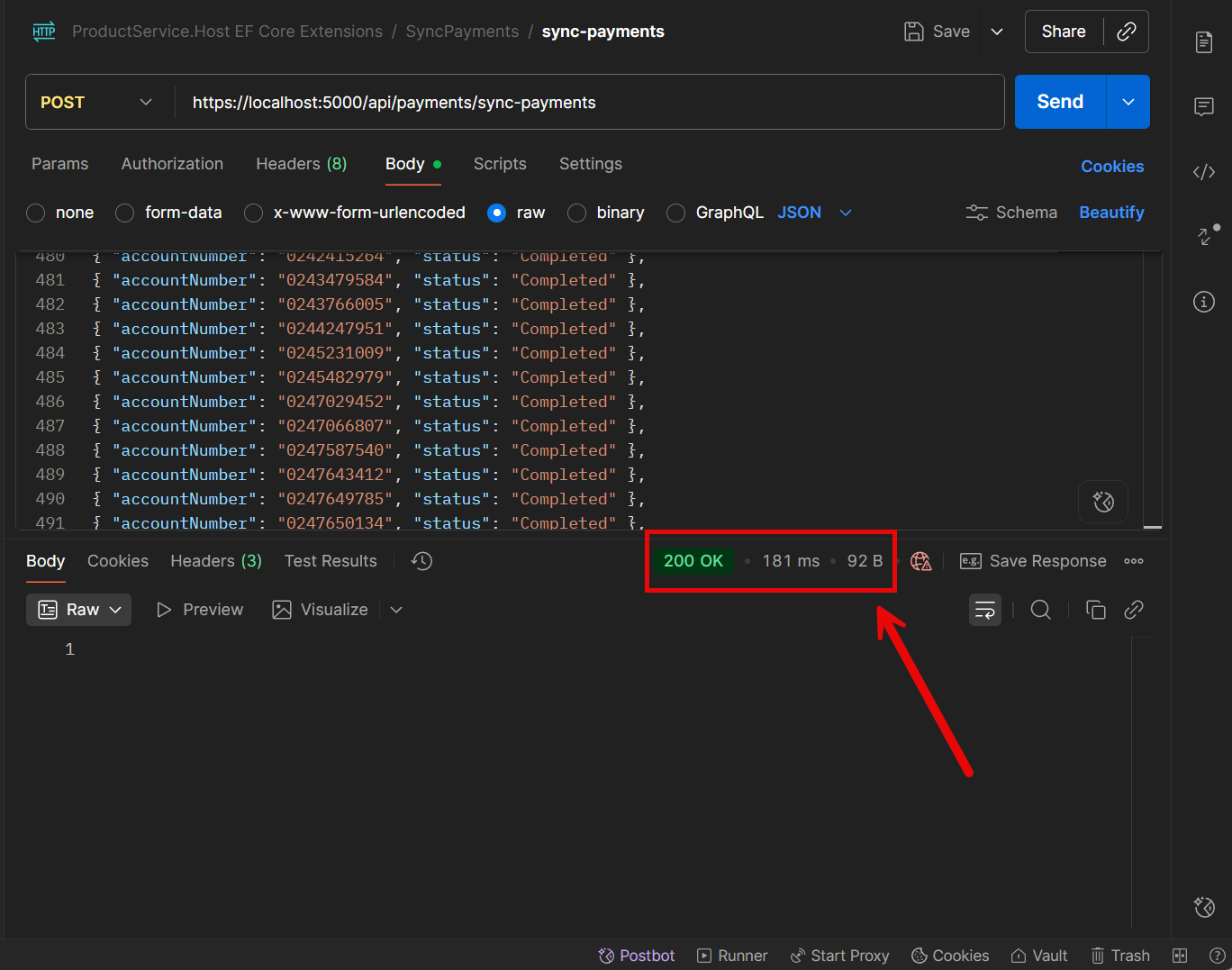
For 500 synced records, it took only 181 ms.
Here is why Entity Framework Extensions is a better fit than the manual merge approach:
- Fewer database round trips: one operation for upsert instead of multiple separate queries (inserts and updates).
- Stable performance with large batches: no IN clause limits, no 2,100-parameter trap that EF Core has
- Flexible when requirements change: you can change how the merge matches or updates with options, instead of rewriting the entire flow.
Here are examples of flexible options you can toggle later without refactoring the sync flow: Match by a different key or composite key if the business key changes:
csharpoptions => options.ColumnPrimaryKeyExpression = p => new { p.CustomerId, p.RecipientAccountNumber }
Summary
Building a high-performance real-world apps requires careful attention to how you handle bulk database operations.
Entity Framework Extensions transformed our production API from an 8-second bottleneck into a 500ms success story with minimal code changes.
The library's BulkInsert and BulkInsertOptimized methods delivered a 15x performance improvement by using bulk inserts with minimal database round trips.
This eliminated the performance issues caused by EF Core's default SaveChanges method when processing thousands of records.
The BulkMerge method further simplified our daily payment sync operations, replacing complex manual merge logic with a single line of code.
Entity Framework Extensions offers flexible configuration options that adapt easily to changing requirements. For production systems handling large datasets, Entity Framework Extensions provides a reliable, well-tested solution that scales with your needs.
The investment in this library pays off quickly through improved performance, reduced development time, and simplified maintenance.
If you often work with big data in .NET, give Entity Framework Extensions a try — it may become your go-to choice for bulk operations in EF Core.
Many thanks to ZZZ Projects for sponsoring this blog post.
Hope you find this newsletter useful. See you next time.

Comments