A while ago, I published an article about ASP.NET Core Integration Testing Best Practices. WebApplicationFactory, TestContainers, and Respawn simplifies integration testing in .NET Core applications.
But .NET Aspire simplifies the process further for distributed applications.
.NET Aspire replaces both WebApplicationFactory and TestContainers with a single tool: DistributedApplicationTestingBuilder.
You no longer need to set up Docker containers manually or override environment variables.
Aspire handles service discovery, container orchestration, and connection strings for you.
In this post, I will share the best practices I discovered while writing integration tests for a distributed Aspire application with multiple APIs, PostgreSQL, and Redis.
In this post, we will explore:
- The System We Will Be Testing
- Best Practice 1: Use DistributedApplicationTestingBuilder Instead of WebApplicationFactory
- Best Practice 2: Share the App Instance Across Tests with ICollectionFixture
- Best Practice 3: Wait for Resources to Be Healthy
- Best Practice 4: Wait for Services to Start before Running Tests
- Best Practice 5: Cleanup Database Between Tests
- Best Practice 6: Test your API Contracts
- Best Practice 7: Test Error Responses and Cross-Service Communication
Let's dive in.
The System We Will Be Testing
I have built a distributed system with two APIs orchestrated by .NET Aspire:
- Products API: manages products, supports CRUD operations and purchasing. Uses PostgreSQL and Redis for caching. Calls the Stocks API to check and update stock levels during purchases.
- Stocks API: manages stock inventory for products. Uses PostgreSQL.
Both APIs share the same PostgreSQL server but use separate database schemas.
Here is the Aspire AppHost that defines the architecture:
csharpvar builder = DistributedApplication.CreateBuilder(args); var postgres = builder.AddPostgres("postgres") .WithDataVolume(isReadOnly: false); var redis = builder.AddRedis("cache"); var stocksApi = builder.AddProject<Projects.Stocks_Api>("stocks-api") .WithReference(postgres) .WaitFor(postgres) .WithExternalHttpEndpoints(); builder.AddProject<Projects.Products_Api>("products-api") .WithReference(stocksApi) .WaitFor(stocksApi) .WithReference(postgres) .WaitFor(postgres) .WithReference(redis) .WaitFor(redis) .WithExternalHttpEndpoints(); builder.Build().Run();
The Products API depends on the Stocks API for inter-service communication.
When a user purchases a product, the Products API calls the Stocks API via HTTP to verify stock availability and update the count.
Both APIs use EF Core with PostgreSQL and run database migrations on startup.
Now let's explore how to write integration tests for this system.
Best Practice 1: Use DistributedApplicationTestingBuilder Instead of WebApplicationFactory
In my previous article, I used WebApplicationFactory together with TestContainers to spin up Docker containers for PostgreSQL and RabbitMQ.
With .NET Aspire, you don't need either of these.
Aspire provides DistributedApplicationTestingBuilder, which replaces both tools with a single, unified approach.
With the traditional approach, your test project references the API project directly:
xml<ProjectReference Include="..\Products.Api\Products.Api.csproj" />
With Aspire, your test project references the Aspire AppHost project instead:
xml<ProjectReference Include="..\AspireNetConf.AppHost\AspireNetConf.AppHost.csproj" />
This means you test the entire distributed application, not just a single API in isolation.
To create a test project, you can use the ready Aspire Test Project template:
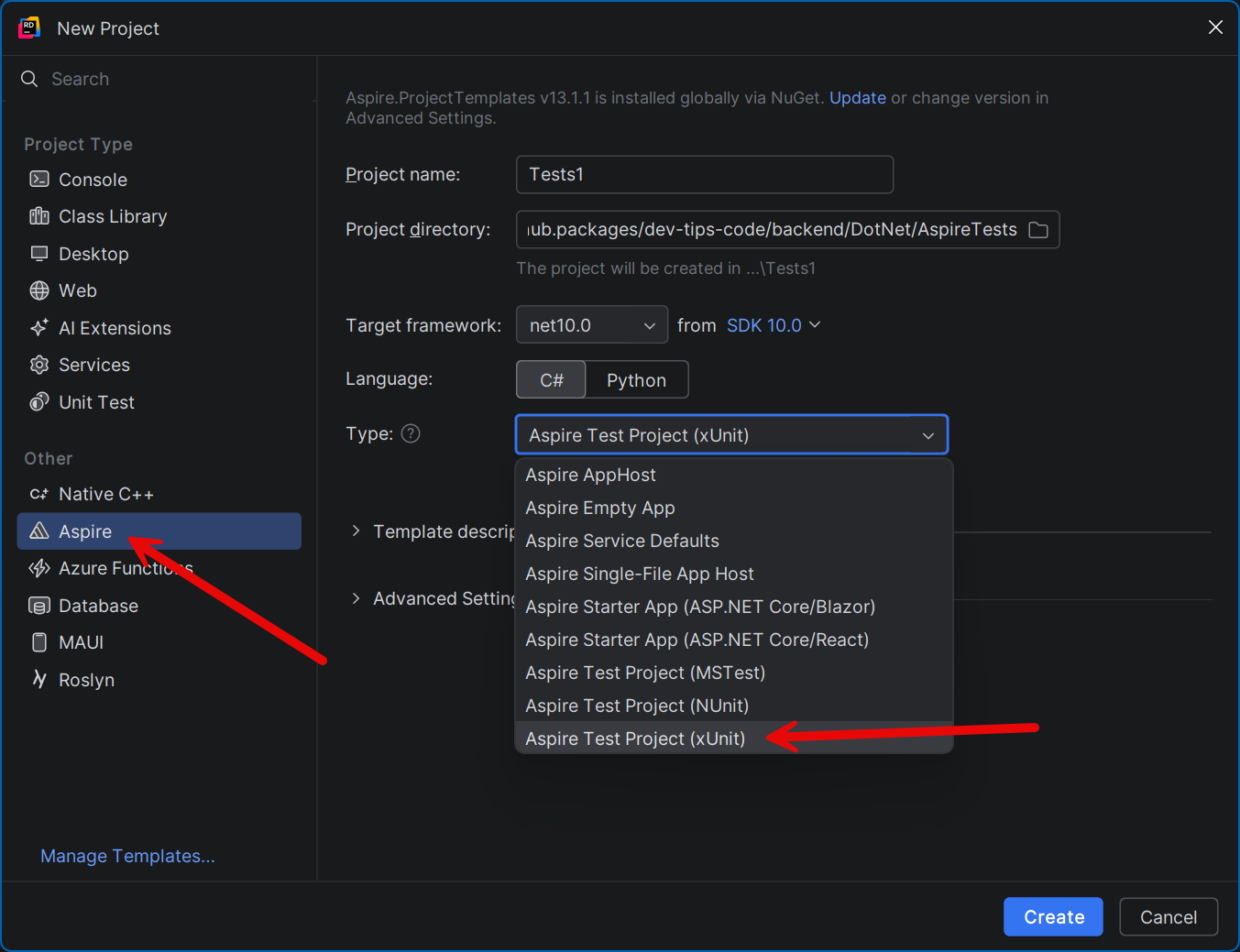
You can install the Aspire project templates by running the following command:
bashdotnet new install Aspire.ProjectTemplates
You will also need to install the Aspire CLI:
bashdotnet tool install --global aspire.cli
The testing project installs the Aspire.Hosting.Testing NuGet package.
This one package replaces multiple packages from the traditional approach:
Microsoft.AspNetCore.Mvc.Testing(WebApplicationFactory)Testcontainers.PostgreSql(TestContainers for PostgreSQL)Testcontainers.RabbitMq(or other container packages)
To create the distributed application in your tests, use DistributedApplicationTestingBuilder:
csharpvar appHost = await DistributedApplicationTestingBuilder .CreateAsync<Projects.AspireTests_AppHost>(); var app = await appHost.BuildAsync(); await app.StartAsync();
This starts the entire Aspire application, including all containers and services.
To create HTTP clients for your APIs, use CreateHttpClient with the resource name from your AppHost:
csharpvar productsClient = app.CreateHttpClient("products-api"); var stocksClient = app.CreateHttpClient("stocks-api");
No need to configure base URLs or connection strings. Aspire handles service discovery automatically.
Best Practice 2: Share the App Instance Across Tests with ICollectionFixture
Starting a distributed application with Docker containers is expensive. It takes several seconds to pull images, start containers, and wait for services to become healthy.
You should not rebuild the distributed application for every test (like in the Aspire Test project template). Instead, build it once and share it across all test classes.
In xUnit, you can achieve this with ICollectionFixture and IAsyncLifetime.
First, create a fixture that manages the application lifecycle:
csharppublic class DistributedAppFixture : IAsyncLifetime { private static readonly TimeSpan StartupTimeout = TimeSpan.FromSeconds(120); private DistributedApplication _app = null!; private DbConnection _dbConnection = null!; public HttpClient ProductsApiClient { get; private set; } = null!; public HttpClient StocksApiClient { get; private set; } = null!; public async Task InitializeAsync() { var appHost = await DistributedApplicationTestingBuilder .CreateAsync<Projects.AspireTests_AppHost>(); appHost.Services.ConfigureHttpClientDefaults(clientBuilder => { clientBuilder.AddStandardResilienceHandler(); }); _app = await appHost.BuildAsync(); await _app.StartAsync(); // Wait for all services to be healthy await _app.ResourceNotifications .WaitForResourceHealthyAsync("products-api") .WaitAsync(StartupTimeout); await _app.ResourceNotifications .WaitForResourceHealthyAsync("stocks-api") .WaitAsync(StartupTimeout); // Create HTTP clients for both APIs ProductsApiClient = _app.CreateHttpClient("products-api"); StocksApiClient = _app.CreateHttpClient("stocks-api"); await InitializeDatabaseConnectionAsync(); } public async Task DisposeAsync() { ProductsApiClient.Dispose(); StocksApiClient.Dispose(); await _dbConnection.DisposeAsync(); await _app.DisposeAsync(); } // ... database methods shown later }
I also added AddStandardResilienceHandler to handle transient HTTP errors during test execution.
Next, define a shared test collection:
csharp[CollectionDefinition("AspireTests")] public class SharedTestCollection : ICollectionFixture<DistributedAppFixture>;
Now every test class can share the same fixture instance:
csharp[Collection("AspireTests")] public class GetAllProductsTests(DistributedAppFixture fixture) : IAsyncLifetime { public Task InitializeAsync() => Task.CompletedTask; public async Task DisposeAsync() => await fixture.ResetDatabaseAsync(); [Fact] public async Task GetAllProducts_ShouldReturnEmptyList_WhenNoProductsExist() { // Act var response = await fixture.ProductsApiClient.GetAsync("/products"); var products = await response.Content.ReadFromJsonAsync<List<ProductResponse>>(); // Assert response.StatusCode.Should().Be(HttpStatusCode.OK); products.Should().BeEmpty(); } }
The [Collection("AspireTests")] attribute tells xUnit to share the DistributedAppFixture across all test classes that use this collection.
The fixture is created once, and all test classes receive the same instance.
Each test class implements IAsyncLifetime and calls ResetDatabaseAsync() in DisposeAsync to ensure a clean database state after each test.
Best Practice 3: Wait for Resources to Be Healthy
When testing with Aspire, your application starts Docker containers for PostgreSQL, Redis, and your API services. These containers need time to become ready.
Aspire provides a built-in mechanism for waiting: WaitForResourceHealthyAsync.
We need wait for services to become healthy in DistributedAppFixture.InitializeAsync before executing tests:
csharpawait _app.ResourceNotifications .WaitForResourceHealthyAsync("products-api") .WaitAsync(StartupTimeout); await _app.ResourceNotifications .WaitForResourceHealthyAsync("stocks-api") .WaitAsync(StartupTimeout);
This method subscribes to resource health notifications from the Aspire orchestrator. It waits until the specified resource reports a healthy status.
I always wrap this call with .WaitAsync(StartupTimeout) to avoid hanging forever if something goes wrong.
I use a 120-second timeout, which is more than enough for containers to start and APIs to become healthy.
For health checks to work, your APIs must have health-check endpoints configured.
If you use the Aspire ServiceDefaults project, health checks are configured automatically.
Best Practice 4: Wait for Services to Start before Running Tests
By default, Aspire starts all resources in parallel. This means your API can start before PostgreSQL is ready to accept connections.
When this happens, EF Core migrations fail silently (when executed from code at startup), and the API crashes.
The tricky part is that WaitForResourceHealthyAsync might still succeed briefly before all the initialization has completed.
The fix is to use .WaitFor() in your Aspire AppHost to enforce startup ordering:
csharp// Bad: APIs may start before PostgreSQL is ready var stocksApi = builder.AddProject<Projects.Stocks_Api>("stocks-api") .WithReference(postgres) .WithExternalHttpEndpoints(); // Good: APIs wait for their dependencies var stocksApi = builder.AddProject<Projects.Stocks_Api>("stocks-api") .WithReference(postgres) .WaitFor(postgres) .WithExternalHttpEndpoints(); builder.AddProject<Projects.Products_Api>("products-api") .WithReference(stocksApi) .WaitFor(stocksApi) .WithReference(postgres) .WaitFor(postgres) .WithReference(redis) .WaitFor(redis) .WithExternalHttpEndpoints();
Always add .WaitFor() for every resource dependency.
Without it, your tests may fail.
Also, when it takes longer to spin up an external resource (a database Docker container), even our applications can crash during startup. So it's safer to run our services after all external dependencies are ready.
Best Practice 5: Cleanup Database Between Tests
After each test, the database contains leftover data that can affect other tests. That's why you need to clean up the database after each test.
I recommend using the Respawn library for database cleanup.
As stated on the library's GitHub:
Respawn examines the SQL metadata intelligently to build a deterministic order of tables to delete based on foreign key relationships between tables. It navigates these relationships to build a DELETE script starting with the tables with no relationships and moving inwards until all tables are accounted for.
First, install the following NuGet package:
csharpdotnet add package Respawn
Next, update your DistributedAppFixture to use a Respawner:
csharppublic class DistributedAppFixture : IAsyncLifetime { private DistributedApplication _app = null!; private DbConnection _dbConnection = null!; private Respawner _respawner = null!; // ... public async Task InitializeAsync() { // ... app startup and health checks ... await InitializeDatabaseConnectionAsync(); } public async Task ResetDatabaseAsync() { await _respawner.ResetAsync(_dbConnection); } public async Task DisposeAsync() { await _dbConnection.DisposeAsync(); await _app.DisposeAsync(); } private async Task InitializeDatabaseConnectionAsync() { var connectionString = await _app.GetConnectionStringAsync("postgres"); var csBuilder = new NpgsqlConnectionStringBuilder(connectionString); if (string.IsNullOrEmpty(csBuilder.Database)) { csBuilder.Database = "postgres"; } _dbConnection = new NpgsqlConnection(csBuilder.ConnectionString); await _dbConnection.OpenAsync(); await InitializeRespawnerAsync(); } private async Task InitializeRespawnerAsync() { _respawner = await Respawner.CreateAsync(_dbConnection, new RespawnerOptions { SchemasToInclude = [ "products", "stocks" ], DbAdapter = DbAdapter.Postgres }); } }
Notice how _app.GetConnectionStringAsync("postgres") retrieves the connection string directly from Aspire — no environment variables, no hardcoded strings.
The Respawner is initialized with RespawnerOptions specifying the schemas to include (products and stocks) and the database adapter (DbAdapter.Postgres).
Respawn will intelligently determine the correct order to delete rows based on foreign key relationships within those schemas.
InitializeDatabaseConnectionAsync is called at the end of InitializeAsync, after the application has fully started and all resources are healthy.
This is important because the database schemas are created by EF Core migrations that run on startup — Respawn needs them to already exist when it scans the metadata.
Finally, call ResetDatabaseAsync in each test class's DisposeAsync to ensure every test ends with a clean database:
csharp[Collection("AspireTests")] public class CreateProductTests(DistributedAppFixture fixture) : IAsyncLifetime { public Task InitializeAsync() => Task.CompletedTask; public async Task DisposeAsync() => await fixture.ResetDatabaseAsync(); // ... test methods }
Best Practice 6: Test your API Contracts
This best practice comes from my personal experience.
Instead of referencing request and response models from the API project, duplicate them in the test project:
csharpnamespace AspireTests.Models; public record ProductRequest(string Name, decimal Price); public record ProductResponse(int Id, string Name, decimal Price); public record PurchaseProductRequest(int Quantity); public record PurchaseProductResponse(int ProductId, int Quantity, decimal TotalPrice);
csharpnamespace AspireTests.Models; public record StockResponse(int Id, int ProductId, int Count); public record UpdateStockCountRequest(int ProductId, int CountChange);
Why duplicate them?
If someone renames a property in the API project (for example, renames Name to ProductName), tests will fail.
You catch the breaking API contract change before it reaches production.
Here is the test for the PurchaseProduct endpoint that uses the models from the Aspire Testing project:
csharp[Fact] public async Task PurchaseProduct_ShouldReturnOk_WhenProductExistsAndHasStock() { // Arrange var productRequest = new ProductRequest("Laptop", 999.99m); var createResponse = await fixture.ProductsApiClient.PostAsJsonAsync("/products", productRequest); var createdProduct = await createResponse.Content.ReadFromJsonAsync<ProductResponse>(); var stockRequest = new UpdateStockCountRequest(createdProduct!.Id, 10); await fixture.StocksApiClient.PutAsJsonAsync("/stocks/update-count", stockRequest); var purchaseRequest = new PurchaseProductRequest(2); // Act var response = await fixture.ProductsApiClient.PostAsJsonAsync( $"/products/{createdProduct.Id}/purchase", purchaseRequest); var purchaseResponse = await response.Content.ReadFromJsonAsync<PurchaseProductResponse>(); // Assert response.StatusCode.Should().Be(HttpStatusCode.OK); purchaseResponse.Should().BeEquivalentTo(new PurchaseProductResponse( createdProduct.Id, 2, 999.99m * 2)); }
If you reference the shared models, the rename compiles successfully everywhere (even in tests), and the broken API contract goes undetected until a consumer reports the issue.
Best Practice 7: Test Error Responses and Cross-Service Communication
Many developers only write happy-path tests. But testing error responses is just as important.
For every endpoint, test all HTTP status codes that it can return.
This includes 200 OK, 201 Created, 204 No Content, 400 Bad Request, 404 Not Found, and 409 Conflict.
Here is an example of a simple CRUD test:
csharp[Fact] public async Task CreateProduct_ShouldReturnCreated_WhenRequestIsValid() { // Arrange var request = new ProductRequest("Monitor", 349.99m); // Act var response = await fixture.ProductsApiClient.PostAsJsonAsync("/products", request); // Assert response.StatusCode.Should().Be(HttpStatusCode.Created); response.Headers.Location.Should().NotBeNull(); }
Now, the most interesting part of Aspire testing: cross-service integration tests.
With Aspire, you can test how multiple services work together in a single test.
This is something that WebApplicationFactory cannot do out of the box.
Here are the tests for the PurchaseProduct endpoint, which calls the Stocks API internally:
csharp[Collection("AspireTests")] public class PurchaseProductTests(DistributedAppFixture fixture) : IAsyncLifetime { public async Task InitializeAsync() => await fixture.ResetDatabaseAsync(); public Task DisposeAsync() => Task.CompletedTask; [Fact] public async Task PurchaseProduct_ShouldReturnOk_WhenProductExistsAndHasStock() { // Arrange: create a product via the Products API var productRequest = new ProductRequest("Laptop", 999.99m); var createResponse = await fixture.ProductsApiClient .PostAsJsonAsync("/products", productRequest); var createdProduct = await createResponse.Content .ReadFromJsonAsync<ProductResponse>(); // Arrange: add stock via Stocks API var stockRequest = new UpdateStockCountRequest(createdProduct!.Id, 10); await fixture.StocksApiClient .PutAsJsonAsync("/stocks/update-count", stockRequest); var purchaseRequest = new PurchaseProductRequest(2); // Act: purchase via Products API (which internally calls Stocks API) var response = await fixture.ProductsApiClient.PostAsJsonAsync( $"/products/{createdProduct.Id}/purchase", purchaseRequest); var purchaseResponse = await response.Content .ReadFromJsonAsync<PurchaseProductResponse>(); // Assert response.StatusCode.Should().Be(HttpStatusCode.OK); purchaseResponse.Should().BeEquivalentTo( new PurchaseProductResponse(createdProduct.Id, 2, 999.99m * 2)); } [Fact] public async Task PurchaseProduct_ShouldReturnNotFound_WhenProductDoesNotExist() { // Arrange var purchaseRequest = new PurchaseProductRequest(1); // Act var response = await fixture.ProductsApiClient.PostAsJsonAsync( "/products/999999/purchase", purchaseRequest); // Assert response.StatusCode.Should().Be(HttpStatusCode.NotFound); } [Fact] public async Task PurchaseProduct_ShouldReturnConflict_WhenNotEnoughStock() { // Arrange var productRequest = new ProductRequest("Tablet", 449.99m); var createResponse = await fixture.ProductsApiClient .PostAsJsonAsync("/products", productRequest); var createdProduct = await createResponse.Content .ReadFromJsonAsync<ProductResponse>(); var stockRequest = new UpdateStockCountRequest(createdProduct!.Id, 3); await fixture.StocksApiClient .PutAsJsonAsync("/stocks/update-count", stockRequest); var purchaseRequest = new PurchaseProductRequest(5); // Act var response = await fixture.ProductsApiClient.PostAsJsonAsync( $"/products/{createdProduct.Id}/purchase", purchaseRequest); // Assert response.StatusCode.Should().Be(HttpStatusCode.Conflict); } }
In the Arrange phase, I use two different API clients:
fixture.ProductsApiClientto create a productfixture.StocksApiClientto add stock for that product
In the Act phase, the Products API internally calls the Stocks API to check stock availability and update the count.
This test validates the entire chain: Products API -> Stocks API -> PostgreSQL and back.
With WebApplicationFactory, you would need to mock the Stocks API or set up a separate test server.
With Aspire, it just works.
Summary
Let's recap the key takeaways:
- Use
DistributedApplicationTestingBuilderinstead of WebApplicationFactory and TestContainers. - Share the app instance across all tests with
ICollectionFixture. Starting Docker containers is expensive - do it once. - Wait for resources using
WaitForResourceHealthyAsyncwith a timeout. - Add
.WaitFor()in your AppHost to enforce startup ordering. Without it, APIs crash because they start before their dependencies are ready. - Use Respawn for database cleanup.
- Duplicate models in the test project to catch breaking API contract changes.
- Test cross-service communication end-to-end. This is the biggest advantage of Aspire testing over WebApplicationFactory.
Hope you find this newsletter useful. See you next time.
