
In ASP.NET Core, one of the most powerful and underused caching tools is the Output Cache middleware.
Though so many developers still don't know about it or how to use it effectively.
Output Cache is not the same as storing objects in IMemoryCache or IDistributedCache.
It operates at the HTTP response level, caching the full serialized response and serving it directly — without touching your handlers, your database, or your business logic.
The result is dramatically lower latency and reduced load on your infrastructure.
In this post, we will explore:
- What Output Cache is and how it differs from IMemoryCache and IDistributedCache
- How to set up Output Cache in ASP.NET Core
- How to customize cache behavior with policies and options
- How to evict cached responses using tags, keys, and full cache clearing
- How to use Redis as the Output Cache store for distributed scenarios
- How to handle caching safely in authenticated APIs to avoid leaking data between users
Let's dive in.
What Is Output Cache and How Does It Differ from Other Caches
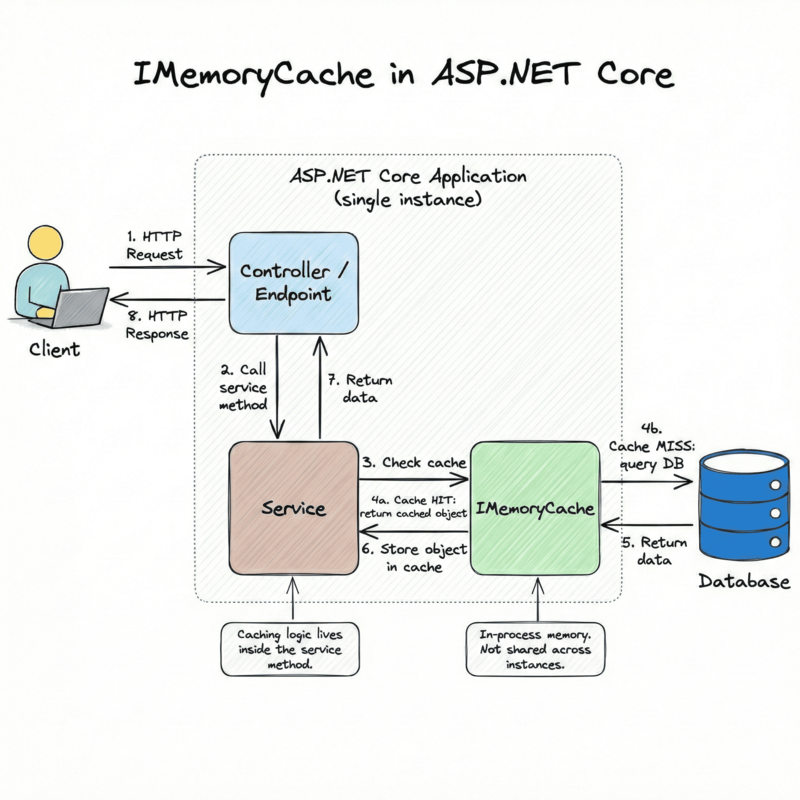
IMemoryCache is an in-process, key-value store that lives in the memory of your application.
You use it to cache any .NET object — a list, a domain model, a computed value. You control what gets stored, how it is serialized, and when it expires.
It is fast because there is no network hop. But it is local to a single instance of your app, so it does not work across multiple servers without extra coordination.
csharppublic class OrderService(IMemoryCache cache, OrdersDbContext db) { public async Task<List<OrderSummary>> GetOrdersAsync(CancellationToken ct) { return await cache.GetOrCreateAsync("orders:all", async entry => { entry.AbsoluteExpirationRelativeToNow = TimeSpan.FromMinutes(5); return await db.Orders .Select(o => new OrderSummary(o.Id, o.Status, o.TotalAmount)) .ToListAsync(ct); }); } }
IDistributedCache is an abstraction over an external cache store, usually Redis.
It stores byte arrays, so you serialize and deserialize your objects manually (or with a wrapper).
It works across multiple app instances because all instances share the same external store. The downside is the added latency of a network call to the cache server.
Both IMemoryCache and IDistributedCache require you to write caching logic inside your service or handler.
You have to call the cache before your database query, check for a hit, store the result after a miss, and handle expiration yourself. This adds boilerplate to every method you want to cache.
Output Cache works differently.
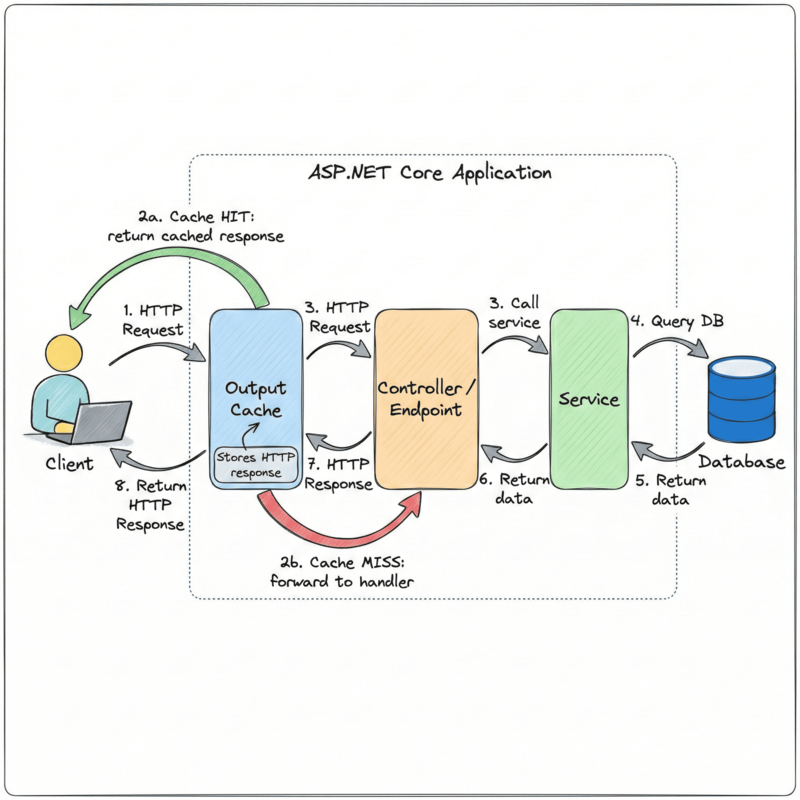
Instead of caching objects inside your application code, Output Cache intercepts the HTTP response at the middleware level. It stores the full serialized response — the status code, headers, and body — and replays it on subsequent matching requests.
Your endpoint handler, database query, and business logic are never called when a cached response is available. The middleware short-circuits the pipeline and writes the stored response directly.
This means you can add caching to existing endpoints with almost no changes to your application code. You decorate an endpoint or controller with an attribute or a policy name, and the middleware handles the rest.
The built-in cache lock feature in Output Cache is particularly useful. When multiple requests arrive for the same uncached resource at the same time, only one request is allowed through to execute the handler.
The others wait for the first response and then receive the cached copy. This prevents the "thundering herd" problem, where a cache miss causes a spike of concurrent database queries.
Output Cache was introduced in .NET 7 and has been improved in further .NET versions.
Setting Up Output Cache in ASP.NET Core
To get started with Output Cache, install the following NuGet package:
bashdotnet add package Microsoft.AspNetCore.OutputCaching
Register Output Cache services in Program.cs:
csharpvar builder = WebApplication.CreateBuilder(args); // Register OutputCache in DI builder.Services.AddOutputCache(); var app = builder.Build(); // Add OutputCache Middleware app.UseOutputCache(); app.MapControllers(); app.Run();
The middleware must be placed after UseRouting (if you call it explicitly) and before MapControllers or any Minimal API endpoints like MapGet.
Now, let's define a simple Orders API example:
csharp[ApiController] [Route("api/orders")] public class OrdersController(OrdersDbContext db) : ControllerBase { [HttpGet] [OutputCache] public async Task<IActionResult> GetOrders(CancellationToken ct) { var orders = await db.Orders.ToListAsync(ct); return Ok(orders); } [HttpGet("{id:guid}")] public async Task<IActionResult> GetOrder(Guid id, CancellationToken ct) { var order = await db.Orders.FindAsync([id], ct); if (order is null) return NotFound(); return Ok(order); } }
To cache the GetOrders endpoint, we add the [OutputCache] attribute.
With this one attribute, the first request to GET /api/orders will execute the handler, call the database and store the response.
Every subsequent request within the default expiration window (60 seconds) will receive the cached response without hitting the database.
You can also cache endpoints in Minimal APIs by calling .CacheOutput() on the RouteHandlerBuilder:
csharpapp.MapGet("/api/orders", async (OrdersDbContext db, CancellationToken ct) => { var orders = await db.Orders.ToListAsync(ct); return Results.Ok(orders); }).CacheOutput();
Customizing Output Cache: Policies and Options
The default Output Cache behavior uses a 60-second expiration and caches based on the full request URL. In most real applications, you need more control.
You can set a custom expiration time directly on the attribute:
csharp[HttpGet] [OutputCache(Duration = 120)] // cache for 2 minutes public async Task<IActionResult> GetOrders(CancellationToken ct) { var orders = await db.Orders.ToListAsync(ct); return Ok(orders); }
Or in Minimal APIs:
csharpapp.MapGet("/api/orders", async (OrdersDbContext db, CancellationToken ct) => { var orders = await db.Orders.ToListAsync(ct); return Results.Ok(orders); }).CacheOutput(x => x.Expire(TimeSpan.FromMinutes(2)));
Output Cache Policies
Hard-coding cache options on every endpoint gets messy fast. A better approach is to define named policies during service registration and reference them by name on your endpoints.
This gives you a single place to change cache behavior across multiple endpoints.
csharpbuilder.Services.AddOutputCache(options => { options.AddPolicy("OrdersPolicy", policy => policy .Expire(TimeSpan.FromMinutes(5)) .SetVaryByHeader("Accept-Language") .Tag("orders") ); options.AddPolicy("OrderDetailPolicy", policy => policy .Expire(TimeSpan.FromMinutes(2)) .SetVaryByRouteValue("id") .Tag("orders") ); });
Reference the policy by name in your controller:
csharp[HttpGet] [OutputCache(PolicyName = "OrdersPolicy")] public async Task<IActionResult> GetOrders(CancellationToken ct) { var orders = await db.Orders.ToListAsync(ct); return Ok(orders); } [HttpGet("{id:guid}")] [OutputCache(PolicyName = "OrderDetailPolicy")] public async Task<IActionResult> GetOrder(Guid id, CancellationToken ct) { var order = await db.Orders.FindAsync([id], ct); if (order is null) return NotFound(); return Ok(order); }
Or in Minimal APIs:
csharpapp.MapGet("/api/orders", async (OrdersDbContext db, CancellationToken ct) => { return Results.Ok(await db.Orders.ToListAsync(ct)); }).CacheOutput("OrdersPolicy"); app.MapGet("/api/orders/{id:guid}", async (Guid id, OrdersDbContext db, CancellationToken ct) => { var order = await db.Orders.FindAsync([id], ct); return order is null ? Results.NotFound() : Results.Ok(order); }).CacheOutput("OrderDetailPolicy");
VaryBy Options
By default, Output Cache stores one version of a response per unique URL. But sometimes the same URL can return different content depending on request properties.
Output Cache supports several VaryBy options:
VaryByHeader — cache a separate response for each value of a given header.
Useful for multi-language APIs where the Accept-Language header changes the response content:
csharpoptions.AddPolicy("LocalizedOrdersPolicy", policy => policy .Expire(TimeSpan.FromMinutes(5)) .SetVaryByHeader("Accept-Language") .Tag("orders") );
VaryByQuery — cache a separate response for each unique value of a query string parameter. Useful for paginated or filtered endpoints:
csharpoptions.AddPolicy("PagedOrdersPolicy", policy => policy .Expire(TimeSpan.FromMinutes(5)) .SetVaryByQuery("page", "pageSize", "status") .Tag("orders") );
With this policy, GET /api/orders?page=1&pageSize=10 and GET /api/orders?page=2&pageSize=10 are stored as two separate cache entries.
VaryByRouteValue — cache a separate response for each unique route segment value.
This is the right choice for GET /api/orders/{id} endpoints:
csharpoptions.AddPolicy("OrderDetailPolicy", policy => policy .Expire(TimeSpan.FromMinutes(2)) .SetVaryByRouteValue("id") .Tag("orders") );
VaryByValue — cache a separate response for each unique computed value. This is the most flexible option, and we will cover it in depth in the Authentication section below.
Disabling Cache for Specific Requests
Sometimes you want a policy in place, but need to disable caching for certain conditions.
You can use NoStore() to skip caching entirely:
csharpoptions.AddPolicy("ConditionalOrdersPolicy", policy => policy .Expire(TimeSpan.FromMinutes(5)) .Tag("orders") .With(ctx => { // Do not cache if the request includes a "no-cache" header if (ctx.HttpContext.Request.Headers.CacheControl.Contains("no-cache")) { ctx.EnableOutputCaching = false; } return default; }) );
Cache Eviction: Tags, Keys, and Full Cache Clearing
Caching data that never changes is straightforward. The hard part is knowing when to remove cached data because the underlying data changed.
Output Cache supports eviction by tag, eviction by key (using VaryByValue), and clearing all entries.
Eviction by Tag
Tags are labels you attach to cache entries during policy registration. When data changes, you can evict all cache entries that share a tag in a single call.
You attach tags to your policy:
csharpbuilder.Services.AddOutputCache(options => { options.AddPolicy("OrdersPolicy", policy => policy .Expire(TimeSpan.FromMinutes(5)) .Tag("orders") ); options.AddPolicy("OrderDetailPolicy", policy => policy .Expire(TimeSpan.FromMinutes(2)) .SetVaryByRouteValue("id") .Tag("orders") .Tag("order-detail") ); });
Notice that both OrdersPolicy and OrderDetailPolicy share the "orders" tag.
When an order is created, updated, or deleted, you want to evict both the orders list and any individual order detail that may be stale.
Inject IOutputCacheStore and call EvictByTagAsync:
csharppublic async Task<IActionResult> CreateOrder( [FromBody] CreateOrderRequest request, CancellationToken ct) { var order = new Order(Guid.NewGuid(), request.CustomerName, request.TotalAmount, "Pending"); db.Orders.Add(order); await db.SaveChangesAsync(ct); // Evict all cache entries tagged with "orders" await cache.EvictByTagAsync("orders", ct); return CreatedAtAction(nameof(GetOrder), new { id = order.Id }, order); } // Do the same for PUT and DELETE
One EvictByTagAsync("orders", ct) call removes every stored response that was tagged with "orders".
This means the list endpoint and any cached order detail pages are all cleared at once.
Eviction by Key Using VaryByValue
Sometimes you want to evict the cached response for a specific order, rather than all orders.
VaryByValue (and other Vary methods) lets you define a custom key fragment that is appended to the cache key.
You provide a delegate that extracts a value from the request context, and Output Cache uses that value to distinguish cache entries.
When you want to evict only a specific order, use a tag that includes the order ID:
csharpbuilder.Services.AddOutputCache(options => { options.AddPolicy("OrderDetailPolicy", policy => policy .Expire(TimeSpan.FromMinutes(2)) .SetVaryByRouteValue("id") .WithVaryByTagFromRouteValue(ctx => { var id = ctx.Request.RouteValues["id"]?.ToString() ?? string.Empty; return [$"order-{id}"]; }) ); });
Then, in your write endpoint, after updating a specific order, evict only that order's cache entry:
csharp[HttpPut("{id:guid}")] public async Task<IActionResult> UpdateOrder( Guid id, [FromBody] UpdateOrderRequest request, CancellationToken ct) { var order = await db.Orders.FindAsync([id], ct); if (order is null) return NotFound(); db.Orders.Entry(order).CurrentValues.SetValues(request); await db.SaveChangesAsync(ct); // Evict only the cache entry for this specific order await cache.EvictByTagAsync($"order-{id}", ct); return NoContent(); }
This is more efficient than evicting all orders when only one changed.
Clearing the Entire Cache
Sometimes you need a clean slate — for example, after a bulk import, a data migration, or a major configuration change.
You can evict all cache entries by creating a policy named "all" and tag every entry with it:
csharpbuilder.Services.AddOutputCache(options => { options.AddBasePolicy(policy => policy.Tag("all")); options.AddPolicy("OrdersPolicy", policy => policy .Expire(TimeSpan.FromMinutes(5)) .Tag("orders") ); options.AddPolicy("OrderDetailPolicy", policy => policy .Expire(TimeSpan.FromMinutes(2)) .SetVaryByRouteValue("id") .Tag("orders") ); });
AddBasePolicy applies to all endpoints that use Output Cache, regardless of which named policy they use.
So every cache entry automatically gets the "all" tag.
To clear everything:
csharp[HttpPost("admin/cache/clear")] public async Task<IActionResult> ClearAllCache(CancellationToken ct) { await cache.EvictByTagAsync("all", ct); return NoContent(); }
A single call evicts every Output Cache entry in your application.
Output Cache with Redis
The default Output Cache store is in-memory, which means:
- Cache is lost when the application restarts
- Cache is not shared between multiple application instances
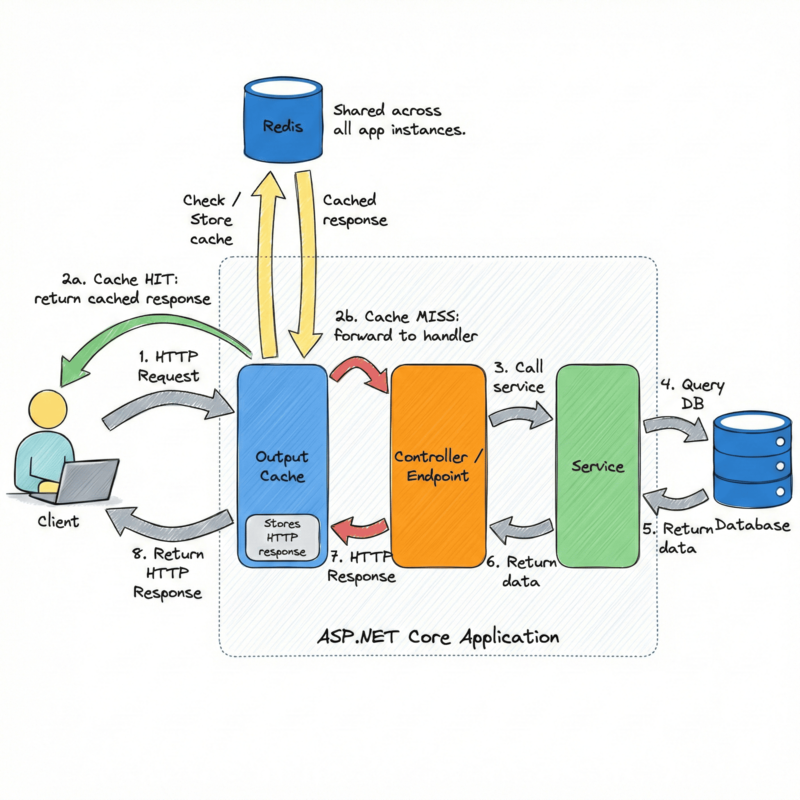
In production, when you have multiple instances of your API behind a load balancer, each instance has its own local cache.
A request routed to instance A may hit the cache, while the same request routed to instance B hits the database. This is inconsistent and wastes resources.
The solution is to use Redis as a shared, distributed Output Cache store.
ASP .NET Core includes a Redis Output Cache provider, installed as a separate NuGet package:
bashdotnet add package Microsoft.AspNetCore.OutputCaching.StackExchangeRedis
All you need to do is configure Redis in Program.cs:
csharpvar redisConnectionString = builder.Configuration.GetConnectionString("Redis")!; builder.Services.AddStackExchangeRedisOutputCache(options => { options.Configuration = redisConnectionString; options.InstanceName = "OrdersApi:"; }); builder.Services.AddOutputCache(options => { // ... });
When you replace the default in-memory store with Redis, everything else stays the same.
Your [OutputCache] attributes, .CacheOutput() calls, named policies, tag-based eviction — all of it works exactly as before.
The only difference is where the serialized responses are stored.
Redis adds a network round-trip to every cache lookup. For very fast endpoints (a few milliseconds), adding a Redis cache read might not significantly improve latency.
Output Cache with Redis shines when:
- Your endpoint is slow due to a complex database query (100ms or more)
- Your endpoint is under high load and database connections are a bottleneck
- You run multiple application instances and want consistent cache behavior
Output Cache and Authentication
Caching authenticated API responses requires extra care.
If you cache the response for User A and User B later sends the same request, they could receive User A's data. That is a serious data leakage bug.
By default, Output Cache does not cache responses for authenticated requests.
The Authorization header presence causes the middleware to skip caching.
But you may want to explicitly enable caching for authenticated endpoints and ensure the responses are properly scoped to each user.
Imagine a GET /api/orders/my endpoint that returns orders belonging to the currently logged-in user.
User A (userId = user-a-id) calls the endpoint.
The response — User A's orders — is cached.
User B (userId = user-b-id) calls the same endpoint.
They receive User A's orders from the cache.
User B should not have access to User A's data. But the cache has no idea these are two different users.
This is a real security bug!
The Solution: VaryByValue with ClaimsPrincipal
The correct fix is to use SetVaryByValue to include the current user's identity in the cache key.
This ensures each user's response is stored and retrieved independently.
csharpbuilder.Services.AddOutputCache(options => { options.AddPolicy("UserOrdersPolicy", policy => policy .Expire(TimeSpan.FromMinutes(2)) .Tag("orders") .SetVaryByValue(ctx => { // Extract the user ID from the JWT claims var userId = ctx.HttpContext.User.FindFirstValue(ClaimTypes.NameIdentifier) ?? "anonymous"; return new KeyValuePair<string, string>("userId", userId); }) ); });
Now the cache key includes the user ID.
User A's response is stored under a key that includes "userId:user-a-id".
User B's response is stored under a separate key that includes "userId:user-b-id".
They never share a cache entry.
Apply the policy to your user-scoped endpoint:
csharp[Authorize] [HttpGet("my")] [OutputCache(PolicyName = "UserOrdersPolicy")] public async Task<IActionResult> GetMyOrders(CancellationToken ct) { var userId = User.FindFirstValue(ClaimTypes.NameIdentifier)!; var orders = await db.Orders .Where(o => o.UserId == userId) .ToListAsync(ct); return Ok(orders); }
Summary
Output Cache is one of the most effective ways to reduce database load and improve API response times in ASP.NET Core.
Unlike IMemoryCache and IDistributedCache, Output Cache works at the HTTP middleware level and caches full serialized responses.
Your handlers, services, and database queries are never called when a cached response is available.
This requires minimal changes to your existing code.
Named policies in Output Cache give you a clean, centralized place to define cache behavior — expiration, vary-by rules, and tags — without scattering options across every endpoint.
Tag-based eviction lets you invalidate groups of related cache entries in a single call.
Combined with VaryByRouteValue, you can also evict the cache entry for a specific resource, like a single order.
Using AddBasePolicy with a universal "all" tag makes it easy to clear the entire Output Cache when needed.
Redis replaces the default in-memory store with a distributed, persistent cache shared across all application instances.
The only code change needed is calling AddStackExchangeRedisOutputCache during service registration.
For authenticated APIs, SetVaryByValue with the user ID from ClaimsPrincipal is essential.
It ensures each user's cached response is stored under a unique cache key, preventing data from one user from being served to another.
Hope you find this newsletter useful. See you next time.

Comments