
90% of all developers who use EF Core use only official NuGet packages.
Today I want to show you 5 EF Core packages that provide features that save time, reduce boilerplate, and improve performance.
They are hidden gems that can level up your projects if you know about them.
In this post, we will explore how to:
- Handle database exceptions in a clean way
- Automatically align your schema with naming conventions
- Speed up bulk operations with massive performance gains
- Execute dynamic queries at runtime
- Track entity changes with Auditing
Let's dive in!
→ Explore Entity Framework Extensions
1. EntityFramework.Exceptions
EF Core throws general DbUpdateException and DbUpdateConcurrencyException.
They are hard to act on. You need to look into inner exceptions to determine what happened.
EntityFramework.Exceptions turns low-level database errors into clear, typed exceptions like UniqueConstraintException.
This makes bugs easier to see and handle in code, logs, and APIs.
List of available exceptions:
UniqueConstraintException- for unique constraint violationsCannotInsertNullException- for null values in insert statementsMaxLengthExceededException- for string length violationsNumericOverflowException- for numeric overflowsReferenceConstraintException- for reference constraint violations
To get started, install the package from NuGet based on the Database provider you use:
bashdotnet add package EntityFrameworkCore.Exceptions.SqlServer dotnet add package EntityFrameworkCore.Exceptions.MySql dotnet add package EntityFrameworkCore.Exceptions.MySql.Pomelo dotnet add package EntityFrameworkCore.Exceptions.PostgreSQL dotnet add package EntityFrameworkCore.Exceptions.Sqlite dotnet add package EntityFrameworkCore.Exceptions.Oracle
You can configure and add typed exceptions with the UseExceptionProcessor method in the OnConfiguring method of your DbContext.
csharppublic class UserDbContext : DbContext { public DbSet<User> Users { get; set; } protected override void OnModelCreating(ModelBuilder builder) { builder.Entity<User>().HasIndex(user => user.EmailAddress).IsUnique(); } protected override void OnConfiguring(DbContextOptionsBuilder optionsBuilder) { optionsBuilder.UseExceptionProcessor(); } }
You can also use it in the AddDbContext method:
csharpbuilder.Services.AddDbContext<UserDbContext>(options => { options .UseNpgsql(builder.Configuration.GetConnectionString("Postgres")) .UseExceptionProcessor(); });
DbContextFactory and Pooled DbContext are also supported.
Let's explore an example of how to handle a typed EF Core exception.
When a user registers with an email that already exists, return 409 Conflict with a clear message:
csharp// UniqueConstraintException using EntityFramework.Exceptions.Common; app.MapPost("/api/users", async (CreateUserRequest request, UserDbContext db) => { var user = new User { EmailAddress = request.Email, Name = request.Name }; db.Users.Add(user); try { await db.SaveChangesAsync(); return Results.Created($"/api/users/{user.Id}", new { user.Id, user.EmailAddress, user.Name }); } catch (UniqueConstraintException) { // e.ConstraintName - contains the name of the violated associated constraint // e.ConstraintProperties - contains the properties that are part of the constraint. return Results.Conflict(new ProblemDetails { Title = "Email already exists", Detail = "Please use a different email address.", Status = StatusCodes.Status409Conflict }); } });
You can use e.ConstraintName and e.ConstraintProperties to log a more detailed error message.
Note:
ConstraintNameandConstraintPropertieswill not be populated when using SQLite.
Recap:
EntityFramework.Exceptions gives you clear, actionable exceptions for common database errors.
It reduces boilerplate, improves API responses, and makes failures easy to understand for both developers and clients.
2. EntityFramework.NamingConventions
When creating mapping in EF Core, developers usually divide into two groups:
- Who specifies column names and table names in the correct database casing
- Who doesn't care about database casing, and EF Core generates these names automatically
By default, EF Core maps to tables and columns named exactly as your .NET classes and properties.
For example, mapping a typical User class to PostgreSQL will result in SQL such as the following:
sqlCREATE TABLE "Users" ( "Id" integer NOT NULL GENERATED BY DEFAULT AS IDENTITY, "EmailAddress" text NULL, CONSTRAINT "PK_Users" PRIMARY KEY ("Id") ); SELECT "Id", "EmailAddress" FROM "Users" AS WHERE "EmailAddress" = '[email protected]';
But is this really an issue?
Yes, it is!
This is a problem with PostgreSQL that uses lower snake_case for table and column names.
The database needs double-quotes around names. Without quotes, PostgreSQL changes all names to lowercase. All those quotes make the code look messy and hard to read.
Another example: if you're using an Oracle database, it uses all uppercase letters in the UPPER_SNAKE_CASE casing.
Hand-writing table and column names is really tiresome.
You add HasColumnName() here and there, and can still miss a few:
csharpbuilder.ToTable("users"); builder.Property(x => x.EmailAddress) .HasColumnName("email_address") .IsRequired();
The wrong column name can easily sneak into a database migration. You need to delete the migration, regenerate it, or even rollback it in the database to fix the column name.
EntityFramework.NamingConventions package comes to the rescue.
This package applies a global naming convention to all tables, columns, keys, and indexes that EF Core creates.
You can switch to snake_case, lowercase, UPPER_SNAKE_CASE, UPPERCASE, or keep PascalCase — without manually specifying it for each entity.
To get started, install the package from NuGet:
bashdotnet add package EFCore.NamingConventions
Enable a convention when registering your DbContext:
csharpusing Microsoft.EntityFrameworkCore; builder.Services.AddDbContext<AppDbContext>(options => { options .UseNpgsql(builder.Configuration.GetConnectionString("Postgres")) .UseSnakeCaseNamingConvention(); // or .UseUpperCaseNamingConvention() // or .UseUpperSnakeCaseNamingConvention() // or .UseCamelCaseNamingConvention() // or .UseLowerCaseNamingConvention() });
This will automatically make all your table and column names have lower snake_case naming:
csharppublic class User { public int Id { get; set; } public DateTime CreatedAt { get; set; } public string EmailAddress { get; set; } = default!; public ICollection<UserLogin> Logins { get; set; } = new List<UserLogin>(); } public class UserLogin { public int Id { get; set; } public int UserAccountId { get; set; } public DateTime SignedInAt { get; set; } public UserAccount User { get; set; } = default!; }
With .UseSnakeCaseNamingConvention(), EF Core will create names like:
- Tables:
user_account,user_login - Columns:
created_at,email_address,user_account_id,signed_in_at - Indexes/keys: e.g.,
IX_user_login_user_account_id
sqlCREATE TABLE users ( id integer NOT NULL GENERATED BY DEFAULT AS IDENTITY, email_address text NULL, CONSTRAINT "pk_users" PRIMARY KEY ("Id") ); SELECT id, email_address FROM users AS WHERE email_address = '[email protected]';
Supported naming conventions:
- UseSnakeCaseNamingConvention:
FullNamebecomesfull_name - UseLowerCaseNamingConvention:
FullNamebecomesfullname - UseCamelCaseNamingConvention:
FullNamebecomesfullName - UseUpperCaseNamingConvention:
FullNamebecomesFULLNAME - UseUpperSnakeCaseNamingConvention:
FullNamebecomesFULL_NAME
Recap:
EntityFramework.NamingConventions gives you a simple way to apply a naming convention to all tables, columns, keys, and indexes that EF Core creates.
Without manually specifying it for each entity.
3. Entity Framework Extensions
When working with large datasets in Entity Framework Core, developers often hit performance bottlenecks using SaveChanges().
Each entity insertion triggers a separate database round-trip and increases memory usage because of entity tracking overhead. This becomes even more noticeable as the number of rows grows into the thousands or millions.
What can we do to improve insert performance?
- Using Dapper? No, as it also sends each insert as a separate round-trip to the database.
- Maybe using SqlBulkCopy? That's not ideal because you need a lot of custom code, especially if you want to insert child entities or return identity values.
And it only works with SQL Server, so it's not suitable if you need to support other providers.
There is a better solution: Entity Framework Extensions library.
This library offers simpler, more elegant and configurable options for bulk inserts.
To get started with Entity Framework Extensions, install the following NuGet package:
bashdotnet add package Z.EntityFramework.Extensions.EFCore
Entity Framework Extensions allows you to bulk insert thousands of entities with a single line of code:
csharpusing Z.EntityFramework.Extensions; var products = GenerateProducts(10_000); await dbContext.BulkInsertAsync(products);
Both BulkInsert and BulkInsertAsync methods are available.
Let's compare the performance of bulk insert methods with SaveChanges:
- Insert: 14x faster, reducing time by 93% Online Benchmark
- Update: 4x faster, reducing time by 75% Online Benchmark
- Delete: 3x faster, reducing time by 65% Online Benchmark
I have tested the following database queries via Web API:
csharpusing Z.EntityFramework.Extensions; app.MapPost("/products/efcore-insert", async (ProductDbContext dbContext) => { var products = GenerateProducts(10_000); dbContext.Products.AddRange(products); await dbContext.SaveChangesAsync(); return Results.Ok("10,000 products inserted using EF Core SaveChanges."); }); app.MapPost("/products/efcore-bulk-insert", async (ProductDbContext dbContext) => { var products = GenerateProducts(10_000); await dbContext.BulkInsertAsync(products); return Results.Ok("10,000 products inserted using Bulk Insert of EF Core Extensions."); }); app.MapPost("/products/efcore-bulk-insert-optimized", async (ProductDbContext dbContext) => { var products = GenerateProducts(10_000); var result = await dbContext.BulkInsertOptimizedAsync(products); return Results.Ok(result); });
I have tested these queries on a Postgres database, and here are the results for inserting 10_000 products via Web API requests:
- SaveChanges - 2,011 ms
- BulkInsert - 560 ms
- BulkInsertOptimized - 270 ms
Note: benchmarks can vary depending on your hardware and database provider.
Entity Framework Extensions support the following bulk write methods:
- BulkInsert, BulkInsertAsync
- BulkInsertOptimized, BulkInsertOptimizedAsync
- BulkUpdate, BulkUpdateAsync
- BulkDelete, BulkDeleteAsync
- BulkMerge, BulkMergeAsync
- BulkSynchronize, BulkSynchronizeAsync
Entity Framework Extensions support the following database providers:
- SQL Server
- MySQL
- MariaDB
- Oracle
- PostgreSQL
- SQLite
Learn more about Entity Framework Extensions here.
4. EntityFramework.DynamicFilters
Sometimes you can't write LINQ at compile time. You need to build filters, sorts, and projections at runtime based on user input (such as grids, search pages, and reporting).
Microsoft.EntityFrameworkCore.DynamicLinq adds string-based LINQ to EF Core so you can call Where, OrderBy, Select, and more with expressions like Price > 100 && Category == @0.
To get started, install the package from NuGet:
bashdotnet add package Microsoft.EntityFrameworkCore.DynamicLinq
When querying data using Dynamic LINQ, everything can be expressed using strings. This includes predicates, selectors, and sorting.
Strongly typed LINQ looks like:
csharpvar result = context.Users .Where(c => c.EmailAddress == "[email protected]") .ToList();
Dynamic LINQ looks like:
csharpvar resultDynamic = context.Users .Where("EmailAddress == \"[email protected]\"") .ToList();
It's not required to specify the value as a hard-coded value; you can use a parameter:
csharpvar email = "[email protected]"; var resultDynamic = context.Users .Where("EmailAddress == @0", email) .ToList();
Here is a more complex query. You can get data from a user in the Web API request:
csharpusing Microsoft.EntityFrameworkCore; using Microsoft.EntityFrameworkCore.DynamicLinq; // Runtime values from UI / query string string filter = "Price >= @0 && Category == @1"; object[] args = { 100m, "Books" }; string orderBy = "Price desc, Title"; string selector = "new (Id, Title, Price)"; var query = db.Products .Where(filter, args) // dynamic predicate .OrderBy(orderBy) // dynamic sort .Select(selector); // dynamic projection var items = await query.ToListAsync(); // async with EF Core
Explore more examples here.
Learn more about this Dynamic LINQ for EF Core here.
5. Audit.EntityFramework.Core
Knowing who changed what and when is tiresome to do by hand. Writing change logs, including old/new values and user information, takes time and is easy to miss.
Audit.EntityFramework.Core plugs into EF Core and records entity changes automatically (inserts, updates, deletes). You receive a complete audit trail that can be stored or shipped anywhere.
To get started, install the package from NuGet:
bashdotnet add package Audit.EntityFramework.Core
To audit Insert, Delete and Update operations, you can use any of the three SaveChanges interception mechanisms provided:
1. Inherit from AuditDbContext:
csharp// Inherit from Audit.EntityFramework.AuditDbContext public class UserDbContext : AuditDbContext { public DbSet<User> Users { get; set; } protected override void OnModelCreating(ModelBuilder builder) { builder.Entity<User>().HasIndex(user => user.EmailAddress).IsUnique(); } }
Note: If you're using
IdentityDbContextinstead ofDbContext, you can install the packageAudit.EntityFramework.Identity.Coreand inherit from the classAuditIdentityDbContextinstead ofAuditDbContext.
2. Override SaveChanges:
You can use the library without changing the inheritance of your DbContext.
You can override SaveChanges and SaveChangesAsync:
csharppublic class UserDbContext : DbContext { private readonly DbContextHelper _helper = new DbContextHelper(); private readonly IAuditDbContext _auditContext; public UserDbContext(DbContextOptions<UserDbContext> options) : base(options) { _auditContext = new DefaultAuditContext(this); _helper.SetConfig(_auditContext); } public override int SaveChanges(bool acceptAllChangesOnSuccess) { return _helper.SaveChanges(_auditContext, () => base.SaveChanges(acceptAllChangesOnSuccess)); } public override async Task<int> SaveChangesAsync(bool acceptAllChangesOnSuccess, CancellationToken cancellationToken = default(CancellationToken)) { return await _helper.SaveChangesAsync(_auditContext, () => base.SaveChangesAsync(acceptAllChangesOnSuccess, cancellationToken), cancellationToken); } }
3. Create save changes interceptor:
Alternatively, you can create a save changes interceptor and register it with EF Core:
csharppublic class UserDbContext : DbContext { protected override void OnConfiguring(DbContextOptionsBuilder optionsBuilder) { optionsBuilder.AddInterceptors(new AuditSaveChangesInterceptor()); } }
Or you can add the AuditSaveChangesInterceptor when registering your DbContext:
csharpbuilder.Services.AddDbContext<UserDbContext>(options => { options .UseNpgsql(builder.Configuration.GetConnectionString("Postgres")) .AddInterceptors(new AuditSaveChangesInterceptor()) });
To store audit events, you need to configure a Data Provider within EF Core:
csharpAudit.Core.Configuration.Setup() .UseEntityFramework(ef => ef .UseDbContext<OrderDbContext>() .AuditTypeExplicitMapper(m => m .Map<Order, OrderAudit>() .Map<Orderline, OrderlineAudit>() .AuditEntityAction<IAudit>((evt, entry, auditEntity) => { auditEntity.AuditDate = DateTime.UtcNow; auditEntity.UserName = evt.Environment.UserName; auditEntity.AuditAction = entry.Action; // Insert, Update, Delete }) ) );
It's recommended to use a separate DbContext for Auditing.
As a result, you will get the following database schema in the database:
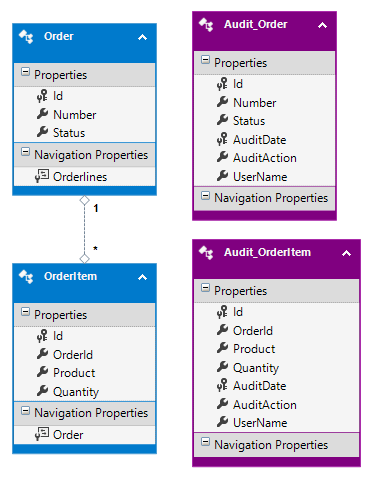
Learn more about this Auditing package in the documentation here.
Thanks to ZZZ Projects for sponsoring this blog post.
Hope you find this newsletter useful. See you next time.

Comments